
Key Takeaways
- A laser cutting machine uses a focused CO2 or fiber beam to cut and engrave materials like wood, acrylic, and leather with high precision—unlike CNC routers that use rotating cutting tools for thicker structural work.
- Simply Technologies offers laser machines and accessories designed for small shops, schools, and maker spaces requiring safe, repeatable performance.
- Most users start with a CNC router for versatility, then add a laser cutter later for engraving, fine details, and light cutting of classroom materials.
- Simply Technologies supports educators with CSA-compliant systems and structured training through the ACADEMY Series and EMPOWER[ED] ACADEMY.
- Need help choosing between CNC and laser? Call 800-288-2961 for direct guidance on your specific applications.
Introduction to Laser Cutting Machines
A laser cutting machine is a CNC-controlled system that directs a focused CO2 or fiber laser beam to cut and engrave materials including wood, acrylic, textiles, and thin metals. The process works through thermal action—vaporizing, melting, or burning material away to create clean, precise edges.
In modern shop and classroom environments, laser cutters typically work alongside CNC routers, not instead of them. Desktop craft lasers (40–60 W benchtop units) serve hobbyists and light-duty crafting, while production-ready systems handle higher duty cycles with proper safety features and enclosures.
Simply Technologies operates as a CNC-first provider that also offers CO2 laser machines for shops and educators needing complementary engraving and light cutting capability. This article covers real materials, typical use cases for 2024–2026, and guidance on when to prioritize a CNC router versus a laser cutter.
How a Laser Cutting Machine Works
Laser cutters generate a focused beam—typically 0.1–0.3 mm wide—through a CO2 or fiber laser tube. Mirrors or gantry optics guide this beam, while CNC motion systems control precise movement across X, Y, and Z axes.
The typical workflow:
- Design in CAD/CAM or vector graphics software
- Export to laser control software
- Set power, speed, and focus parameters for your material
- Run the job on materials like 3 mm birch plywood or 6 mm cast acrylic
CO2 lasers excel at organic materials and plastics—wood, leather, acrylic, and paper. Fiber lasers handle metal marking and thin-metal cutting more effectively due to wavelength absorption differences. Regardless of laser type, motion control, repeatability, and machine rigidity matter just as much as on a CNC router.
Classroom and small shop systems typically operate on 110–240 V power and require exhaust or filtration connections with proper safety interlocks.
Laser Cutting vs CNC Routing in Real Workflows
Most small production shops and schools achieve the best results by pairing a CNC router with a CO2 laser. Each machine handles what it does best, creating a versatile digital fabrication workflow.
Choose a CNC router for:
- Thicker sheet goods (18 mm plywood, MDF)
- Aluminum fixtures and structural parts
- Nested cabinet components
- View machine options
Choose a CO2 laser for:
- Fine laser engraving and detailed text
- Intricate cutouts in 3–6 mm wood or acrylic
- Classroom projects and signage
- Explore laser systems
Example workflows:
- Cut cabinet parts on a PERFORMANCE ATC CNC, then brand them with a company logo on a CO2 laser
- Schools cut STEM project panels on a SIMPLY Series CNC and engrave team names on a laser
Simply Technologies helps educators and shop owners map out which operations should be routed versus lasered. Call 800-288-2961 for application-specific advice.
Made for Making in Small Shops and Classrooms
Laser cutting machines serve as practical tools for small production shops, maker spaces, and K–12 or post-secondary classrooms—not just hobby devices for crafters at home.
Common shop applications:
- Short-run signage and displays
- Prototype enclosures and control panels
- Branded products and custom awards
- Jigs made from acrylic and plywood (3–10 mm range)
Classroom applications:
- Project-based learning in STEM courses
- Design and tech education programs
- Robotics teams cutting chassis plates
- Art classes engraving work on wood and leather
Simply Technologies systems and training are structured for real teaching environments. The ACADEMY Series and EMPOWER[ED] ACADEMY provide 16-session curriculum covering CAD/CAM training and teacher onboarding. All recommended classroom systems prioritize safety—CSA compliance in Canada, interlocks, e-stops, and clear operating procedures designed for repeat use year after year.
Key Features of a Modern Laser Cutting Machine
While many lasers claim similar wattage, differences in motion control, build quality, optics, and safety features define day-to-day usability and productivity.
Motion and control features:
- Rigid gantry construction
- Quality linear rails
- Consistent stepper or servo drives
- Intuitive interfaces approachable for students and shop staff
Optical considerations:
- Stable CO2 laser tubes
- Clean, accessible mirrors and lenses
- Focus capability from thin cardstock to 12–15 mm wood or acrylic
Workflow features:
- Camera or alignment tools for accuracy
- Repeatable origin settings and job libraries
- Compatibility with vector CAD, Illustrator, and CorelDRAW
Safety and reliability:
- Fully enclosed cutting areas
- Keyed switches and interlocked doors
- Exhaust or filtration connections
- Components chosen for long-term performance in educational environments
Material Capabilities and Typical Applications
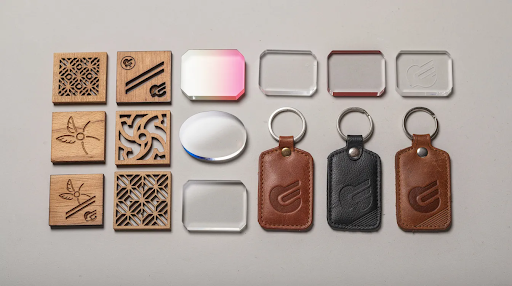
CO2 laser cutting machines commonly handle woods, plywood, MDF, acrylic, leather, paper, cardboard, and some textiles. Fiber systems are better suited for metal marking and thin-metal work.
Practical thickness guidelines for CO2 lasers:
| Material | Clean Cutting | Slower Cuts |
| Plywood | 3–6 mm | 9–12 mm |
| Acrylic | 3–6 mm | 9–12 mm |
| Leather/Paper | All typical thicknesses | N/A |
Application categories:
- Signage and displays
- Custom awards and recognition pieces
- Branded merchandise and gifts
- Prototyping enclosures and fixtures
Simply Technologies positions lasers as complements to CNC machines. Larger parts and structural components go on routers; fine graphics, labeling, and detailed work go on CO2 lasers. Additionally, accessories like rotary attachments expand versatility for cylindrical objects. See detailed capabilities at the laser machines page.
Laser Cutting Machines in Education and EMPOWER[ED] ACADEMY
Laser cutters support STEM, CTE, and design programs by turning 2D digital designs into 3D classroom projects on predictable schedules throughout a semester. The process helps students learn CAD skills while creating tangible products.
Simply Technologies’ ACADEMY Series and EMPOWER[ED] ACADEMY integrate CNC routers and lasers into a 16-session curriculum covering:
- CAD/CAM fundamentals
- Machine setup and safe operation
- Real fabrication projects
Teacher-focused support includes onboarding sessions, documentation, and ongoing technical help so educators aren’t left to self-teach complex workflows. CSA-compliant systems for Canadian schools feature enclosures, emergency stops, and interlocked doors—essential for classroom safety.
Education decision-makers should explore CNC systems first and contact the education team to design a scalable lab. Start with CNC capability, then add laser capacity as programs grow.
Choosing the Right Laser Cutting Machine
The ideal laser cutting machine depends on material focus, throughput needs, space constraints, and whether it will complement existing CNC equipment. There’s no universal “perfect” option—only what’s right for your work area and workflow.
Key decision factors:
- Laser type (CO2 vs fiber)
- Working area size
- Power level and duty cycle
- Safety certification
- Ease of learning alongside CNC routers
Simply Technologies structures its CNC lineup (SIMPLY → DISCOVERY → PERFORMANCE → PERFORMANCE ATC) as a scalable progression. Most new programs and small shops start with a solid CNC platform, then add a CO2 laser for engraving and light cutting as business or program needs grow.
Ready to buy? Call 800-288-2961 to review your materials, production targets, and classroom requirements with a technical specialist before making your decision.
FAQ
Do I need a CNC router if I’m buying a laser cutting machine?
For many small shops and schools, a CNC router handles structural cutting of thicker woods, plastics, and some metals, while the laser cutter handles engraving and precise cuts in thinner materials. Simply Technologies is structured as a CNC-first provider and typically recommends starting with a router for maximum versatility, then adding a laser as project needs expand.
What materials are unsafe for CO2 laser cutting?
Problematic materials include PVC and vinyl (which release corrosive chlorine fumes), certain unknown plastics, and materials with reflective metallic coatings. Always verify material safety data sheets before cutting unfamiliar materials—especially in classroom environments where safe operation is essential.
How much maintenance does a laser cutting machine require?
Routine tasks include cleaning lenses and mirrors, checking focus, maintaining exhaust filters, and monitoring laser tube performance over time. Simply Technologies provides guidance on maintenance intervals suited to school-year calendars and small shop production schedules.
Can students safely operate a laser cutting machine?
With proper training, interlocked enclosures, supervision, and CSA-compliant systems, students in middle school through post-secondary programs can safely operate laser cutters. The EMPOWER[ED] ACADEMY provides structured training sequences and project-based lessons for methodical introduction.
How do I know what power level laser I need?
Lower-power CO2 lasers (40–60 W) work well for engraving and cutting thin materials like paper and 3 mm plywood. Higher-power units (100+ W) better handle 6–12 mm materials with faster throughput. Call 800-288-2961 to discuss your most common materials and daily run time with a technician.