
Choosing the right CNC router for teachers requires balancing safety, curriculum alignment, and long-term reliability. This guide helps K-12 and post-secondary educators select and operate CNC routers effectively in real classroom environments, covering machine formats, project examples, and scaling strategies for growing programs.
Key Takeaways
- Teachers need three core components for successful CNC implementation: a classroom-scale CNC machine, structured curriculum (like the 16-session ACADEMY Series), and strong safety compliance including CSA certification in Canada.
- Simply Technologies offers CNC systems designed specifically for schools and small shops, with a progression from desktop to full-sheet routers.
- Classroom CNC routers enable students to work with wood plastic, foam, acrylic, and light metals, supporting hands-on learning across STEM, CTE, and trades programs.
- Support includes teacher onboarding, CAD/CAM training, and free lifetime technical support via phone at 800-288-2961.
- Schools can start with entry-level systems and scale to advanced manufacturing setups without changing core teaching workflows.
Why CNC Routers Belong in Today’s Classroom
The demand for CNC literacy has surged in the mid-2020s. The U.S. Bureau of Labor Statistics projects 15,000 annual openings for CNC operators through 2032, with median wages around $48,510. Meanwhile, 72% of manufacturing employers now prioritize applicants with CAD/CAM proficiency over traditional manual machining skills.
CNC routers enable students to move from digital design to physical prototyping, cutting materials like wood, plastic, foam, and aluminum with precision cutting capabilities. This process builds spatial reasoning and iterative design skills—a 2023 MIT study showed 35% improved problem-solving scores in STEM classes using CNC versus hand tools.
Typical education environments include public high schools running 10th-grade engineering projects (custom 24×36-inch signs from MDF), community colleges with architecture studios cutting 1:50 scale models, and university makerspaces building furniture jigs from Baltic birch plywood. These applications span engagement, future careers readiness, and cross-curricular use in math, art, engineering, and manufacturing pathways.
What Teachers Should Look For in a Classroom CNC Router
School CNC routing needs differ from production shops. Safety, ease of use, and durability matter more than raw speed when machines face 15-30 unsupervised student hours weekly.
Key selection criteria include:
| Criteria | What to Consider |
| Work area size | Desktop (12×24”), mid-size (2×4’), or full-sheet (4×8’) |
| Machine construction | Steel or cast-iron frames with linear guides for accuracy |
| Control system | PC-based controls allow classroom projection and group demos |
| Electrical compliance | CSA/UL certification mandatory for district approval |
| Dust collection | Integrated hoods connecting to shop vacs (350+ CFM) |
| Noise levels | Below 85 dB for adjacent classroom operation |
| Software compatibility | Works with Fusion 360 Education, carbide create, VCarve |
Typical school materials include 3/4-inch plywood, MDF, HDPE, acrylic, rigid foam, and limited aluminum. Spindle power of 2-5 kW handles these at 12,000-18,000 RPM with 1/4-inch upcut bits. Teachers can compare machine tiers on Simply Technologies’ CNC overview page.
CNC Router Options for Teachers: From Desktop to Full-Sheet
Simply Technologies structures its CNC router lineup as a progression: SIMPLY → DISCOVERY → PERFORMANCE → PERFORMANCE ATC. This approach fits how education programs typically grow over 3-5 years.
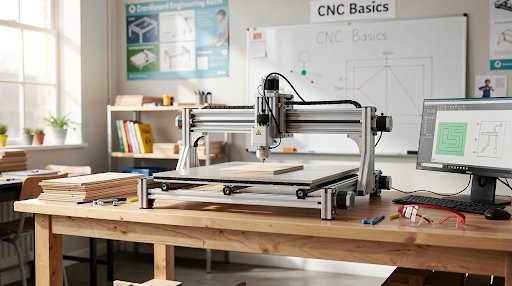
Compact desktop systems suit middle schools and space-constrained studios. These fit on a workbench with 2×2-foot footprints, feature emergency stops standard, and operate at lower noise levels suited for shared spaces.
Mid-size 2×4 routers work well in typical high school or college labs. They run on 115V/230V single-phase power, offer 6-7 inch gantry clearance for material stacks, and can process 4×8 sheets in sections for flat-pack furniture and cabinets.
Full 4×4 and 4×8 routers serve advanced programs in cabinetmaking, furniture production, and applied engineering. The PERFORMANCE and PERFORMANCE ATC tiers handle large projects with automatic tool changers for production runs. The Simply Technologies CNC machines lineup allows schools to start small and upgrade without disrupting core teaching workflows.
Curriculum Support: ACADEMY Series and EMPOWER[ED] ACADEMY
Hardware alone doesn’t build a program. Teachers need ready-to-run curriculum that fits semester timelines and aligns with local standards.
The ACADEMY Series provides a structured 16-session CNC training track covering CAD basics (sessions 1-4), CAM workflows and feeds/speeds (sessions 5-8), machine setup and safety (sessions 9-12), and projects with assessments (sessions 13-16).
EMPOWER[ED] ACADEMY extends this framework with teacher onboarding, lesson plans with rubrics, and project files designed for 1-3 period builds:
- Personalized aluminum nameplates (2 hours, 1/8-inch end mills)
- Layered MDF school logos (3 periods, V-bits)
- Flat-pack stools (semester project)
- STEM bridge models (load-tested prototyping)
This curriculum scales across the product range—teachers don’t rewrite lessons when upgrading from SIMPLY to PERFORMANCE systems.
Safety, Compliance, and Classroom Management
CNC routers must operate safely in rooms with 15-30 students under supervision. Simply Technologies designs systems with education environments in mind.
Essential safety features include: emergency-stop buttons within 3-foot reach, keyed power controls preventing unauthorized use, safety enclosure with interlocks that halt operation when doors open, and clear sightlines for instructor supervision.
CSA certification in Canada (and UL compliance in the USA) verifies 600V insulation and proper grounding—critical as districts face liability concerns. Non-compliant equipment is typically rejected by facility managers.
Dust collection via integrated hoods capturing 95% of particles at 350 CFM addresses air quality. Practical classroom management includes pre-job checklists for students, defined roles (operator, observer, cleanup), approved tool libraries with pre-vetted bits, and keyed lockout procedures when teachers are absent.
Integrating CNC Routers Into STEM and CTE Programs
CNC technology serves multiple pathways—engineering, robotics, construction, manufacturing, and visual arts—making budget justification easier for department heads.
Physics teachers can mill test fixtures for pendulum experiments with 0.01-inch precision. Math classes visualize parametric curves and coordinate systems through routed plots. Art programs carve 3D reliefs in foam using ball nose bits. Construction tech builds cabinet parts and jigs toleranced to 1/32-inch.
These projects build core skills: measurement, tolerancing, iteration, and understanding automated workflows used in industry. Simply Technologies’ CNC systems and ACADEMY curriculum map complexity over time—from first-week safety signs to capstone furniture projects. Teachers can consult the main CNC page for sample project paths tailored to specific grade bands.
Scaling Your Program: From First Machine to Full Lab
Many schools start with a single machine and expand as interest grows. The SIMPLY → DISCOVERY → PERFORMANCE → PERFORMANCE ATC progression provides a roadmap for building lab capacity.
Programs typically move up when shifting from beginners prototyping to production runs of student-designed products (100+ units for school events or community partners). Accessories like vacuum tables, rotary attachments, and upgraded dust collection can be added without disrupting existing curriculum.
CO2 laser systems complement CNC routers for thin materials and engraving—see Simply Technologies laser machines—though routers remain the core subtractive platform. Planning tips: schedule shared machines across courses, stagger purchase over budget years, and align upgrades with facility changes in power and ventilation.
Teacher Support, Training, and Ongoing Service
Simply Technologies operates as a technical resource, not just a hardware vendor. This matters especially for teachers new to CNC machine operations.
Teacher onboarding includes remote or on-site machine setup, control software walkthroughs, first-run projects, and safety orientation tailored to local policies. CAD/CAM training fits into teacher prep time through live sessions and recorded modules.
Direct phone support at 800-288-2961 helps with machine selection and classroom implementation questions before purchase. Lifetime tech support and parts availability ensure labs maintain consistent machine behavior across multi-year program cycles. The investment in quality equipment delivers durability that schools can rely on from 2026 onward.
FAQ
How much space does a classroom CNC router typically require?
Compact desktop systems fit on a sturdy 2-3 foot deep bench. Mid-size 2×4 routers need approximately 4×8 feet including clearance for operator movement. Full 4×8 machines typically require a dedicated area of 10×14 feet to accommodate safe access, dust collection, and material handling.
What grade levels can realistically work with a CNC router?
Upper middle school students (grades 7-8) can operate enclosed desktop systems with simple 2D projects under supervision. High school and post-secondary students can run larger floor-standing routers, with curriculum adjusted for skill level and complexity rather than changing core hardware.
Do teachers need prior CNC or machining experience?
Prior experience helps but isn’t a necessity. The ACADEMY Series and EMPOWER[ED] ACADEMY are designed to bring teachers from zero to confident operation over 16 sessions, with ongoing phone assistance from Simply Technologies’ support team.
What software do students use with education-focused CNC routers?
Most schools pair CNC machines with accessible CAD tools (browser-based or education-licensed) and CAM software outputting standard G-code. Compatible options range from free platforms like carbide create to professional tools like Fusion 360 Education Edition—no expensive software licenses required for basic operation.
How long does it take to get a CNC program up and running?
Typical timeline: a few weeks for purchase approval and delivery, 1-2 days to install and complete basic training, then 2-4 weeks of classroom ramp-up using the 16-session curriculum. Students can produce useful projects within their first grading period, building workflow confidence through guided practice.