
Key Takeaways
- CAD/CAM training for teachers connects computer aided design and manufacturing instruction directly to real CNC routers and CO2 laser equipment, preparing educators to run effective middle school, high school, and college programs.
- Simply Technologies’ EMPOWER[ED] ACADEMY delivers a 16-session curriculum covering CAD basics through advanced CNC machining, with teacher onboarding, certification pathways, and classroom-ready resources.
- Training builds around practical workflows using SIMPLY, DISCOVERY, and PERFORMANCE series CNC machines, with lasers and automation serving as supporting tools.
- Delivery options include on-site bootcamps, online instructor-led sessions, and hybrid models designed to minimize disruption to school schedules.
- Safety, CSA-compliant equipment for Canadian schools, and ongoing support are core priorities—educators can call 800-288-2961 for direct guidance.
Why CAD CAM Training for Teachers Matters in 2026
CAD/CAM is now central to CTE, STEM, and advanced manufacturing pathways across North America. Yet teacher readiness—not student interest or equipment availability—remains the primary bottleneck for program success.
- Persistent industry demand: 85% of North American manufacturers report shortages of CNC programmers and CAD/CAM-capable technicians. Schools are expected to prepare students for these roles.
- Teachers managing complex workflows: Educators are asked to run design software like Fusion 360, create toolpaths, operate CNC routers, and sometimes manage CO2 lasers—often without formal manufacturing backgrounds.
- Idle equipment problem: Studies show 40% of school CNC machines sit unused due to instructor skill gaps. Structured cad cam training gives teachers confidence to run Simply Technologies systems day-to-day.
- Real machining matters: A modern program integrates CAD, CAM, and hands-on CNC machining on compact routers suited to classroom learning—not desktop simulations alone.
Overview of CAD CAM Training for Teachers
CAD/CAM teacher training is a structured pathway covering 2D and 3D design, toolpath creation, post-processing, and safe operation of CNC equipment. The goal is practical proficiency, not theoretical knowledge alone.
- Training modules use concrete tools such as Fusion, SolidWorks, or Mastercam paired with real CNC routers like the SIMPLY and DISCOVERY series from Simply Technologies.
- For schools with CO2 lasers, courses should cover basic laser CAM workflows, materials settings, and integration with CNC projects for cross-technology learning.
- Expected outcomes: teachers can set up stock, choose tools, run a dry run, and execute jobs safely on classroom CNC machines.
- Training serves educators in middle school, high school, and postsecondary settings, progressing at their own pace from operator tasks to CNC programming proficiency.
EMPOWER[ED] ACADEMY: 16-Session CAD/CAM & CNC Curriculum
EMPOWER[ED] ACADEMY is Simply Technologies’ structured training framework designed specifically for teachers running manufacturing education programs.
- Curriculum structure: 16 sessions that teachers can run as a semester course or embed as modules into existing CTE or engineering classes.
- Sessions 1–4: CAD basics, coordinate systems, simple 2D toolpaths on SIMPLY series CNC routers. Students learn foundational skills with high-quality instruction and video tutorials.
- Sessions 5–10: Workholding, tool libraries, feeds and speeds, and multi-step projects like signs, fixtures, or small furniture on DISCOVERY series machines.
- Sessions 11–16: Advanced content including 3D toolpaths, basic multi-sided machining, and integration of CNC with CO2 laser operations where available.
- Resources included: Teacher guides, student worksheets, assessment rubrics, and project files ready for classroom use.
- Teachers develop new skills progressively, with lessons structured so students graduate from basic operations to independent projects.
Teacher Onboarding and Certification Pathways
Simply Technologies positions teacher training as step-by-step onboarding rather than a one-off workshop, focusing on long-term retention and confidence.
- Initial onboarding: Teachers receive one-on-one support to set up their CNC router, verify CSA-compliant safety features (critical in Canada), and run first demonstration jobs with expert guidance.
- Structured progression: Teachers advance from “Operator” level (basic machine setup, running provided toolpaths) to “Programmer” level (creating and editing their own toolpaths) within the school year.
- Certification: Optional certification tied to EMPOWER[ED] ACADEMY, requiring practical project submission and a short knowledge check—focused on real-world training applications rather than purely theoretical testing.
- Certified teachers can mentor colleagues, maintain lab standards, and help align their program with local industry relevance and apprenticeship requirements.
Delivery Formats: On-Site, Online, and Hybrid Teacher Training
Effective CAD/CAM training must fit real school calendars, PD days, and prep periods. Simply Technologies offers flexible delivery to match your schedule.
| Format | Description | Best For |
| On-site | 1–2 day intensive at your school with live cutting projects on your equipment | Initial setup, team training |
| Online | Instructor-led sessions after school hours with screen sharing and remote support | Ongoing skill development |
| Hybrid | On-site bootcamp followed by online courses aligned to 16 sessions | Complete curriculum adoption |
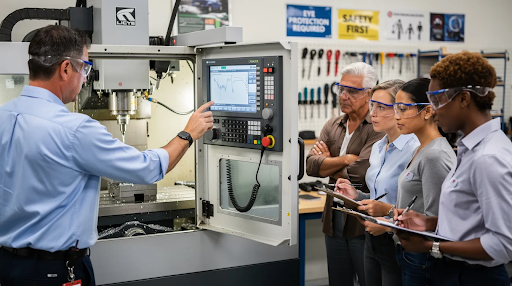
On-site training configures CNC routers, reviews workflows, and builds hands-on experience with your SIMPLY, DISCOVERY, or PERFORMANCE series systems.- Online sessions let teachers learn at their own schedule, with unlimited access to resources and direct instructor support.
- Hybrid models minimize impact on instruction time while ensuring teachers master both software and hardware.
Integrating CNC Routers and CO2 Lasers into the Classroom
CAD/CAM training always connects back to real hardware. For Simply Technologies, this primarily means CNC routers, supported by CO2 laser machines where appropriate.
- Start compact: Teachers begin with SIMPLY series CNC routers for introductory 2D and 2.5D projects, then progress to DISCOVERY and PERFORMANCE series machines as program demand increases.
- Add laser capability: CO2 lasers from Simply Technologies serve as complementary tools for engraving, cutting thin materials, or creating jigs that support CNC router workflows.
- Classroom projects: Personalized nameplates, robotics chassis plates, or small furniture components that combine CNC-routed parts with laser-etched details demonstrate cross-technology skills.
- The progression increases capability without increasing operational complexity—teachers and students achieve success at each level before advancing.
Building a Sustainable CAD/CAM Program for Schools
Moving beyond one-time grants or pilot projects requires planning for a program that runs effectively for 3–5 years.
- Align with standards: Map CAD/CAM projects to existing pathways like PLTW-style engineering courses, local apprenticeship programs, or regional manufacturing initiatives.
- Select classroom-ready equipment: Choose CNC routers with safety features, CSA compliance in Canada, and robust enclosures meeting district risk management requirements.
- Budget for consumables: End mills, spoilboards, filters, dust collection, and accessories should be planned into annual budgets—end mills typically last 50–200 linear feet depending on materials.
- Scale as needed: Simply Technologies helps schools grow from a single entry-level SIMPLY machine to a complete lab of PERFORMANCE or PERFORMANCE ATC systems as enrollment increases.
Support, Guidance, and Partnership with Simply Technologies
Simply Technologies serves as a long-term technical partner for educators rather than just a hardware vendor.
- Direct consultation: Call 800-288-2961 to discuss machine selection, lab layouts, and training plans tailored to your program.
- Ongoing support: Access remote diagnostics for CNC routers, advice on cutting strategies for new materials, and refresh training when new teachers join an established program.
- Product guidance: Educators can explore appropriate machines through the CNC product pages and specific machine listings.
- Simply Technologies provides curriculum alignment resources, safety documentation, and support for long-term program health—helping the next generation of students develop manufacturing skills that meet industry demand.
FAQs: CAD CAM Training for Teachers
How long does it take a new teacher to feel confident running a CNC router in class?
With focused onboarding and the EMPOWER[ED] ACADEMY 16-session structure, most teachers safely run basic CNC jobs with students within the first month. Full confidence in editing toolpaths and troubleshooting typically develops over one semester of consistent use, supported by periodic check-ins with Simply Technologies.
Do teachers need prior machining or CAD experience to start?
Many participating teachers come from general STEM or tech-ed backgrounds, not machining. CAD/CAM concepts are introduced progressively, starting with simple 2D geometry and preconfigured tool libraries on SIMPLY series machines. The training meets educators where they are.
Can CAD/CAM training align with existing CTE standards and local industry needs?
Simply Technologies works with schools to map EMPOWER[ED] ACADEMY modules to local or state standards and employer expectations. Projects can align with skills like blueprint reading, GD&T basics, or CNC safety checklists valued by nearby manufacturers and apprenticeship programs.
What equipment is recommended for a school just starting with CAD/CAM?
Begin with an entry-level SIMPLY series CNC router that fits a standard classroom. Add CO2 laser capability and more advanced DISCOVERY or PERFORMANCE machines as programs expand. Review size, power, and feature differences at the CNC product overview.
How is safety addressed in teacher training and classroom use?
Training includes lockout procedures, safe material selection, dust collection basics, and student supervision practices. CSA-compliant options meet Canadian school requirements. Simply Technologies systems include enclosures, e-stops, and clear operating checklists as standard features.