
Key Takeaways
Choosing a CNC router for sale in 2026 requires matching the machine to your actual work materials, part sizes, and daily production demands. Simply Technologies specializes in CNC systems built for small shops, schools, and maker spaces, offering a scalable lineup from SIMPLY through PERFORMANCE ATC. You can start small and upgrade as your business grows without adding operational complexity.
- Machine selection should prioritize materials (wood, plastics, aluminum), work area size, and duty cycle over price alone
- The SIMPLY → DISCOVERY → PERFORMANCE → PERFORMANCE ATC progression keeps training consistent across tiers
- Education programs benefit from CSA-compliant systems with structured curriculum and teacher support
- For direct guidance on which CNC router fits your application, call 800-288-2961
What Is a CNC Router and Why It Matters When You’re Buying
A CNC router machine is a computer-controlled system that uses a rotating spindle with cutting tools to shape various materials on a fixed table. Unlike handheld routers, CNC machines execute precise, repeatable operations driven by G-code generated from CAD/CAM software.
Simply Technologies focuses on CNC routers engineered for real working environments—not hobby-grade equipment that fails under daily loads.
Typical 2026 applications include:
- Cabinet components nested from plywood or MDF
- Signage and engraving on acrylics and foam
- STEM education projects like 3D topographic models
- Small-run production of aluminum brackets
Wood vs. Metal CNC Routers: What You Actually Need
Listings for a CNC router for sale often mix wood, plastic, and light-metal machines. Understanding the differences matters for accurate precision cutting.
| Feature | Wood-Focused Router | Light-Metal-Capable Router |
| Spindle Speed | 18,000–24,000 RPM | 12,000–18,000 RPM |
| Frame Type | Aluminum extrusions | Steel-reinforced gantry |
| Typical Table | 4×4 or 4×8 ft | Similar, with rigidity focus |
| Primary Materials | Plywood, MDF, hardwood | Aluminum, brass, composites |
Heavy steel machining requires dedicated CNC mills rather than routers. Simply Technologies machines are optimized for wood, plastics, composites, and light metals commonly used in schools and small manufacturing.
Router Table Types and Workholding Options
The table and workholding system determine what you can safely cut and at what speed. When comparing equipment, evaluate these options:
Vacuum Table Systems
- Hold sheet material flat using dedicated zones and spoilboards
- Enable fast nested manufacturing without manual clamps
- Require vacuum pumps and periodic spoilboard resurfacing
T-Slot Tables
- Allow bolt-down or cam-style clamps for irregular parts
- Flexible for one-off work, fixtures, and thicker stock
- No vacuum system needed
Hybrid systems combine both approaches. Simply Technologies CNC platforms offer practical workholding solutions suited to classrooms and small shops.
New vs. Used CNC Router for Sale in 2026
Buyers often compare used industrial routers to new compact systems. Each path has trade-offs worth understanding.
Advantages of New CNC Routers:
- Warranty coverage (typically 1-2 years)
- Current control electronics with modern software support
- Safety features including e-stops and interlocks
- CSA-compliant configurations for Canadian schools
Risks with Used Machines:
- Unknown spindle hours causing vibration issues
- Discontinued controllers with no parts access
- Missing documentation and training materials
- Industry data suggests 60% of small shops regret used purchases
For education programs and small production shops, long-term reliability and training support often outweigh initial savings. Call 800-288-2961 to compare any used listing against current Simply Technologies systems.
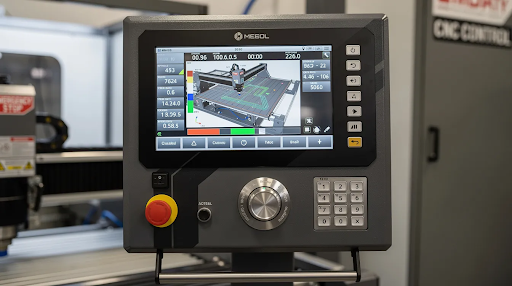
Simply Technologies CNC Lineup: From Entry to ATC
The Simply Technologies product family progresses from entry-level to automated production while maintaining consistent operating concepts across tiers.
| Series | Best For | Key Features |
| SIMPLY | First CNC, small shop, classroom | Compact footprint, wood and plastics |
| DISCOVERY | Growing operations | Larger work area, heavier frames |
| PERFORMANCE | Daily production | Stronger gantry, higher acceleration |
| PERFORMANCE ATC | Cabinet shops, advanced programs | Automatic tool changers, multi-tool jobs |
Each machine tier shares similar workflows, so upgrading doesn’t require retraining from scratch.
Education-Focused CNC Routers and Training Programs
Schools and maker spaces need more than just a capable machine—they need safety, curriculum, teacher support, and multi-year durability.
The ACADEMY Series and EMPOWER[ED] ACADEMY provide structured training ecosystems built around Simply Technologies CNC routers:
- 16-session curriculum covering safety, CAD/CAM fundamentals, and complete student projects
- Teacher onboarding with remote or onsite training options
- Certification pathways for students and instructors
- CSA compliance for Canadian school adoption
These systems handle both daytime classes and real production work, making them reliable for ongoing use year after year.
How to Evaluate a CNC Router for Sale: Practical Checklist
Use a concrete checklist rather than relying on brands or price alone:
- [ ] Table size matches your material sizes (4×8 ft minimum for full sheet nesting)
- [ ] Spindle power (kW/HP) appropriate for your materials
- [ ] Motion system type (rack-and-pinion for speed, ballscrew for precision)
- [ ] Control software compatibility with your CAD/CAM tools
- [ ] Electrical requirements (single-phase vs. three-phase)
- [ ] Dust collection capacity (1,500 CFM recommended)
- [ ] Noise level acceptable for your environment
Document your top applications—50 cabinet doors per week, 10 classroom projects per semester, or 20 custom signs per month—and discuss them with Simply Technologies before buying.
Accessories, Lasers, and Shop Automation That Add Capability
The right accessories often deliver more value than jumping to a bigger machine.
Core CNC Accessories:
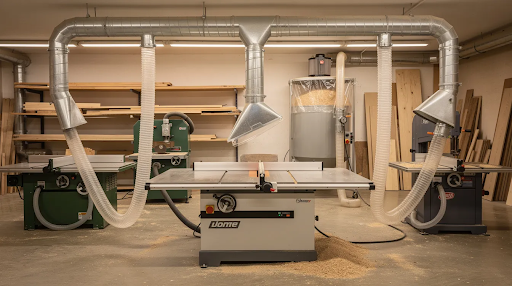
- Dust collection systems sized to your router
- Rotary 4th-axis attachments for cylindrical work
- Tool length probes to simplify setups
CO2 Laser Systems: CO2 lasers complement CNC routers for engraving, fine-cut details, and non-contact marking. Routers handle structure; lasers add detail. Both share similar CAD workflows, making cross-training efficient.
Shop Automation:
- Automatic vacuum switching
- Workpiece alignment fixtures
- Job presets reducing operator error
Support, Service, and How to Move Forward
Vendor support determines long-term success with any CNC purchase. Simply Technologies provides direct phone support, application-specific advice, and guidance based on your shop layout, materials, and production volume.
Customers can start with a SIMPLY or DISCOVERY machine and later move to PERFORMANCE or PERFORMANCE ATC models while retaining familiar workflows.
Review the CNC product overview, then call 800-288-2961 with notes on your materials, part sizes, and budget. Small shops, schools, and maker spaces can discuss their next CNC router purchase and long-term program goals directly with the Simply Technologies team.
FAQ
How much does a reliable CNC router for a small shop cost in 2026?
Compact professional systems start at a few thousand dollars, while full-size production units with automatic tool changers reach mid-five figures. Total cost of ownership includes tooling, dust collection, electrical work, and training. Simply Technologies provides ballpark figures once you share your application and location.
Can one CNC router handle both education and light production work?
Yes. Many ACADEMY-equipped routers run coursework during the day and real production after hours. Robust construction and industrial controls make dual-use practical when matched to appropriate duty cycles.
How long does it take to go from delivery to first production part?
Basic setup and first cuts typically happen within a few days. Full workflow integration takes 2–4 weeks depending on prior CNC experience. EMPOWER[ED] ACADEMY onboarding shortens the learning curve—plan for initial training time in your project schedule.
What software do I need to run a CNC router from Simply Technologies?
You need CAD software to design parts and CAM software to generate toolpaths and G-code. Simply Technologies supports commonly used packages and can recommend options appropriate for schools versus production environments.
Is a laser cutter a replacement for a CNC router?
No—lasers complement rather than replace routers. Lasers excel at thin materials, engraving, and fine internal features. Routers handle thicker stock and structural components. A cabinet shop might cut panels on a router and add engraved logos using a CO2 laser.