
Key Takeaways
- Schools must decide between desktop versus full-size CNC, router versus mill or lathe, and simulator versus real machine based on their specific program goals and student populations.
- Simply Technologies focuses on education-ready CNC solutions, comprehensive support, and training for teachers who may be new to manufacturing technology.
- Safety features, total cost of ownership, and curriculum integration matter just as much as hardware specifications when selecting equipment.
- Schools should plan for phased growth—start with entry-level machines or simulators, then add industrial-grade equipment as programs mature and enrollment increases.
- Choosing industry-relevant controls and software prepares students for real manufacturing jobs and creates clearer pathways to apprenticeships and careers.
Why CNC Machines Belong in Today’s Classrooms
CNC machines have become essential tools for schools that want to connect STEM education with real-world career pathways. As automation reshapes manufacturing across the country, educators face growing demand to prepare the next generation of CNC operators, programmers, and engineers. The ability to transform digital designs into physical parts gives students a tangible connection between math, science, and production that textbooks alone cannot provide.
When students program a CNC router to cut a robot chassis or watch a mill carve aluminum brackets with sub-millimeter accuracy, abstract concepts like coordinate systems and vector math suddenly make sense. These hands on experiences bridge the gap between classroom learning and the precision manufacturing that drives modern industry. A high school engineering lab might produce fixtures for a local company, while a middle school shop class engraves wooden keychains—both scenarios teach the same foundational skills in different contexts.
The manufacturing sector faces a documented skills gap, with thousands of CNC machining and automation roles unfilled throughout Wisconsin and beyond. Technical colleges with dedicated CNC programs report job placement rates exceeding 95% for graduates, with median salaries ranging from $60,000 to $80,000. By introducing CNC concepts early, public schools can funnel more students toward these high-demand careers through apprentice programs, community college certifications, and university engineering degrees.
Types of CNC Solutions for Schools
Schools rarely need only one type of CNC equipment. Most successful programs blend multiple formats to accommodate different courses, skill levels, and project requirements. Understanding the range of available options helps educators make informed decisions that serve their specific curriculum goals.
Three main categories exist for educational CNC equipment:
| Category | Description | Typical Use |
| Full-size CNC machine tools | Industrial-grade mills, lathes, and routers | Post-secondary, advanced high school |
| Desktop/benchtop machines | Compact mills, routers, lathes on standard power | Middle school, introductory high school |
| Software simulators | PC-based control emulation | All levels, unlimited student access |
CNC routers excel at cutting wood, plastics, and sheet materials over large work areas. CNC mills handle metals and deliver superior precision for smaller parts. A lathe creates round components through rotational cutting. Hybrid education platforms combine elements of multiple machine types to maximize versatility in limited space.
Middle schools typically start with desktop routers for safe, low-stakes introduction to manufacturing concepts. High schools often add small mills capable of cutting aluminum. Post-secondary programs invest in full-size equipment that mirrors what students will encounter in industry. Simply Technologies can help schools design a balanced lab that mixes real machines with simulators for maximum student access and learning outcomes.
Full-Size CNC Machine Tools for Education
Industrial-grade mills and lathes bring the factory floor into the classroom. When your program needs to produce parts that match real-world specifications, full-size CNC machine tools deliver the rigidity, power, and capability required.
Key features educators should evaluate:
- Enclosed work areas that contain chips, coolant, and debris
- Industrial controls that match what students will use in manufacturing jobs
- Automatic tool changers for efficient multi-operation parts
- Robust safety interlocks that prevent operation when doors are open
- Adequate spindle power for cutting steel and other demanding materials
Full-size machines give students experience with real tooling, coolant systems, and workholding—all elements they will encounter in production environments. This level of realism prepares students for immediate productivity when they enter the workforce or continue to college machining programs.
Before purchasing, schools must verify that their facilities can support these machines. Requirements typically include three-phase power, adequate ventilation or coolant mist collection, and floor space that allows safe movement around the equipment. Simply Technologies focuses on pairing industrial hardware with teacher-friendly training and curriculum support, ensuring schools are not left to figure out installation and integration alone.
Desktop and Tabletop CNC Machines
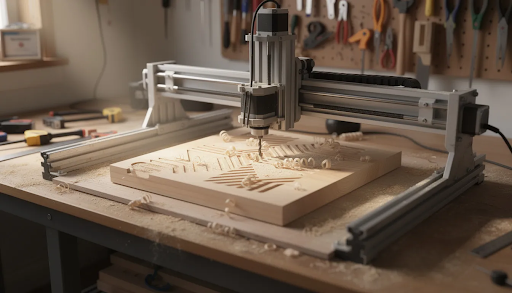
Compact CNC mills, lathes, and routers that run on standard 110-120V power have transformed what schools can achieve with modest budgets and limited space. These machines fit on benches or mobile carts, making them ideal for classrooms that serve multiple purposes throughout the day.
Strengths of desktop CNC equipment include:
- Lower purchase costs (often $5,000-$15,000 versus $50,000+ for full-size)
- Smaller footprint suitable for existing shop spaces
- Reduced safety barriers for introductory instruction
- Easier maintenance with fewer complex systems
- Portability for storage or shared use between rooms
Typical classroom applications include cutting plastics, wood, and soft metals for STEM projects, robotics team components, and design-build challenges. Students learn the same fundamental programming and setup procedures used on larger equipment, making the transition to industrial machines much smoother.
Many middle schools and entry-level high school programs make desktop machines their first CNC investment. These systems allow instructors to teach coordinate systems, toolpath concepts, and machine safety without the infrastructure demands of full-size equipment. Simply Technologies can recommend specific desktop systems that mimic industrial workflows while staying classroom-friendly and affordable.
CNC Simulators and Virtual Training Tools
Software simulators run on standard PCs, laptops, or tablets to emulate CNC controls and machine motion without requiring physical equipment. These tools have become essential for programs that want to maximize student practice time and minimize waiting for machine access.
Simulators let many students work simultaneously on programming, toolpath generation, and virtual setups. A single computer lab can train an entire class while only one or two physical machines handle actual cutting. This dramatically increases the number of students who can learn CNC concepts each semester.
Virtual environments display tool motion, collision warnings, and material removal in real time. Students see exactly what happens when they make programming errors—without damaging expensive tooling or workpieces. This safe space for mistakes accelerates learning and builds confidence before students approach real machines.
Schools with limited budgets or floor space often start with simulators while planning for future physical equipment. As funding becomes available, students already understand the programming environment and can transition quickly to hands on machining. Simply Technologies helps schools integrate simulators with their chosen CAD/CAM software so students practice a complete end-to-end workflow from design through production.
Before you shortlist machines, our guide to choosing a CNC machine in Canada walks through the seven decisions that apply to any buyer, whether a school or a working shop.
Key Buying Criteria for School CNC Labs
Hardware specifications tell only part of the story. Educators must balance pedagogy, safety, budget, and long-term program sustainability when selecting CNC equipment. A machine that looks impressive on paper may prove impractical for actual classroom use.
Primary decision factors include:
- Curriculum goals: What skills and outcomes must the equipment support?
- Student age group: What safety features and complexity levels are appropriate?
- Materials to machine: Wood and plastic require different capabilities than aluminum or steel
- Available space and power: Can your facility support the equipment without major renovation?
- Long-term program plans: How will needs change over 3-5 years?
Rather than treating equipment purchase as a one-time event, schools benefit from creating a multi-year roadmap. This approach aligns CNC investment with school improvement plans, CTE pathway development, and anticipated enrollment growth.
Simply Technologies works directly with educators to map equipment choices to state standards and career pathways. Their approach considers not just purchase price but the complete support and training ecosystem that determines whether machines get used daily or gather dust.
Safety, Compliance, and Classroom Management
Every machine chosen for a school must have clear guarding, emergency stops, and safety-rated enclosures suitable for student operators. This requirement applies whether you are selecting equipment for middle schoolers or college students—only the specific features and supervision protocols change.
Before ordering equipment, check:
- Local electrical codes and whether your room meets power requirements
- Ventilation standards for dust collection or coolant mist
- PPE requirements and whether you have budget for safety glasses, hearing protection, and appropriate clothing
- National standards for school shop safety and CNC-specific guidelines
Lab layout deserves careful planning. Teachers need clear visibility of all machine stations from a central position. Student traffic flow should keep pathways clear and prevent crowding around operating equipment. Many programs mark floor zones with tape to indicate safe standing areas.
Practical classroom controls that reduce risk include:
- Sign-off procedures requiring teacher approval before running any program
- Lockable control panels that prevent unauthorized machine operation
- Clear “no-go” zones marked around chip ejection areas and moving components
- Emergency stop buttons positioned within easy reach of every operator
Simply Technologies can advise on safe lab layouts and help schools build safety checklists and student contracts tailored to their specific CNC equipment and student populations.
Budgeting and Total Cost of Ownership
The machine price represents just one component of total program cost. Schools must account for tooling, vises, collets, dust collection or coolant systems, teacher training, and ongoing maintenance when building realistic budgets.
Common funding sources for school CNC equipment:
| Source | Typical Coverage | Notes |
| CTE grants | 50-80% of equipment cost | Often requires matching funds |
| Perkins funds (U.S.) | Varies by state | Must align with approved pathways |
| State workforce initiatives | Equipment and training | May include industry partnerships |
| Local industry sponsorship | Equipment, materials, internships | Builds community connections |
Annual budget lines should include consumables like end mills, inserts, stock material for projects, and replacement safety gear. Plan for maintenance costs running 5-10% of purchase price annually to sustain machine reliability over 10,000+ hours of operation.
Simply Technologies helps schools estimate realistic program costs over 3-5 years so administrators face no surprises. Their guidance often reveals that choosing robust, serviceable machines—even at higher initial cost—produces better outcomes than selecting the cheapest option. Frequent downtime frustrates teachers and students alike, undermining program momentum and learning outcomes.
Age-Appropriate Machines and Controls
Expectations differ substantially for middle school, high school, and post-secondary labs in terms of complexity, power, and student independence. Matching equipment to student development levels ensures both safety and appropriate challenge.
Middle school recommendations:
- Simpler, slower machines with intuitive interfaces
- Stronger safety features including full enclosures
- Focus on wood and plastics rather than metals
- Emphasis on basic concepts like coordinate systems
High school considerations:
- Progression from desktop to larger equipment as skills develop
- Introduction to industrial-style controls and G-code
- Aluminum and other softer metals appropriate for advanced students
- Integration with CAD/CAM software used in industry
Post-secondary requirements:
- Industrial controls matching employer expectations
- Real production scenarios with tolerances and quality requirements
- Steel and other challenging materials
- Multi-axis capabilities for complex geometries
Maintaining a consistent control style across simulators, desktop machines, and full-size equipment reduces student confusion. When programming logic transfers between platforms, students build cumulative knowledge rather than starting over with each new machine.
Simply Technologies helps schools choose controls and machines that students can realistically master within a semester or school year, ensuring program completion rates remain high.
Integrating CNC into School Curriculum
Even the best CNC machine produces disappointing results without a clear curriculum plan. Equipment utilization and student outcomes depend on thoughtful integration with existing courses and standards.
CNC projects align naturally with multiple subject areas:
- Engineering and technology: Design-build projects, robotics components
- Manufacturing courses: Production processes, quality control
- Woodworking and shop: Furniture components, decorative items
- Mechatronics: Automation integration, system thinking
- Design and art: Parametric modeling, fabrication of creative works
Mapping CNC activities to standards—whether STEM outcomes, CTE pathways, or local curriculum frameworks—helps justify equipment investment to administrators and school boards. Documentation showing alignment makes grant applications stronger and demonstrates program value during budget discussions.
A typical progression model moves students through stages:
- Basic CAD skills and machine safety orientation
- 2D machining operations (profiles, pockets, drilling)
- Simple 3D contours or turning operations
- Multi-setup parts requiring planning and problem-solving
- Capstone projects integrating design, programming, machining, and inspection
Simply Technologies supports educators with example projects, lesson ideas, and alignment to common standards rather than leaving teachers to develop everything from scratch.
Sample Projects and Skill Pathways
Concrete projects give students purpose and motivation. The most effective programs scaffold complexity as students build skills throughout a course or multi-year sequence.
Entry-level projects:
- Engraved keychains and nameplates
- Wooden coasters with decorative patterns
- Simple phone stands or desk organizers
- Acrylic signs with school logos
Intermediate projects:
- Aluminum brackets for robots or mechanical assemblies
- Gear assemblies demonstrating involute profiles
- Custom enclosures for electronics projects
- Turned components like handles or axles
Advanced projects:
- Multi-part assemblies requiring tolerances and fits
- Competition robot chassis and mechanisms
- Production runs of functional parts for school or community use
- Capstone designs from concept through finished product
Skills should build in a logical ladder: reading drawings, understanding coordinates, basic G-code concepts, setting work offsets, tool setup, running programs, and inspecting finished parts. Students who complete this progression possess knowledge valued by employers and post-secondary programs alike.
Integrating CNC with other technologies like 3D printing and laser cutting teaches prototyping-to-production workflows. Students learn when each technology makes sense and how to select the right tool for each job. Simply Technologies can share sample project libraries to help teachers quickly get students machining meaningful parts.
Assessment, Credentials, and Student Portfolios
Assessing CNC learning requires looking beyond simple test scores. Part quality, process documentation, safety adherence, and problem-solving during setbacks all indicate student mastery.
Effective assessment approaches include:
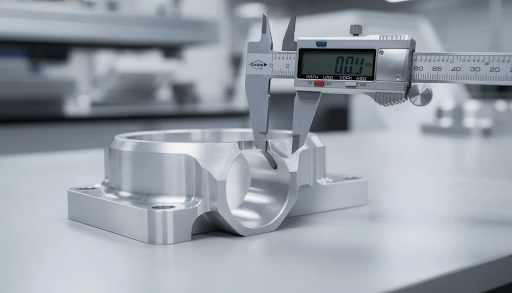
- Part inspection against drawing specifications using measuring tools
- Process documentation showing setup decisions and programming logic
- Safety observation checklists completed during machine operation
- Reflection on problems encountered and solutions developed
- Peer review of design and manufacturing approaches
Schools should encourage students to build digital portfolios containing CAD models, CAM setups, photos of finished parts, and videos of machine operation. These portfolios demonstrate capability to employers and college programs far more effectively than grades alone.
Aligning school CNC work with industry-recognized concepts prepares students for external certifications they may pursue later. While specific credentials require dedicated testing, classroom experiences that mirror certification content give students advantages when they do sit for exams.
Hosting in-class design-and-manufacture challenges or skills competitions linked to local industry needs creates engagement and demonstrates program relevance. Simply Technologies can advise on structuring assessments so administrators see clear evidence of skill growth and program impact.
Teacher Training, Support, and Long-Term Sustainability
Teacher confidence is often the deciding factor in whether a CNC machine gets used daily or gathers dust in a corner. Instructors who feel prepared and supported create engaging programs; those who feel abandoned struggle to justify continued investment.
Initial training should cover:
- Hardware operation and basic maintenance
- CAD/CAM software workflows
- Classroom management strategies specific to CNC
- Safety procedures and emergency response
- Troubleshooting common problems
Ongoing professional development ensures new staff can step in when positions turn over and existing teachers can adopt more advanced features as their comfort grows. Summer workshops, online modules, and peer observation all contribute to sustained capability.
Reliable technical support matters enormously for schools without dedicated maintenance staff. Quick access to spare parts, clear documentation written for educators rather than industrial technicians, and responsive help channels keep machines running and teachers confident.
Simply Technologies focuses on building long-term relationships with schools rather than treating sales as one-time transactions. Their support channels are tailored to busy teachers who need answers without waiting through lengthy hold times or navigating complex corporate structures.
Planning for Growth and Program Evolution
Many schools start with one small machine and later expand to multiple stations, simulators, and advanced equipment. This growth trajectory should inform initial purchasing decisions.
Design your first purchase with expansion in mind:
- Standardize on a control style that carries through from entry-level to advanced machines
- Select a CAD/CAM platform with room to grow into more complex features
- Establish safety expectations and procedures that scale to larger labs
- Choose equipment from a supplier who can support your program as it develops
Involving local employers in advisory boards keeps CNC curriculum and equipment aligned with changing industry practices. These partnerships often yield internship opportunities, donated materials, and equipment sponsorships that extend program capabilities.
Track outcomes systematically to support future funding requests:
- Course enrollment trends
- Student certifications or credentials earned
- Job placements in manufacturing roles
- Post-secondary program enrollments
- Employer feedback on graduate preparation
Simply Technologies can help schools create multi-year roadmaps that phase in more complex CNC and automation as student demand grows and program success demonstrates return on investment.
How Simply Technologies Supports Schools
Simply Technologies positions itself as a partner focused on education-ready CNC solutions rather than just hardware sales. Their approach recognizes that schools face unique challenges—limited budgets, teachers without prior manufacturing experience, and students who need safe, engaging learning environments.
The company specializes in helping public schools, private institutions, and technical colleges choose and implement CNC machines effectively. Whether you are launching a new program or expanding an existing lab, their team brings experience from similar installations across the country.
Services include:
- Needs analysis: Understanding your curriculum goals, student population, and budget constraints
- Lab layout guidance: Designing safe, efficient spaces that maximize learning
- Machine selection: Matching equipment capabilities to educational requirements
- Onboarding support: Getting teachers and students comfortable with new technology
- Ongoing technical assistance: Help when questions arise or problems develop
Simply Technologies prioritizes user-friendly software setups, teacher-centric training, and curriculum resources tailored to real classroom schedules. Their goal is ensuring that every machine they install becomes a proud centerpiece of active learning rather than an underused investment.
Educators interested in exploring CNC options for their programs can contact Simply Technologies through https://simplytechnologies.xyz/ to discuss specific lab goals, budgets, and timelines. Their team can provide details on equipment options, answer questions about implementation, and help develop a plan that fits your school’s unique situation.
FAQ
How many CNC machines does a typical high school program need to start?
Many schools successfully begin with 1-2 desktop CNC machines plus several software simulators, then expand as enrollment and funding grow. A practical rule of thumb aims for one physical CNC station per 4-6 students during advanced classes to keep schedule wait times reasonable and maximize hands on practice. Simply Technologies can review your class sizes and course structures to suggest a realistic starter configuration that balances cost with student access.
Can middle schools safely run CNC equipment with younger students?
Yes, when schools choose slower, fully enclosed, education-focused machines and follow strict supervision protocols. Limiting materials to plastics and wood at this level reduces risk while still teaching valuable concepts like coordinate systems and design-for-manufacture thinking. Simply Technologies can help administrators and teachers select age-appropriate systems and create safety checklists that address the specific concerns of working with younger students.
What software should schools use with their CNC machines?
Schools typically need three software layers: CAD for design, CAM for toolpath generation, and either a CNC control or simulator for running programs. Choosing software that offers education licensing, quality tutorials, and interfaces students can learn within a term makes curriculum development much easier. Simply Technologies helps schools standardize on a toolchain that matches their budget, hardware choices, and student skill level—ensuring the entire workflow from design to finished part works seamlessly.
How long does it take to get a new CNC lab fully up and running?
Hardware delivery and install can often be completed in a matter of weeks once purchasing is approved, assuming the room meets power and space requirements. The bigger variable is teacher training and curriculum preparation, which typically takes one planning period or summer to set up well. Simply Technologies coordinates timelines so training and curriculum support arrive alongside the machines, minimizing downtime and ensuring teachers feel prepared from day one.
What if our school has very limited space and power?
Starting with compact desktop CNC machines or routers that run on standard outlets makes CNC accessible even in constrained facilities. These machines can be moved or stored when not in use, maximizing flexibility in multi-purpose rooms. Combining physical machines with simulators lets more students practice without requiring additional floor space. Simply Technologies can help design a space-efficient layout and recommend equipment that fits within your existing infrastructure, working around the optional renovations that larger machines would require.
For schools specifically looking for a CO2 laser, the Full Spectrum Muse Core is a popular choice — enclosed design, safety interlock, and sized for a classroom environment.