
Key Takeaways
- CNC machines including routers, mills, and supporting lasers are now core tools in STEM and CTE programs, directly connecting classroom learning to real manufacturing careers.
- Simply Technologies offers education-ready CNC routers for classrooms, with scalable systems from compact SIMPLY Series units to larger PERFORMANCE ATC machines.
- A modern CNC lab blends real machines, CO2 laser cutters, and simulators, supported by structured training such as the 16-session EMPOWER[ED] ACADEMY curriculum.
- This guide helps schools choose the right CNC machine tools, plan safe labs, and integrate CNC technology into curriculum with age-appropriate educational CNC equipment.
- Ready to build your program? Explore CNC products online and call 800-288-2961 to speak with Simply Technologies’ education team.
Why CNC Machines Belong in Today’s Tech Classrooms
CNC machines bridge the gap between classroom theory and real-world manufacturing workflows. In 2026, North American employers continue reporting critical skills gaps—a Manufacturing Institute survey indicated 2.1 million manufacturing jobs could go unfilled by 2030 due to lack of workers proficient in CNC operation and programming.
CNC routers, mills, and supporting CO2 lasers expose students to CAD/CAM software, automation, and digital fabrication far beyond textbooks. Engineering capstone projects, robotics parts, and product design prototypes all become achievable when students have hands-on experience with real production processes.
This technical education connects directly to career pathways in machining, industrial automation, product design, and small-scale manufacturing. Graduates familiar with CNC controls and workflows enter the job market as stronger candidates for local industry positions.
Starting CNC education as early as grade 8–9 helps students understand coordinate systems, toolpaths, and process planning. These exercises reinforce math and physics concepts with tangible outcomes—students see how G-code translates equations into physical parts.
Simply Technologies designs CNC solutions and training specifically for education programs, focusing on safety, classroom fit, and reliability rather than hobbyist-only machines.
Types of CNC Solutions for Schools and Tech Programs
Schools rarely use just one machine type. Effective programs combine CNC routers, small mills, and lasers, scaled to space requirements, budget, and curriculum goals.
CNC routers serve as the primary workhorses in tech education—cutting wood, plastics, and composites for STEM and CTE student projects. Explore the full range of CNC systems designed for educational settings.
Other CNC machine tools complement routers in a well-equipped lab:
| Equipment Type | Primary Use | Best For |
| CNC Mill | Metal precision work | Advanced manufacturing |
| CNC Lathe | Turned parts, cylinders | Engineering programs |
| CO2 Laser | 2D cutting/engraving | Design labs |
| Simulators | Virtual G-code practice | All levels |
Simply Technologies helps schools build balanced labs that fit actual building power, ventilation, and safety constraints while mimicking real production environments.
Full-Size CNC Routers and Mills for Education
Full-size CNC routers and mills give students the closest experience to a real production floor. These industrial machines suit senior high school and post-secondary programs preparing CNC operators for immediate employment.
Key characteristics include:
- Welded steel frames for stability
- Industrial spindles (5-10HP)
- Proper dust collection or coolant systems
- Control systems designed for repeatability
Concrete project examples include furniture components, fixture plates, robot chassis panels, and small production runs for school enterprises or research projects.
Facility requirements for a larger machine typically include dedicated floor space (200-400 sq ft), dust extraction, reliable power including three phase power where applicable, and clear safety zones around the machines.
The DISCOVERY, PERFORMANCE, and PERFORMANCE ATC tiers from Simply Technologies represent natural steps for schools scaling from entry-level to advanced projects.
Desktop and Tabletop CNC Machines
Desktop CNC routers and compact mills serve as ideal starting points for middle schools, smaller high schools, and classrooms with limited space and standard 120 VAC outlets.
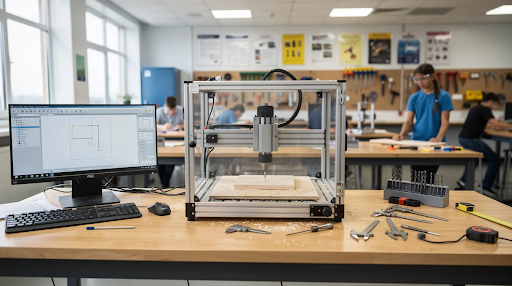
These machines typically handle wood, MDF, plastics, and soft metals like aluminum at modest depths—perfect for stem programs, robotics parts, and introductory manufacturing exercises suitable for younger students.
Benefits of desktop systems:
- Lower infrastructure requirements
- Easier supervision and easy operation
- Safer speeds for younger learners
- Professional CAD/CAM workflows that transfer to larger equipment
The SIMPLY Series from Simply Technologies provides classroom-friendly, compact systems that mirror the control logic and programming environment of larger shop equipment. Students transition later without relearning everything.
Multiple desktop stations plus simulators can serve larger classes more effectively than a single large machine, improving student machine time and engagement.
CO2 Laser Systems and CNC Simulators as Supporting Tools
CO2 lasers and virtual CNC simulators are not replacements for routers and mills but powerful supporting tools in an education lab.
CO2 laser capabilities for schools include precise 2D cutting and engraving of wood, acrylic, and textiles for signage, enclosures, and design projects. Review laser system options for your program.
Simulators run on standard PCs or laptops, letting students practice G-code, toolpaths, and workstation setup safely before touching a real spindle. This approach reduces errors by up to 70% before physical runs.
A practical configuration: 24 students can program and verify jobs on simulators while 2–3 groups run real parts on shared CNC routers—increasing effective machine time by 8x.
Simply Technologies integrates simulators, all the machines, and lasers into a consistent toolchain so students see the full process from CAD design to cut parts.
How to Choose the Right CNC Machine for Your School
Machine choice should flow from curriculum goals, budget, class sizes, and the age range of students—not from brand hype or a single grant opportunity.
Four main considerations guide selection:
- Curriculum alignment – Does equipment support existing CTE standards and certification pathways?
- Safety and compliance – Does it meet CSA or equivalent standards with proper safety features?
- Total cost of ownership – What are tooling, maintenance, and training costs over 3-10 years?
- Age-appropriate controls – Can students at your grade level operate it safely?
Simply Technologies works with schools to map these criteria into clear equipment roadmaps over 3–5 years rather than one-off purchases.
For most high schools in 2026, a blended starter lab might include 1–2 desktop CNC routers, 1 mid-sized router, a CO2 laser, and several simulator seats.
Safety, Compliance, and Classroom Management
Safety is the first gating factor for any education CNC system. Equipment must be controllable, clearly guarded, and compliant with local regulations including CSA standards in Canada.
Essential machine safety features:
- Emergency stop buttons
- Interlocked doors or enclosures
- Spindle covers
- Clear labeling
- Straightforward control panels
Classroom layouts should give teachers clear sightlines to each machine with marked safety zones on the floor, organized tools storage, and defined student roles during operation.
Simply Technologies supports schools with layout recommendations, safety checklists, and sample student safety contracts adaptable to district policies. Include lockout/tagout procedures and dust collection requirements in your planning.
Budgeting and Total Cost of Ownership
The sticker price of a CNC machine is only one part of the budget. Schools must plan for tooling, fixtures, consumables, training, and maintenance across 3–10 years.
Annual maintenance and consumables often run 5–10% of initial machine cost depending on usage and materials.
Typical ongoing costs include:
- Cutting tools and collets
- Spoilboards and fixtures
- Dust collection filters
- Lubricants and wear parts
- Safety glasses and hearing protection
- Software updates or subscriptions
Grants and CTE funding often cover initial capital purchases, but schools should build ongoing supplies into regular operating budgets. Educational discounts from software vendors help reduce subscription costs.
Simply Technologies helps schools structure realistic multi-year budgets and prioritize durable, serviceable machines for daily student use.
Age-Appropriate Machines and Controls
Younger students need lower-power, slower machines with simplified workflows. Older advanced students can handle more complex controls and higher material removal rates.
Middle school (grades 6–8): Fully enclosed desktop routers and CO2 lasers with heavily scaffolded tasks focusing on design fundamentals and safe operation.
High school (grades 9–12): Mid-sized routers and entry-level CNC milling centers giving students independence in setup, probing, and problem solving.
Technical colleges and post-secondary: Full-size routers, mills, and CNC lathe systems aligned with local industry standards for advanced projects.
Keep control interfaces similar across simulators and machines so students aren’t relearning basic navigation each time. Simply Technologies prioritizes this consistency when recommending systems to schools.
Integrating CNC Machines into Tech and STEM Curriculum
CNC is not a standalone course in most secondary education settings. Instead, it supports existing pathways in engineering, manufacturing, robotics, and design technology.
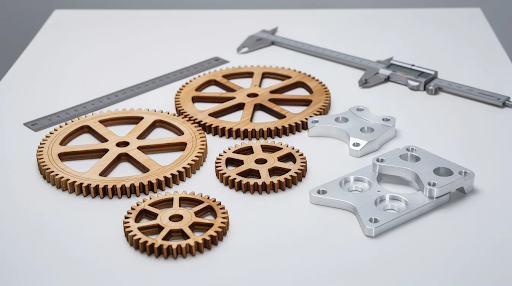
Aligning CNC projects with local or state standards—such as CTE manufacturing standards requiring 330+ hours with various machine tools—strengthens grant applications and justifies equipment to administrators.
Simply Technologies’ ACADEMY Series and EMPOWER[ED] ACADEMY resources provide a 16-session curriculum walking students from CAD basics through CAM programming and safe operation, culminating in skills-based assessments.
Cross-curricular applications include:
- Physics: Forces, feeds, speeds (SFM = 0.262 x RPM x diameter)
- Math: Geometry, trigonometry for toolpath calculations
- Science: Material properties and cutting behaviors
- Entrepreneurship: Product costing and small batch production
Sample Projects and Skill Pathways by Level
Concrete project examples help educators visualize how CNC fits into existing courses and school year timeframes.
| Level | Projects | Skills Developed |
| Entry | Nameplates, 2D profiles, laser engravings | Coordinate systems, work zero, basic toolpaths |
| Intermediate | Gear trains, box joints, robots brackets | Multiple setups, tool changes, caliper inspection |
| Advanced | Fixtures, capstone prototypes, production runs | Tolerances (±0.005 inch), quality control, process planning |
Use a consistent CAD/CAM toolchain across grade levels so students build depth through problem-based learning over multiple years.
Assessment, Credentials, and Student Portfolios
Effective CNC education measures more than part completion. It evaluates understanding of process planning, safety, and problem-solving under realistic constraints.
Assessment criteria should include:
- Setup documentation accuracy
- Correct tool selection
- Adherence to safety protocols
- Part quality (tolerances, surface finish)
- Error identification and correction
Digital portfolios should include CAD models, CAM screenshots, setup sheets, and short videos of students operating machines—evidence for employers and careers planning.
Simply Technologies’ EMPOWER[ED] ACADEMY structure and certification pathways anchor assessment frameworks that remain consistent through teaching staff changes.
Teacher Training, Support, and Long-Term Program Sustainability
Teacher confidence is the single most important factor determining whether CNC machines are used daily or kept idle. Studies indicate 80% of idle educational CNC equipment links to instructor gaps rather than equipment issues.
Training should cover basic machine operation, safety routines, simple maintenance, curriculum integration, and troubleshooting common student mistakes across 1-2 week onboarding sessions.
Simply Technologies provides direct technical support, educator-focused documentation, and phone-based guidance at 800-288-2961 for machine selection, installation, and day-to-day operation.
Schools should establish internal support structures:
- Student lab assistants for routine maintenance
- Cross-trained teachers for program continuity
- Clear documentation for all CNC workflows
Planning for Growth and Program Evolution
Successful programs rarely stay static. As enrollment and community interest grow, CNC labs must scale intentionally.
Start with 1–2 desktop CNC routers, a CO2 laser, and simulators for introductory classes. Add mid-sized and eventually PERFORMANCE ATC-level routers as advanced classes and local industry partnerships develop.
Advisory input from local manufacturers, trade schools, and workforce boards keeps equipment and curriculum aligned with real hiring needs for the next generation of workers.
Partnership benefits include material donations, guest speakers, plant tours, internships, and potential sponsorship of additional machines or tooling—making programs cost-effective over time.
Simply Technologies collaborates with schools to create multi-year roadmaps that phase in more powerful CNC systems and complementary automation without overwhelming teachers or facilities staff.
How Simply Technologies Supports Tech Education Programs
Simply Technologies serves as a CNC-focused partner for schools, maker spaces, and small production labs building or upgrading education programs.
The scalable product structure progresses naturally:
- SIMPLY: Entry-level classroom machines
- DISCOVERY: Expanded capability for serious STEM/CTE labs
- PERFORMANCE: Industrial-grade routers
- PERFORMANCE ATC: Automatic tool change systems for advanced workflows
For each tier, Simply Technologies recommends matching CO2 laser systems, dust collection, workholding, and accessories—complete, ready-to-teach solutions that can be easily integrated rather than isolated hardware.
Education-specific services include lab layout consulting, installation support, teacher onboarding, the ACADEMY Series curriculum, and EMPOWER[ED] ACADEMY for structured training and certification.
Ready to build your program?
- Explore CNC machine options
- Review laser systems
- Call 800-288-2961 to speak directly with the education team about your program plans
FAQ: CNC Machines in Tech Education
These questions address common practical concerns schools raise when planning or expanding CNC labs.
How many CNC machines does a typical high school tech program need to start?
Many high schools successfully launch programs with 1 mid-sized CNC router or 2 desktop routers plus several simulator seats, aiming for roughly one physical station for every 4–6 students in advanced classes. Introductory classes can operate with fewer real machines since early work involves design and simulation. For programs serving 60–80 students per year, consider 2 desktop routers, 1 mid-sized router, a CO2 laser, and 10–20 simulator licenses. Simply Technologies reviews enrollment and schedules to propose specific configurations for each school.
How long does it typically take to get a new CNC lab ready for students?
Once funding is secured, hardware delivery and installation usually fall within 4–8 weeks depending on machine complexity. Preparation work—electrical, dust collection, tables, and layout—often takes longer than installation and should be coordinated with facilities early. Teacher training and curriculum integration require at least a planning period or summer session before first student projects. Simply Technologies coordinates installation, training, and curriculum onboarding for confident first-term operation.
What CAD/CAM software should schools pair with CNC machines?
Schools need three components: CAD for designing parts, CAM for generating toolpaths, and control software or simulators mirroring the real CNC interface. Favor education-licensed packages widely used in industry with strong tutorial ecosystems—students learn within one semester and carry skills forward to careers. Standardize on limited tools across grades to reduce retraining. Simply Technologies matches software to budget, hardware, and age level while ensuring school IT policies support the chosen toolchain.
How do schools keep CNC machines reliable with heavy student use?
Reliability depends on simple daily and weekly maintenance: cleaning chips and dust, checking tool condition, inspecting cables, and following lubrication schedules. Assign student roles or rotating teams for basic cleaning under teacher supervision, reinforcing real-world shop habits. Budget for replacement cutting tools, spoilboards, and wear parts. Simply Technologies provides maintenance guidance, documentation, and replacement components designed for long-term educational use—reducing downtime by up to 50% when students participate in routines.
What if our school has very limited space and only standard power outlets?
Many successful programs operate in standard classrooms using compact desktop CNC routers and CO2 lasers running on 110–120 VAC circuits. Mount machines on mobile carts to share space with other courses. Dust or fume collection can be handled with appropriately sized portable systems. Pair a small number of physical machines with multiple simulator seats for adequate programming practice. Simply Technologies routinely designs space-efficient layouts and recommends models specifically suited to constrained power and floor area—making precision manufacturing accessible to any educational institution.