
Key Takeaways
CNC routers have become essential tools in middle school, high school, and college STEM and CTE programs. Simply Technologies focuses on safe, CSA-compliant classroom CNC systems designed for real educational environments.
- Match router size to your curriculum: desktop machines handle prototypes, mid-size routers build furniture components, and 4×8 systems support production-level projects.
- The ACADEMY Series combines a 16-session curriculum, CAD/CAM training, and teacher onboarding to make CNC adoption manageable for educators without machining backgrounds.
- A clear upgrade path exists from SIMPLY → DISCOVERY → PERFORMANCE → PERFORMANCE ATC as programs grow, without adding complexity for teachers.
- Explore CNC machines and call 800-288-2961 to speak with the education team.
Why CNC Routers Belong in Today’s Classrooms
Since approximately 2015, CNC routers have moved from industry-only tools into regular high school and college labs. This shift has been driven by STEM initiatives, expanded CTE funding, and the growth of makerspaces across North American schools. Employers now expect entry-level candidates to understand CNC technology, CAD/CAM workflows, and digital fabrication processes.
A properly specified CNC router delivers concrete learning outcomes:
- Reading and interpreting engineering drawings
- CAD modeling and CAM toolpath generation
- Understanding feeds, speeds, and tooling selection
- Workholding strategies and job setup
- Safety procedures and basic troubleshooting
- Machine operations and maintenance fundamentals
Programs that benefit most include Project Lead The Way (PLTW), woodworking and cabinetry courses, engineering technology pathways, robotics teams, and school makerspaces. Students progress from 2D contour projects to 2.5D and 3D work in wood, plastics, foam, and approved light metals like aluminum.
Unlike 3D printers, CNC routers handle larger sheet goods and furniture-scale projects at a lower cost per part. Simply Technologies provides production-grade CNC machines adapted for safe, repeatable classroom use—built for real-world performance, not just demonstrations.
Types of CNC Routers for Schools
Schools typically choose between desktop, mid-size, and full-sheet routers depending on available space, budget, and project scope. Understanding these categories helps match equipment to curriculum goals.
Desktop and Tabletop CNC Routers for Education
Desktop systems with work areas around 12”×12” to 24”×24” are often the first CNC purchase for schools due to lower cost and compact footprint. These machines feature fully enclosed cutting areas, integrated dust collection, and simplified controls suited for middle school and early high school labs.
Ideal use cases include STEM challenges, small robotics brackets, acrylic signs, simple molds, and introductory CAD/CAM projects. A Grade 9 STEM class can design and route personalized nameplates in Baltic birch or HDU foam within a 45–60 minute period.
Simply’s entry-level SIMPLY and DISCOVERY class machines can be configured in desktop formats suited for cart-based or shared-space use. Review options at simplytechnologies.xyz/cnc-products/#machines.
Mid-Size 2×4 and 4×4 CNC Routers
Mid-size routers represent the sweet spot for CTE labs and fabrication classrooms wanting real shop capability without a full 4×8 footprint. These systems typically feature 6–8 inch gantry clearance, vacuum or T-slot tables, and single-phase power compatibility.
Classroom applications include furniture components, guitar bodies, robotics chassis, signage, and fixtures for school events. These routers mirror industrial workflows, preparing students for co-op placements and entry-level manufacturing roles.
Simply’s DISCOVERY and PERFORMANCE class systems can be specified in 2×4 and 4×4 sizes, designed for production-style labs while remaining practical for school budgets.
Full-Sheet 4×8 CNC Routers
Full-sheet routers serve advanced programs, college labs, and districts building dedicated manufacturing academies. A 4×8 machine lets students cut standard plywood and MDF sheets for cabinetry, stage sets, theater props, and full-scale prototypes.
These systems require more planning: clearances around the machine, dust collection infrastructure, material storage, and possibly 3-phase power. Simply’s PERFORMANCE and PERFORMANCE ATC systems deliver production-grade reliability for both instruction and light in-house fabrication.
Districts often start with smaller systems at individual campuses and later add a 4×8 router at a central CTE center, maintaining the same CAD/CAM workflow across machines.
What to Look For in a School CNC Router
Education buyers must balance safety, durability, ease of use, and long-term support—not just peak cutting speed. Use these criteria when evaluating equipment.
Safety, Compliance, and Classroom Readiness
School machines require clear guarding, E-stops, lockable controls, and standardized procedures manageable by dozens of students per term. CSA compliance is mandatory in Canada, with equivalent expectations across North American districts.
Key safety features include:
- Safety enclosure with interlocked doors
- Key-switch power control
- Integrated dust extraction
- Emergency stop access
Simply designs safety into CNC systems from initial engineering, not as retrofit accessories.
Machine Construction and Real-World Performance
Welded steel frames, precision linear guides, and quality spindles matter for day-to-day use in busy labs. Machines must withstand frequent starts/stops, variable operators, and occasional misuse while maintaining tolerances over years of operation.
Simply’s CNC lineup is engineered for real production shops and classrooms, emphasizing repeatability and minimal drift. Look for rigid gantries, proper cable management, and easy maintenance access when evaluating equipment.
Controls, CAD/CAM Software, and Ease of Use
An intuitive controller interface lets students move from zero CNC experience to running parts within a few sessions. Modern CAD/CAM solutions should be cloud-capable, offer student licensing, and work with Chromebooks and Windows laptops.
Simply’s education-focused systems integrate with common software workflows and provide stable, industry-relevant post-processors. Teachers can simulate jobs offline, manage files across machines, and lock out advanced settings to keep beginners within safe operating limits.
Footprint, Power, and Dust Collection
Measure actual lab space and doorways, plan for material loading zones, and leave room for students to observe safely. Common constraints include 120V vs 240V power availability, breaker capacity, and sound levels in shared workshops.
Properly sized dust collection is essential for wood and MDF work. A typical high school lab with one mid-size router needs approximately 6×10 feet of floor space, a compatible dust collector, tool storage, and a CAD workstation area.
Support, Training, and Curriculum Resources
For schools, vendor support and curriculum are almost as important as the hardware itself. Simply Technologies provides direct phone and remote support rather than relying on community forums—critical when classes depend on functioning machines.
The ACADEMY Series and EMPOWER[ED] ACADEMY include a 16-session curriculum, CAD/CAM instruction, teacher onboarding, and certification pathways. Contact the education team at 800-288-2961 to review curriculum alignment and implementation timelines.
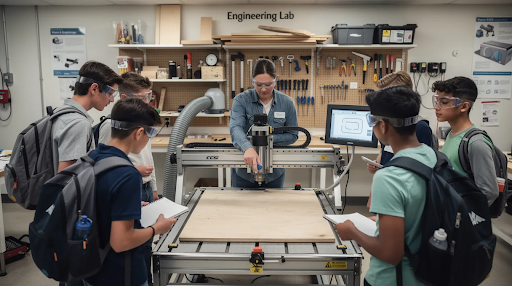
Simply Technologies Education-Focused CNC Solutions
Simply Technologies Group Inc. is a CNC-first company providing routers and CO2 lasers tailored to small production shops, schools, and makerspaces. Each system is built for precision cutting, safety, and long-term reliability in working environments.
SIMPLY and DISCOVERY Series for Entry-Level Programs
SIMPLY and DISCOVERY series systems are intended for schools starting their first CNC program or adding capability to a new makerspace. These compact, classroom-ready routers feature safety enclosures, simple controls, and work areas sized for project-based learning.
Example use cases include introductory CAD/CAM in Grade 8–10, design-and-make projects in STEM electives, and community education classes. Review entry-level options at simplytechnologies.xyz/cnc-products/#machines.
PERFORMANCE and PERFORMANCE ATC for Advanced Labs
PERFORMANCE series systems suit advanced manufacturing programs at high schools, colleges, and trade schools requiring production-capable routers for continuous use. PERFORMANCE ATC adds automatic tool changing for multi-tool operations, mirroring workflows students encounter in modern facilities.
A senior-level manufacturing class can run nested cabinet layouts from 4×8 sheets using multiple tools in a single unattended job. Programs can start with SIMPLY or DISCOVERY systems and scale up while keeping similar control and CAD/CAM workflows.
ACADEMY Series and EMPOWER[ED] ACADEMY Curriculum
The ACADEMY Series bundles CNC hardware with a structured 16-session curriculum tailored for classroom pacing. Components include CAD/CAM fundamentals, machine setup and safety, workholding strategies, basic maintenance, and project-based assessments.
EMPOWER[ED] ACADEMY provides teacher support through onboarding, optional training, and clear certification pathways. This structure reduces burden on educators without prior machining experience, making it realistic to launch a CNC course within a single semester.
Supporting CO2 Laser Systems and Shop Accessories
CO2 laser machines complement CNC routers by handling fast 2D cutting and engraving in plywood, acrylic, and thin materials. Simply offers education-friendly laser systems and accessories at simplytechnologies.xyz/laser-machines-and-accessories.
CNC routers should typically be the backbone of a fabrication program, with lasers filling specialized roles. Simply can help schools design a phased equipment plan starting with CNC and integrating lasers as programs expand.
Implementing CNC Routers in Your School Program
Successful CNC integration follows a clear process: planning, installation, training, curriculum rollout, and continuous improvement.
Planning: Matching Machines to Curriculum and Space
Start with a clear list of target courses, expected student counts, and typical project sizes. Create a matrix aligning machine sizes to project types: desktop for prototypes, mid-size for furniture and robotics, 4×8 for cabinetry and production.
Involve facilities staff early to confirm power availability, ventilation, and dust collection options. Simply’s team can review lab sketches and suggest appropriate machine footprints.
Installation, Setup, and Teacher Onboarding
Most education-focused CNC machines install in one to two days once power and dust collection are ready. Simply offers direct technical support and education-focused onboarding so instructors aren’t left to learn via trial and error.
Schedule teacher PD days or summer sessions specifically for CNC training, using the ACADEMY curriculum as a backbone.
Rolling Out Projects and Assessments
Start with simple 2D contour and pocketing projects before moving to 3D reliefs or complex assemblies. Design projects requiring students to submit CAD files, CAM setups, and setup sheets as graded work—mirroring real shop documentation.
Build a project library over time with both teacher-developed and student-developed assignments. EMPOWER[ED] ACADEMY helps structure assignments and map them to skill milestones.
Maintaining and Growing the Program
Establish a maintenance schedule: daily cleaning by students, weekly checks by teachers, and annual reviews with vendor support. Track machine usage and student outcomes to justify future budget requests.
Expansion pathways include adding a second router, introducing PERFORMANCE ATC for advanced students, or complementing CNC with CO2 lasers for rapid 2D work.
Budgeting and Purchasing Considerations for Schools
Budgets often limit CNC adoption. Administrators need clear numbers and justifications to approve purchases.
Total Cost of Ownership: Beyond the Machine Price
Key cost categories include:
- Machine purchase
- Shipping and installation
- Electrical work
- Dust collection
- Tooling and consumables
- Software licenses
- Teacher training
Expected machine lifespans of 10–15 years or more justify initial investment as a long-term asset. Consider savings from in-house fabrication of signs, fixtures, and stage components.
Funding Sources and Purchasing Strategies
Concrete funding avenues include CTE and STEM grants, district capital budgets, local industry sponsorships, and foundation support. Phase purchases: start with SIMPLY or DISCOVERY systems and add PERFORMANCE machines as enrollment expands.
Work with procurement early to meet bidding requirements, specifying safety, support, and curriculum as mandatory criteria. Contact Simply at 800-288-2961 to align configurations with available money.
Justifying CNC Investment to Administrators
Highlight local manufacturing job forecasts, apprenticeship opportunities, and regional skills gaps in CNC and CAD/CAM. Show how CNC supports multiple disciplines—engineering, design, arts, robotics, and theater—spreading cost across departments.
Reference credentialing opportunities through EMPOWER[ED] ACADEMY and demonstrate how skills feed into future careers and post-secondary programs.
FAQ: CNC Routers for Schools
How much space does a school CNC router really need?
Footprint is more than table size. Allow at least 3 feet of clearance on working sides, plus room for an operator and observers. A typical 2×4 router needs roughly 6×10 feet for safe operation, while desktop units can live on a standard lab bench. Send room dimensions to Simply for layout suggestions.
What grade levels can safely use CNC routers?
Fully enclosed desktop systems can be appropriate for supervised middle school use (Grades 6–8), while open-bed 2×4 and 4×8 routers suit high schools and universities. Safety depends on supervision, hands-on training, and clear procedures. ACADEMY materials include level-appropriate modules.
Do we need dedicated CNC operators, or can teachers run the machines?
Existing CTE, engineering, or tech-ed teachers typically operate CNC equipment after targeted training. Simply’s teacher onboarding and EMPOWER[ED] ACADEMY resources bring educators up to speed regardless of prior machining knowledge. Assign one or two lead teachers per campus to own maintenance and configuration.
Can one CAD/CAM workflow support both routers and lasers?
Many CAD platforms export geometry for both CNC routers and CO2 lasers, though post-processors differ. Schools often standardize on a single CAD environment with separate CAM steps for each machine type. Simply can advise on workflow choices keeping student learning consistent.
How long does it typically take to get a CNC program up and running?
Planning and purchasing may take several months within school approval cycles. Installation and basic teacher training complete in days once equipment arrives. With the ACADEMY 16-session curriculum, many schools run an introductory CNC unit within the same semester as installation. Contact Simply early to align lead times with course scheduling.