
Key Takeaways
- Benchtop CNC routers are compact cnc machines ideal for home shops, schools, and small production spaces, typically weighing 50 to 300 pounds with work areas from 12×12 inches up to 24×48 inches.
- Realistic price ranges in 2024–2026 run roughly from hobby-grade units under $1,500 to professional benchtop systems in the $5,000–$15,000 range, depending on envelope, spindle, and drive type.
- Simply Technologies focuses on industrial-style CNC routers scaled for small spaces, with upgrade paths from entry-level SIMPLY systems through DISCOVERY and PERFORMANCE platforms.
- Buyers must match machine envelope, accuracy, and spindle or router choice to their actual projects—signs, cabinetry, aluminum parts, classroom training, and more.
- Education programs can pair benchtop-class machines with structured training such as a 16-session ACADEMY curriculum and EMPOWER[ED] ACADEMY support for schools.
What Is a Benchtop CNC Router?
A benchtop cnc router is a compact, computer-controlled machine that fits on a workbench or rolling stand rather than requiring a dedicated shop floor. These machines use a gantry-style design where a high-speed rotary tool traverses X, Y, and Z axes over a fixed bed, following G-code instructions from CAD/CAM software. Typical cutting areas range from approximately 12×12 inches for micro-projects to 24×48 inches for larger benchtop-class systems.
In 2024–2026, these machines serve hobbyists crafting custom plaques, small businesses producing acrylic enclosures, and schools running daily STEM labs. Common materials include softwood, hardwood, MDF, plastics, composites, and thin aluminum sheets up to 1/8-inch with appropriate tooling.
It helps to understand the difference between lightweight desktop cnc hobby units under 50 pounds—which often flex under load—and more rigid benchtop routers that can realistically support light production work with tolerances below 0.010 inches. Compared to full-size 4×8-foot shop routers costing $20,000–$100,000+, benchtop units trade raw throughput for 70–90% cost savings, 120V single-phase power, and setup under two hours.
Simply Technologies builds industrial-style cnc routers and small-footprint machines designed for real shop and classroom environments. Their lineup provides a clear progression from entry-level to production-capable systems—see the CNC products page for details.
Benchtop CNC Router Use Cases in 2024–2026
Benchtop routers handle a wide variety of projects when properly matched to the application:
Woodworking applications:
- Custom signage with V-bit engraving at 120 IPM on oak
- 3D relief carvings using ball nose bits at fine stepovers
- Inlays with 0.005-inch tolerance pockets for epoxy fills
- Small furniture components, cabinet doors, and cutting board handles
- Jigs and fixtures for table saws or other shop tools
Prototyping and light production:
- Small-batch branded products like keychains in acrylic
- Musical instrument necks in maple
- Foam molds for upholstery
- Electronics panels and enclosures
Education:
- High school tech programs using 24×24-inch envelopes for CAD/CAM training
- Project-based learning with robot chassis from plywood
- FIRST Robotics parts including polycarbonate brackets
Simply Technologies positions benchtop-class machines as stepping stones toward higher-throughput production, maintaining consistent interfaces across SIMPLY, DISCOVERY, and PERFORMANCE platforms.
Budget: What a Benchtop CNC Router Really Costs
Benchtop CNC pricing in North America spans from around $1,000 hobby kits to $15,000+ for industrial benchtop units. Understanding where your budget falls helps narrow the field quickly.
| Price Range | Category | Typical Features |
| Under $1,500 | Hobby/DIY | Belt drives, trim router, basic steppers |
| $1,500–$4,000 | Prosumer | Improved frames, optional ball screws |
| $4,000–$10,000 | Serious benchtop | Ball screws, servo options, 24×24” envelopes |
| $10,000–$15,000+ | Industrial-lite | Welded steel frames, 2.2kW spindles, tight tolerances |
Cost drivers include envelope size (each 12-inch dimension adds roughly 20–30% cost), spindle versus router ($100 vs $800+), drive type, frame stiffness, and control system quality. Budget another $500–$2,000 for software licenses like VCarve Pro or Fusion 360, bit sets, clamps, and dust collection in your first year.
Simply Technologies’ CNC routers are engineered for long-term reliability rather than lowest upfront cost—explore the CNC product range to understand progression and pricing.
Choosing the Right Work Envelope
Work area refers to usable X, Y, and Z travel—not outside machine dimensions. This is often the first hard decision for buyers.
Common envelope sizes:
- ~12×12×3 inches: Very small benchtops for jewelry, small signs
- ~18×24×4 inches: Typical mid-range for signs and prototypes
- ~24×48×6 inches: Larger benchtop-class for cabinet doors and fixtures
Match envelope to project types. A sign shop producing 18×24-inch dimensional letters needs different capabilities than a furniture maker cutting cabinet doors.
Tiling workflows let you process longer parts on smaller tables by stitching multiple operations together. This works for linear parts like trim but adds 20–50% setup time and introduces potential alignment issues of ±0.015 inches at seams.
Pay attention to Z travel. Account for spoilboard thickness (typically 1 inch), clamp height, and material thickness. Experts recommend 20% oversize for comfortable fixturing.
Accuracy, Rigidity, and Realistic Expectations
Community discussions on forums like Reddit’s r/hobbycnc consistently warn that many hobby-class machines flex under load, creating chatter and reducing tool life. Understanding realistic tolerances prevents disappointment.
Frame construction matters enormously. Extruded aluminum gantries can twist 0.5° under 1HP cuts, while welded steel frames with oversized linear rails achieve ±0.002–0.005 inches repeatability. Hobby benchtops typically yield ±0.010–0.020 inches—fine for signs but impossible for fitted joinery or precision aluminum parts.
Bending under load, not just motor step size, often limits real-world precision. Prioritize a rigid gantry and quality linear components over flashy software features.
Simply Technologies’ machines mimic shop router stiffness for daily use, positioning their benchtop offerings closer to industrial capability than hobby toys.
Drive Systems, Motors, and Control Electronics
Motion components define both performance and maintenance needs:
- Belt drives: Common on entry-level machines. Fast (1,000 IPM rapids) but stretch over time, creating 0.020-inch inaccuracy after 1,000 hours. Good for wood signs.
- Lead screws: Solid mid-tier choice offering better precision than belts but with more friction and slower rapids around 300 IPM.
- Ball screws: Top option with less than 0.001-inch backlash, high efficiency, and long life. Standard on $5,000+ units.
Most benchtop routers use stepper motors (NEMA 23, 3–5 Nm torque), which suffice for 80% of hobby and light production operation. Servos appear in $10,000+ machines, offering 2x speed and closed-loop reliability.
Controls range from GRBL on Arduino boards ($50) to industrial Ethernet systems ($2,000+). Simply Technologies specifies drives and motors for real shop use—view specific machines.
Router vs Spindle on a Benchtop CNC
The choice between a consumer-grade router and a dedicated CNC spindle heavily influences noise, accuracy, and duty cycle.
Trim routers (1.25–2.25 HP) cost around $100, produce 90dB noise, and have 1-hour duty cycles with 0.005-inch runout. They’re easy to replace but wear quickly.
Dedicated spindles (1.5–3.0 kW) run $500–$1,000, operate at 75dB, achieve 0.001-inch runout, and handle 8+ hour cycles. Water-cooled versions excel at aluminum work.
Mid- and high-tier 2024 benchtops often ship with ER collet spindles (ER11, ER16) improving tool holding consistency. Users running a small business or school lab should lean toward spindle-equipped systems, even if that means stepping up one price tier.
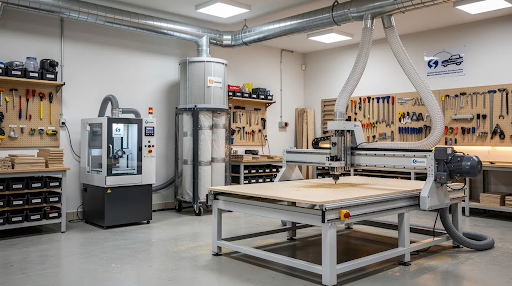
Shop Requirements: Power, Dust, and Footprint
Even compact benchtop CNC routers must be treated as real production tools:
Power: Many smaller benchtops run on 120V 15–20A circuits. Higher-power spindles may require 240V service.
Footprint: Plan space for the machine (typically 30×50 inches), 24-inch clearance around the table, computer or control pendant, and loading access.
Dust collection: MDF and hardwood create serious health hazards. Use at minimum a dedicated shop vacuum with 2.5-inch hose. Fine filtration protects both lungs and machine components.
Noise: Routers and vacuums together can exceed 90dB. Simple enclosures or barriers reduce levels by 10–15dB, making operation more garage and classroom friendly.
Simply Technologies supports shop automation accessories like dust collection and rotary options as part of system planning, not afterthoughts.
Software, Training, and the Learning Curve
CAD/CAM software and operator training matter as much as the physical machine. Common tools in 2024–2026 include VCarve Desktop/Pro ($350–$700) and Fusion 360 ($500/year). Test software for workflow fit and post-processor availability before committing to any platform.
The typical learning path:
- Basic 2D profiles and pockets (1 week)
- V-carving text and designs (2 weeks)
- 3D surfacing and multi-setup projects (1 month)
Structured learning greatly accelerates this process. Simply Technologies’ ACADEMY Series and EMPOWER[ED] ACADEMY provide a 16-session curriculum covering CAD/CAM instruction, teacher onboarding, and certification pathways tailored for school and training environments.
Scaling Up: From Benchtop CNC to Full Production
Many users start with a benchtop router to learn CNC and validate products, then move to larger machines as demand grows. Benchtop limitations include smaller work envelopes, lower material removal rates, and manual tool changes that add cycle time.
Full production often requires 4×4 or 4×8-foot routers, automatic tool changers, vacuum tables, and higher-power spindles. Simply Technologies structures its lineup as a clear progression: SIMPLY for entry into CNC, DISCOVERY for expanding capability, PERFORMANCE for higher throughput, and PERFORMANCE ATC for automated production.
Choose a benchtop machine that shares control philosophy and support structure with your likely future production router.
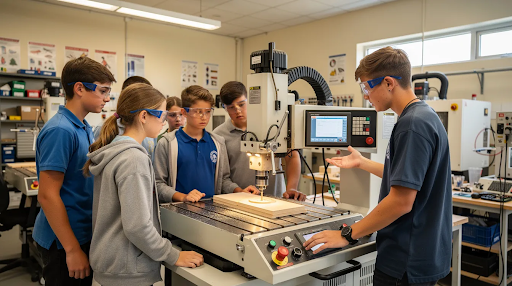
Benchtop CNC Routers in Education and Maker Spaces
Benchtop CNC routers are now standard equipment in many high schools, colleges, and community maker spaces across North America.
Classroom requirements include:
- Clear safety protocols and CSA compliance in Canada
- Machines that withstand daily student use
- Simple workholding and dust collection setups
- Structured curriculum tied to NGSS standards
Simply Technologies supports education-focused CNC labs with ACADEMY systems, EMPOWER[ED] ACADEMY training, and content designed for multi-year program life rather than single semesters. Contact Simply Technologies directly by phone to match machine size, safety features, and training options to specific program goals.
How Simply Technologies Helps You Choose a Benchtop CNC Router
Selecting the right benchtop CNC router depends on materials, part size, tolerance, budget, and future growth plans. It’s normal to ask for guidance—that’s exactly what Simply Technologies provides.
The company serves as a technical resource: discussing applications by phone, reviewing envelope needs, and aligning users with appropriate systems from the SIMPLY, DISCOVERY, PERFORMANCE, and PERFORMANCE ATC progression. They emphasize safety and repeatable performance for real shops, schools, and maker spaces.
Next steps:
- Explore the CNC product overview page
- Review specific CNC machine options
- Call 800-288-2961 to confirm fit, installation details, and accessory planning
The goal is choosing a cnc machine that serves as a long-term tool in your workflow rather than a short-lived experiment.
FAQ
Is a benchtop CNC router enough to start a real business?
For low-volume products like custom signs, small furniture components, or personalized gifts, a well-built benchtop CNC router can support a side business or small startup if cycle times are acceptable. Higher-volume production or tougher materials typically require larger machines with automatic tool changers and vacuum tables. Talk through product ideas and volume expectations with Simply Technologies before relying on any benchtop system as a full-time production backbone.
What materials can I cut on a benchtop CNC router?
Most benchtop CNC routers handle softwood, hardwood, MDF, plywood, many plastics, and composites very well with appropriate tools and feeds/speeds. Aluminum and other non-ferrous metals are possible on stiffer machines with spindles but require conservative settings, good workholding, and attention to coolant or chip evacuation. Contact Simply Technologies for application-specific guidance if metal cutting is a priority.
How much maintenance does a benchtop CNC router require?
Routine tasks include cleaning chips and dust, lubricating linear guides or ball screws per manufacturer recommendations, checking belt tension, and verifying tram and squareness a few times per year. Router-based systems need periodic brush replacement, while spindle systems generally require less frequent but more specialized service. Factor maintenance time into regular shop routines, especially in educational labs with many operators.
Do I need special electrical service for a benchtop CNC router at home or in a classroom?
Many entry-level and mid-range benchtop CNC routers run on standard 120V household or classroom circuits. Higher-power spindles and dust collectors may push 20A limits or require 240V service. Buyers considering more industrial-style benchtop systems should confirm requirements and consult local electricians for proper installation. Simply Technologies can outline typical power needs for each CNC system during pre-purchase planning.
How important is formal training versus learning CNC on my own?
Self-learning is possible using online videos and forums, but structured training greatly reduces mistakes, material waste, and downtime—especially for schools and businesses. Programs like Simply Technologies’ ACADEMY Series and EMPOWER[ED] ACADEMY provide a 16-session curriculum, CAD/CAM instruction, and certification paths that accelerate safe, productive use. Even experienced makers should consider at least a short onboarding session when installing their first benchtop CNC router.
The SIMPLY 4 is our most compact benchtop CNC router, built for tight spaces and school labs. The SIMPLY 8 offers a larger 24×48 bed for shops that need more cutting room.
Simply Technologies builds two machines that sit squarely in the benchtop CNC category: the SIMPLY 4 (24×24 enclosed desktop CNC, ideal for education and prototyping) and the SIMPLY 8 (24×48, for small shops and serious makers who need more cutting room without a full production footprint). Both ship with SimplyCam software and access to the EMPOWER[ED] ACADEMY training platform.