
Key Takeaways
- Enclosed CNC machines dramatically improve safety, cleanliness, and noise control in schools, makerspaces, and shared office environments
- Simply Technologies focuses on enclosed CNC systems specifically designed for education and shared environments, not just generic industrial shops
- Enclosures enable easier lab approvals, better classroom management, and more inclusive access for beginners who may feel anxious about open machinery
- An enclosed CNC often lowers total cost of ownership by reducing cleanup time, tool damage, and maintenance issues caused by dust and stray chips
- This article provides practical selection criteria and concrete recommendations educators and workspace managers can use immediately
What Is an Enclosed CNC Machine?
An enclosed CNC machine is a router or mill surrounded by a rigid safety cabinet that fully contains chips, dust, and moving parts during cnc operations. Unlike open-frame designs that expose spinning tools and flying debris to the surrounding environment, an enclosed system houses all hazardous components within a protective structure that creates a barrier between operators and the machining process.
The difference between fully enclosed CNCs and open gantry machines is significant. Open-frame machines sit on a table without guarding, requiring operators to wear extensive PPE and maintain constant vigilance during cuts. An enclosed CNC, by contrast, operates more like an appliance—you load your workpiece, close the doors, and run the job while the enclosure handles containment.
Enclosure materials typically include:
- Powder-coated steel panels for structural rigidity and durability
- Polycarbonate or safety glass windows for visibility during operation
- Sealed doors with interlocks that pause motion when opened
- Sound-dampening foam to reduce noise in shared environments
- Brush strips and sealed seams to contain dust and chips
Common desktop cnc machine sizes used in STEM labs feature working area envelopes ranging from approximately 300 × 400 mm up to 600 × 900 mm. These dimensions fit comfortably in small classrooms, campus makerspaces, and even standard office environments without requiring dedicated industrial space.
Simply Technologies integrates the enclosure with electronics as a single unified machine rather than treating it as a bolt-on afterthought. This means cable routing is internal, LED lighting illuminates the workspace, emergency stop placement is optimized for quick access, and the entire system arrives ready for operation rather than requiring extensive assembly. The result is a machine that delivers precision and safety from day one.
Why Enclosures Matter So Much in Schools
If you manage a K-12 technology lab or post-secondary fabrication facility, you already know that safety drives every equipment decision. An enclosed CNC machine transforms what could be a liability concern into an accessible learning tool.
Compliance with School Safety Requirements
A full safety enclosure directly supports compliance with school safety requirements that have become standard since 2015. These guidelines typically mandate guarding of moving parts and dust control in technology education labs. An enclosed CNC meets these requirements by design, making documentation and approval processes significantly smoother.
Door Interlocks Prevent Injuries
Interlocked doors that pause spindle motion and axis movement when opened drastically reduce the chance of hand injuries. When curious students get too close during a cut—and they will—the machine stops before anyone can reach the cutting tool. This automatic response removes human error from the equation.
Noise Reduction in Active Classrooms
Consider a typical scenario: you want to run a cnc router job while explaining CAD concepts to half the class. With an open machine, the noise makes instruction nearly impossible. An enclosed CNC with acoustic dampening lets you run parts while teaching, allowing students at nearby desks to focus on their CAM software without distraction.
Administrative Approval Gets Easier
Common administrative concerns include:
| Concern | How Enclosure Addresses It |
| Insurance requirements | Interlocks and guarding demonstrate risk mitigation |
| Risk assessments | Contained hazards simplify safety documentation |
| Parent perception | Professional, appliance-like appearance builds confidence |
| Liability exposure | Automatic shutdowns reduce accident potential |
When your principal or department head sees a machine that looks like professional equipment rather than exposed industrial machinery, conversations about lab expansion become much more productive.
Real-World Example: High School STEM Lab
A high school STEM program using an enclosed CNC can run unattended jobs during supervised lab periods. While one group programs parts in CAD, another observes their project cutting through the viewing window, and a third retrieves finished pieces. This rotation enables more students to complete projects per semester than would ever be possible with an open machine requiring one-on-one supervision.
Benefits for Shared Makerspaces and Office Workspaces
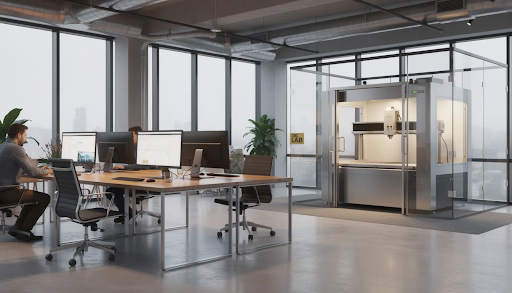
Community makerspaces, coworking labs, product design studios, and corporate innovation hubs face unique challenges when deploying cnc machining equipment. Multiple users with varying skill levels share the same space, and that space often includes expensive adjacent equipment and professional work environments.
Protecting Adjacent Equipment
An enclosure keeps chips and dust inside the machine, protecting adjacent 3D printers, electronics benches, and office computers from contamination. Materials like aluminum, wood, and plastic all produce debris that can damage sensitive equipment. The enclosure acts as a first line of defense.
Acoustic Control for Professional Environments
Acoustic panels and sealed doors make it realistic to place a CNC in an open office or shared lab. You can run a prototype job without disturbing meetings in the next room or focused desk work happening ten feet away. This capability is a game changer for small businesses that need manufacturing ability without dedicated industrial space.
Reduced Housekeeping Burden
The impact on housekeeping is substantial:
- Less sweeping and vacuuming between users
- Fewer complaints about metal chips or MDF dust tracked through common areas
- Easier compliance with landlord rules about industrial activities
- Reduced wear on HVAC filters from airborne particulates
Semi-Supervised Access Models
Enclosures combined with clear operating procedures support semi-supervised access where trained members can use the CNC during staffed hours without a machinist constantly present. The safety features protect users while enabling efficient equipment utilization.
Example: Hardware Startup in Coworking Space
A small hardware startup can use an enclosed CNC in a 2024 coworking space to prototype aluminum brackets and front panels without needing a separate industrial lease. The team can cut aluminum, machine brass enclosures, and produce custom products while sharing space with software companies and consulting firms. This flexibility fundamentally changes the economics of physical product development for small businesses.
How Enclosed CNC Design Improves Learning Outcomes
Beyond safety, enclosed CNC machines actively enhance educational experiences in ways that open machines cannot match.
Visual Learning Through Large Windows
- Internal LED lighting and large viewing windows let entire groups watch toolpaths in action
- Concepts like feed rate, chip load, and step-over become visually understandable
- Students connect the abstract G-code on screen to physical tool movements in real-time
Instruction During Operation
Reduced noise makes it possible for instructors to talk students through CAM workflows while the machine runs. You can point to the z axis movement, explain spindle speed changes, and discuss tool engagement without shouting over machinery.
Focus on Programming, Not PPE
Because chips and coolant stay contained, students concentrate on programming and fixturing rather than constantly managing debris and personal protective equipment. This mental bandwidth matters when learning complex software workflows.
Lowered Intimidation for Beginners
The appliance-like appearance of an enclosed CNC reduces anxiety for beginners. Students without prior shop experience feel more comfortable approaching a machine that looks controlled and contained rather than exposed and industrial. This encourages broader participation in subtractive manufacturing education.
Example Lesson Flow
- Students design a bracket in CAD software
- They generate CAM toolpaths with appropriate feeds and speeds
- The instructor loads stock material and demonstrates workholding
- The group observes the run through the enclosure window
- The teacher points out tool changes, axis movements, and machining metals strategies
- Students retrieve finished parts and evaluate accuracy against their design intent
This workflow would be impossible to execute safely with an entire class gathered around an open machine.
Key Safety and Compliance Features to Look For
When evaluating enclosed CNC machines for your lab or makerspace, use this practical checklist to verify that safety features meet your requirements.
Door Interlocks
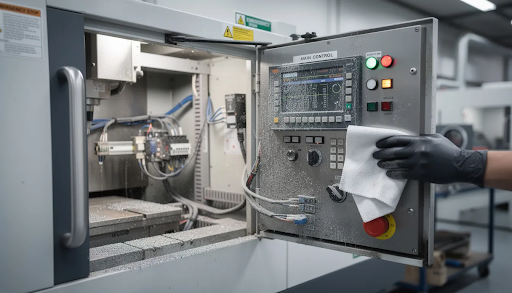
Door interlocks should automatically stop motion and spindle when any door is opened. Critically, these interlocks must be wired into the main control system rather than functioning as add-on accessories. A security verification happens at the controller level—the machine verifies that all doors are closed before executing any movement commands.
Emergency Stop Placement
Look for emergency stop buttons placed:
- On the machine control panel
- On an external pendant or wall station
- Within reach of instructors supervising from a distance
Multiple e-stop locations ensure that anyone can intervene quickly, regardless of their position in the room. This is essential for performing security verification in emergency situations.
Chip and Dust Management
Effective enclosures include:
- Sealed seams preventing chip escape
- Brush strips around door edges
- Integrated dust ports connecting to shop vacuums or collectors
- Internal baffling that directs debris away from viewing windows
These features protect students from airborne particulates during wood, plastic, or composite cutting. When machining harder materials like carbon steel, containment becomes even more critical.
Certifications and Documentation
Administrators should ask vendors to provide written documentation of:
- North American electrical approvals
- Safety testing certifications
- Compliance with educational equipment standards
Simply Technologies designs enclosures to support clear labeling, lock-out/tag-out procedures, and easy daily inspection by non-expert staff. This makes it straightforward for teachers and lab managers to verify that safety systems are functioning properly before each use session.
Practical Considerations for Schools and Shared Labs
Even within the enclosed CNC category, details such as footprint, power requirements, and workflow integration matter enormously for real classrooms and office environments.
Size and Mobility
Consider these practical factors:
| Factor | What to Check |
| External dimensions | Will it fit through 36” doors and elevators? |
| Weight | Can your floor support it safely? |
| Casters or leveling feet | Can it be moved for cleaning or reconfiguration? |
| Table height | Does it work ergonomically for students? |
A professor bench setup or dedicated equipment table should accommodate the machine footprint while leaving room for material handling.
Power Requirements
Schools planning new labs should coordinate with facilities early. Common questions include:
- Does the machine operate on standard 110-120V circuits or require 220-240V?
- What amperage does the spindle draw at full power?
- Are dedicated outlets needed, or can the machine share circuits?
Getting power planning right avoids expensive retrofits after the machine arrives.
Integrated Storage
Machines with built-in drawers or shelving for collets, vises, bits, and accessories reduce clutter and make it easier to keep student workstations organized. When tools have designated homes, inventory management becomes simpler.
Digital Workflow Integration
Position the machine near classroom computers for efficient file transfer. Consider:
- Network connectivity for sending files directly from CAM software
- USB port access for sneakernet workflows
- Compatibility with common software running on Windows and standard PC hardware
A smooth, repeatable process from CAD to CAM to machine execution minimizes friction for both students and instructors.
Maintenance Access
Enclosures should include doors or removable panels that allow instructors to clean chips, inspect ball screws and linear rails, check belts, and service the router spindle without disassembling major components. Good maintenance access extends machine life and keeps equipment in educational service for years.
How Simply Technologies Supports Enclosed CNC Adoption
The guidance above applies broadly to enclosed CNC selection, but Simply Technologies specifically addresses the needs of schools and shared workspaces in its design philosophy.
Designed for Education and Shared Environments
Simply Technologies prioritizes school and shared-space use cases in every design decision. This focus means:
- Compact footprints that fit standard classrooms
- Quiet operation suitable for shared environments
- Large viewing windows providing strong visual access for group instruction
- Monoblock structures requiring no special foundations
- Stability and ease of setup for non-industrial contexts
The v series and similar product lines deliver advanced features without requiring industrial infrastructure or dedicated machinist staff.
Curriculum-Friendly Resources
Simply Technologies provides:
- Comprehensive onboarding guides
- Example projects suitable for beginner through intermediate skill levels
- Documentation that helps teachers get a lab operational within a single term
- Support materials that connect CNC fundamentals to broader STEM curricula
These resources reduce the learning curve for educators who may be new to digital fabrication themselves.
Long-Term Support
Remote support and clear maintenance routines enable non-machinist staff to keep machines operational across multiple academic years. When you invest in equipment for education, verification successful long-term functionality matters as much as initial capability.
A touch probe for workpiece setup, quality linear motion systems, and accessible service points all contribute to machines that serve students reliably year after year.
Ready to explore solutions for your classroom or makerspace? Visit https://simplytechnologies.xyz/ to learn about enclosed CNC options designed specifically for educational and shared environments. Contact Simply Technologies for help planning your 2024-2025 lab upgrade or makerspace installation.
FAQ
Can an enclosed CNC still be used to teach “real” machining skills?
An enclosure does not limit capability in any meaningful way. Students learn CAD, CAM, workholding, feeds and speeds, and multi-axis motion exactly as they would on open industrial machines. They program the same G-code, work with the same materials, and develop the same problem-solving skills.
Starting on an enclosed desktop system actually builds safer habits that transfer well to larger shop-floor equipment later. Students who learn to respect interlocks and safety procedures carry those practices into professional environments. The skills are real; the environment is simply better protected from the security service perspective of institutional risk management.
Do enclosed CNC machines require special ventilation in a classroom?
While enclosures greatly reduce airborne chips and dust, schools should still follow local ventilation codes. This is especially important when cutting MDF, composites, or using coolants that can produce fumes or fine particulates.
Coordinate with your facilities team to connect the CNC’s dust port to an existing dust collector or HEPA filtration unit where possible. Many enclosed machines include standard 4” dust ports that plug directly into common shop vacuum systems. The enclosure handles containment; proper ventilation handles air quality.
How many students can realistically share one enclosed CNC in a school year?
Capacity depends on run-time per part and how efficiently you schedule machine access. With typical 10-20 minute jobs, an enclosed desktop machine can support dozens of students per term if projects are well-scoped and production schedules are managed intentionally.
Effective strategies include:
- Batching similar toolpaths to minimize tool changes
- Scheduling CNC time like you would 3D printers or laser cutters
- Running machines during lunch periods or before/after school with supervision
- Designing projects with efficiency in mind to maximize throughput
The key is treating machine time as a shared resource and building that constraint into your curriculum planning.
Is an enclosed CNC too advanced for middle school or beginner makerspace users?
Enclosed CNCs are often better suited for beginners precisely because the barrier between user and moving parts reduces both fear and accidents while they learn fundamentals. The contained environment removes variables that could otherwise overwhelm new users.
Start younger students with simple 2D and shallow 2.5D projects in soft materials like foam or plywood before progressing to harder materials or complex geometries. The learning progression might include:
- Basic 2D cutouts in foam board
- Simple 2.5D pockets in wood
- Multi-operation parts in plastic
- Eventually, cut aluminum or machine brass once fundamentals are solid
The enclosure makes each step safer and less intimidating.
What is the typical lifespan of an enclosed CNC machine in a busy shared lab?
With regular cleaning, lubrication of linear rails and ball screws, and basic preventive maintenance, a quality enclosed CNC can run productively for many years even under daily student use. The enclosure itself protects internal components from environmental contamination, extending service life.
Before purchasing, ask vendors about:
- Spare parts availability for consumable items
- Long-term support policies and response ray id tracking for service requests
- Expected maintenance intervals and associated costs
- Upgrade paths as technology evolves
Simply Technologies and other education-focused vendors should be able to document their support commitments in writing. Equipment that becomes a page displayed in a service manual rather than a working tool serves no one—invest in machines designed for longevity and backed by responsive support.