
Key Takeaways
- A “production ready” CNC machine can run 6–12 hours daily with consistent accuracy, minimal downtime, and predictable maintenance schedules that keep your shop moving.
- Rigidity, motion control, workholding, and dust collection matter more than raw spindle power when it comes to real-world throughput and cut quality.
- Simply Technologies focuses on CNC solutions specifically designed for daily use in small shops, prototyping labs, and light industrial production environments.
- Buyers should evaluate not just the machine itself, but also software, support, and upgrade paths for the next 3–5 years of business growth.
- This article provides concrete, checklist-style criteria you can use when judging whether any CNC is ready for continuous production in your facility.
Introduction: From Hobby Tool to Daily Production Asset
There’s a fundamental difference between a CNC that handles weekend projects and one that runs every day in a production environment. In 2024–2025, more shops than ever are making the leap from occasional hobbyist use to true daily operations—and many are discovering that not every machine is built for that transition.
Consider a small woodworking shop that needs to cut 30 cabinet doors per day. A hobby-grade setup might handle three or four doors before overheating, losing accuracy, or simply wearing out components that weren’t engineered for sustained load. A production ready CNC, by contrast, runs those 30 doors and asks for more. It maintains the same precision on door number 30 as it did on door number one.
“Production ready” isn’t about having the biggest machine or the highest price tag. It’s about reliability, repeatability, and workflow efficiency. It’s about a system that starts cutting when you need it to, finishes jobs on schedule, and doesn’t surprise you with unplanned downtime in the middle of a deadline.
At Simply Technologies, we write from the perspective of a company obsessed with day-in, day-out use. Every design decision, every component choice, and every support resource we develop is aimed at one goal: helping your shop run without interruption, shift after shift.
Defining a “Production Ready” CNC Machine
A production ready CNC is one that can run multiple shifts per week—typically 40 or more hours—with predictable accuracy and low unplanned downtime. This isn’t about theoretical capability; it’s about measurable performance in real shop conditions.
The key attributes that separate production machines from occasional-use equipment include:
- Mechanical rigidity that resists vibration and maintains dimensional accuracy under sustained cutting loads
- Industrial-grade motion components including quality linear rails, ball screws or precision rack-and-pinion drives, and properly sized motors
- Stable control electronics that don’t glitch, overheat, or lose position during extended operations
- Dependable workholding systems that keep material secure through long job cycles
The difference between weekend project use and continuous operation shows up in duty cycles, heat management, and wear patterns. A hobby machine might cut beautifully for two hours, then lose accuracy as bearings warm up and rails expand. A production-ready setup maintains its tolerances whether it’s been running for five minutes or five hours.
Production readiness is measurable. Track your uptime percentage, scrap and rework rate, tool life consistency, and maintenance intervals. When cutting aluminum brackets, MDF panels, or acrylic signage day after day, these metrics reveal whether your equipment is truly capable of the workload.
Mechanical Foundation: Frame, Gantry, and Motion System
The mechanical structure is the foundation of production readiness. No amount of software optimization or fancy spindles can compensate for a frame that flexes or a motion system that introduces play.
Frame Design
A production-capable frame uses welded or heavily bolted construction, typically from steel or thick-wall aluminum extrusions. The goal is maximum rigidity—a steel frame that resists twist and vibration during long runs. Thin-wall tubing or lightweight assemblies might work for engraving foam, but they’ll chatter and flex when pushing through hardwood or aluminum for hours.
Look for designs with a rigid base that distributes cutting forces across the entire structure. Gussets, cross-members, and diagonal bracing all contribute to the stiffness that keeps your cuts accurate.
Linear Motion
Quality linear motion separates machines that maintain precision from those that gradually drift out of spec. Production setups use proper linear rails or supported round bearings with appropriate preload. The rails should be protected from dust and chips—contamination is the enemy of smooth, accurate travel.
Proper alignment is critical. A machine that arrives misaligned, or one that loses alignment as bolts settle, will never deliver consistent results. Check the z axis and y axis for smooth manual travel with no binding, excessive play, or gritty resistance.
Drive Systems
The choice between belt, ballscrew, and rack-and-pinion drives depends on your application:
| Drive Type | Best For | Production Considerations |
| Belt | Light-duty routing, fast moves | May stretch over time; limited pushing force |
| Ball screws | High precision, moderate speeds | Excellent accuracy; requires periodic lubrication |
| Rack-and-pinion | Large format machines, high speeds | Good for large sheets; quality varies widely |
Ball screws offer the best combination of accuracy and durability for most production shops. They require maintenance, but properly cared for, they’ll deliver consistent positioning for years.
Axis Sizing and Gantry Mass
There’s a balance between rigidity and responsiveness. An undersized gantry will chatter and produce poor surface finish. But an oversized gantry hurts acceleration and can stress drive components. The best designs optimize for the materials and speeds the machine will actually encounter, not theoretical maximums.
If possible, physically inspect machines before purchase. Push and pull on the gantry. Move the axes by hand. You’re checking for stiffness, smooth travel, and absence of flex or play that will show up in your parts.
Spindle, Power, and Material Capability
Spindle choice should be driven by the materials and throughput your shop needs—not by chasing the highest wattage on a spec sheet.
Common Configurations
Production setups typically fall into three categories:
- Compact trim routers (1–2 HP): Adequate for light wood and plastic work, but limited run time and precision
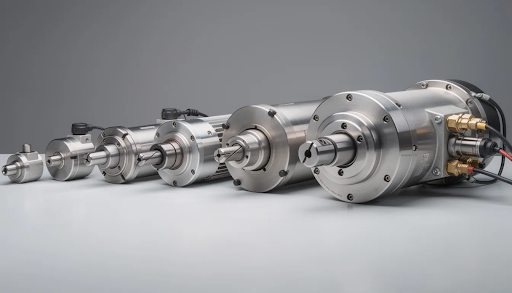
- Air-cooled spindles (1.5–3 kW): The workhorse for most production shops; good for wood, plastics, and light aluminum
- Industrial water-cooled spindles (3+ kW): Necessary for heavy metal work, extended shifts, and demanding materials
The key specification is continuous duty rating. A spindle rated for continuous operation at 18,000–24,000 RPM without overheating is essential for production. Trim routers often need rest breaks; purpose-built spindles run all day.
Real-World Cutting Examples
Different materials demand different capabilities:
- 18mm Baltic birch plywood: Requires a 1.5 kW+ spindle with proper chip evacuation for clean edges
- 3/4” MDF: Generates heavy dust; needs good dust collection and a spindle that won’t bog down in dense material
- 10mm aluminum plate: Demands rigidity, proper feeds and speeds, and often a 2.2 kW or larger spindle for efficient material removal
- Engineering plastics (HDPE, Delrin): Need consistent spindle speed and sharp tooling to avoid melting
Power Requirements
Most production spindles require 220–240V circuits. Running a 2.2 kW spindle on a 110V circuit through a converter is asking for trouble—you’ll get inconsistent power, reduced capability, and potential damage to electronics.
Plan your shop’s electrical infrastructure before the machine arrives. A dedicated circuit for the spindle, separate from the control system, prevents power fluctuations from causing positioning errors.
A production ready setup includes more than just hardware. It includes a tested library of toolpaths and tool settings for your common materials—so your team can start cutting with confidence on day one.
Control System, Software, and Workflow
Many production bottlenecks come from software and control issues, not mechanical problems. A machine that cuts beautifully but requires ten minutes of fiddling to start each job is not truly production ready.
Controller Requirements
A reliable controller needs:
- Stable firmware that doesn’t crash or behave unpredictably
- Support for modern G-code including standard machining process commands
- Smooth motion planning that eliminates jerky movements
- Consistent homing and limit switch behavior
- Ability to recover gracefully from pauses, emergency stops, or power interruptions
Some controllers require you to enable javascript in a browser interface; others use dedicated software. What matters is stability and predictability, not flashy features you’ll never use.
CAM Workflow
For repeatable jobs—batch panel cutting, serialized parts, standard products—your CAM workflow should support:
- Saved setups and templates that eliminate repeated work
- Reliable post-processors matched to your controller
- Easy nesting for maximum material utilization
- Version control so you know exactly which file produced which parts
Daily Operations
Think through the daily workflow: powering up, homing all axes, loading stock, probing for material thickness or position, starting a job, and recovering from interruptions. Each step should be simple and consistent.
At Simply Technologies, we prioritize control solutions that new operators can learn quickly while still allowing experienced users to refine toolpaths for better performance and efficiency.
Before purchasing, evaluate whether the system includes training materials, sample projects, and clear documentation for production-style workflows. Remote diagnostics capability can also save significant downtime when troubleshooting issues with support staff.
Workholding, Dust/Chip Management, and Shop Integration
Many “production” problems—scrap parts, rework, poor finish—come from stock shifting during cuts or chips building up and interfering with tooling.
Workholding Systems
Choose workholding based on your production patterns:
| System | Best Application | Considerations |
| T-slot bed | Versatile fixturing, smaller parts | Requires clamps and fixtures for each setup |
| Threaded inserts | Custom jigs, repeat jobs | Excellent for dedicated fixtures |
| Vacuum table | Large sheets, flat stock | Requires vacuum pump; best for sheet goods |
| Custom fixtures | High-volume identical parts | Upfront cost pays off in reduced setup time |
For shops cutting large sheets of plywood or MDF repeatedly, a vacuum system dramatically reduces setup time. For mixed production with different environments and part types, T-slots offer flexibility.
Dust Collection
Dust collection isn’t optional for production work. Without proper chip evacuation:
- Cut quality suffers as chips recut and damage edges
- Tooling wears faster
- Material can shift if chips build up under clamps
- Operator health suffers from airborne particles
A dedicated dust collector or high-performance shop vacuum, connected via properly routed hoses to a dust shoe, is essential. Consider static pressure requirements—long hose runs reduce suction dramatically.
For aluminum and other metals, chip evacuation becomes chip management. Flood coolant or mist systems may be necessary for extended aluminum cutting.
Shop Integration
Your CNC doesn’t exist in isolation. Plan for:
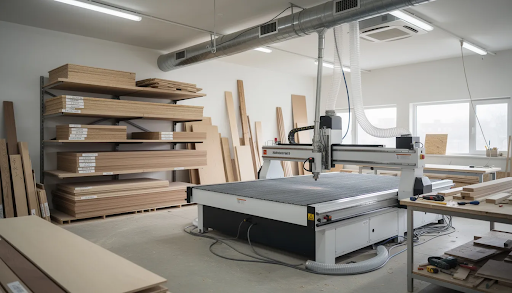
- Physical footprint including clearance for material loading
- Material staging areas for incoming sheets and panels
- Output areas for completed parts
- Clear operator paths around all sides of the machine
- Adequate lighting for inspection and setup
The full workflow runs from raw sheet arrival through cutting to part labeling and stacking. Treating the CNC as an isolated island, rather than part of an integrated system, creates bottlenecks that limit your true productivity.
Reliability, Maintenance, and Long-Term Support
A machine is truly production ready only when owners can predict maintenance needs and get help quickly when something goes wrong.
Routine Maintenance
Plan for regular tasks that keep your machine at full potential:
- Daily: Chip cleanup, visual inspection of rails and spindle
- Weekly: Rail cleaning, lubrication check, belt tension verification
- Monthly: Squareness and tram check, ball screw inspection, limit switch function test
- Quarterly: Deep cleaning, bearing inspection, electrical connection check
Document everything. A simple maintenance log reveals patterns—helping you catch problems before they cause unplanned downtime.
Component Standardization
Machines built with standard, easily replaceable components minimize emergency repair delays. Quality linear bearings, common sensor types, and standard electrical connectors mean parts are available on short notice—often overnight from industrial suppliers.
At Simply Technologies, we focus on designs that owners can service themselves with basic tools. You shouldn’t need a factory technician for routine maintenance or common repairs.
Documentation
Demand comprehensive documentation:
- Detailed assembly drawings
- Wiring diagrams
- Troubleshooting guides
- Spare part lists with supplier information
- Recommended maintenance schedules
Long-Term Support
Before purchasing, confirm:
- Technical support availability (email, phone, response times)
- Firmware and software update policy
- Replacement part availability commitment (minimum 5 years)
- Upgrade paths as your needs grow
A great choice today becomes a liability if support disappears next year.
Is Your Application Ready for a Production CNC? (Use-Case Scenarios)
Not every shop needs the same level of machine. Here’s how to match equipment to your unique needs.
Scenario 1: Small Cabinet Shop
Profile: 10–20 full sheets per week, primarily plywood and MDF, standard cabinet parts
Minimum requirements:
- 4’ x 8’ cutting area for large sheets
- Vacuum workholding for flat sheet goods
- 2.2 kW spindle for clean cuts in thick material
- Reliable dust collection with 4”+ main line
- Simple nesting software for efficient material use
Scenario 2: Sign Shop
Profile: Daily acrylic and aluminum work, varied sizes, quick turnaround
Minimum requirements:
- 2’ x 4’ or larger work area
- Strong T-slot or vacuum hybrid table for varied materials
- 1.5–2.2 kW spindle capable of plastics and non-ferrous metals
- Flood coolant or mist system for aluminum
- Fast job changeover capability
Scenario 3: Prototyping Lab
Profile: Mixed-material batches, engineering plastics, light aluminum, wood composites
Minimum requirements:
- High precision motion system (ball screws preferred)
- Versatile workholding with T-slots and fixture plates
- Spindle with wide RPM range for different materials
- Quick tool change capability
- Good surface finish requirements demand maximum rigidity
Calculating Your Needs
Estimate your production requirements:
- Hours of actual cutting per week
- Frequency of job changes (setup time matters)
- Material types and thicknesses
- Accuracy requirements for your products
- Growth projections for next 2–3 years
If you’re approaching 30+ cutting hours weekly, you need equipment engineered for sustained operation—not a hobby machine pushed beyond its limits.
At Simply Technologies, we aim to align machine configurations, accessories, and training with real-world shop profiles. One-size-fits-all specs don’t serve shops with specific needs.
Document your daily and weekly production goals before purchasing. This clarity helps you evaluate any CNC objectively.
How Simply Technologies Designs for Daily Production Use
At Simply Technologies, every design decision starts with one question: will this perform reliably in daily production, not just in a demo?
Design Priorities
Our machines feature:
- Rigid frames using welded steel construction for vibration dampening
- Quality motion components including precision linear rails and properly sized ball screws
- Control electronics selected specifically for reliability across extended shifts in different environments
- Engineered cooling for spindles and electronics to maintain accuracy during long runs
Validation Process
Production readiness isn’t assumed—it’s tested. We validate equipment through:
- Internal testing protocols simulating weeks of continuous operation
- Long-duration cutting trials across wood, plastic, and aluminum
- Feedback integration from daily-use customers who push machines hard
- Component life testing to establish realistic maintenance intervals
Complete Systems
A CNC machine alone isn’t a solution. We emphasize complete systems:
- Machine with appropriate motion and spindle configuration
- Control system with proven reliability
- Recommended tooling matched to common materials
- Workflow guidance and add ons tailored to typical shop applications
- Accessories that deliver more value for your projects
Support Commitment
We back our equipment with:
- Responsive technical support for troubleshooting and optimization
- Comprehensive documentation including assembly, wiring, and maintenance guides
- Clear upgrade paths that allow owners to grow capacity over time
- Firmware and software updates that add new features without breaking existing workflows
Our team understands that downtime costs money. When you’re running production, you need answers fast—not ticket numbers and week-long wait times.
Visit Simply Technologies for detailed specifications, real project examples, and guidance on matching machines to your workload. We’re focused on making your manufacturing operations run at full potential.
FAQ: Production Ready CNC for Daily Use
How many hours per day should a “production ready” CNC realistically run?
A well-configured production ready CNC can typically run 6–12 hours per day, 5–6 days per week, assuming proper maintenance and adequate cooling. The machine itself often isn’t the limiting factor—tooling wear, dust collection capacity, and operator fatigue frequently determine practical limits.
Very high duty cycles approaching 24/7 operation require industrial-level power infrastructure, water-cooled spindles, and scheduled maintenance routines similar to larger factory environments. For most small to medium shops, planning for 8-hour shifts with brief setup breaks between jobs is realistic and sustainable.
Can a smaller desktop-style CNC ever be considered production ready?
Yes—for the right applications. Compact machines can be production ready for small parts, engraving, PCB milling, or light aluminum work when built with rigid frames, quality linear motion, and reliable control systems.
“Production ready” is about matching machine capability to the scale and materials of your work. A shop running many small, high precision parts may actually benefit from multiple smaller machines rather than one large-format system. This provides redundancy and allows parallel operations.
The key is honest assessment: a desktop machine isn’t production ready for cutting full plywood sheets, but it might be perfect for producing hundreds of small acrylic components daily.
What shop upgrades are usually needed when moving to daily CNC use?
Common facility upgrades include:
- Electrical: Dedicated 220V circuit for the spindle, separate circuit for control electronics, surge protection
- Dust collection: Purpose-built collector or high-CFM shop vacuum with proper filtration
- Lighting: Adequate illumination for setup, inspection, and safe operation
- Material handling: Organized storage for sheets, offcuts, and finished parts
- Computer infrastructure: Stable PC for control, uninterruptible power supply (UPS), secure file backup
Establish a maintenance corner with lubricants, cleaning supplies, and basic measuring instruments—calipers, dial indicators, and machinist squares help catch problems early.
How long does it take a team to become comfortable operating a production CNC safely?
Most operators can become competent with basic setup, job loading, tool changes, and emergency procedures within a few days of focused training. The fundamentals—homing, material fixturing, starting jobs, monitoring cuts—are straightforward on well-designed equipment.
Deeper skills develop over weeks to months: optimizing toolpaths for better performance, troubleshooting cut quality issues, designing efficient fixtures, and recovering from unusual situations. Structured onboarding guides and repeatable workflows significantly shorten this ramp-up period.
Simply Technologies advocates documentation and training resources that get new team members productive quickly while building toward advanced capability over time.
When should a shop consider upgrading to a more powerful or larger CNC?
Clear signals that you’ve outgrown your current equipment include:
- Consistent 80–90% machine utilization with growing backlogs
- Regularly turning down jobs due to size limits or material capability
- Frequent multi-part fixturing workarounds to fit projects on the table
- Outsourcing cutting work that could be done in-house with better equipment
- Scrap rates increasing as you push beyond the machine’s comfortable operating envelope
Periodically compare your current throughput, scrap rates, and cost per part against the capabilities of newer machines. An upgrade that increases your productivity by even 25% can pay for itself quickly—and position your business for projects you currently can’t accept.