
Key Takeaways
- An efficient CNC shop layout reduces travel time, setup delays, and scrap by optimizing machine, material, and people flow throughout your facility.
- Safety must be designed in from day one: clear aisles, guarded zones, chip and coolant control, and compliant electrical and ventilation systems prevent incidents before they happen.
- Plan for growth by leaving space, utilities, and data capacity for at least 3–5 additional machines or new processes over the next 5–10 years.
- Simply Technologies can support your layout planning with automation, controls, and digital workflow integration that connects your entire operation.
Introduction: Why CNC Shop Layout Matters in 2026 and Beyond
The manufacturing industry is shifting faster than ever, and CNC shops that fail to optimize their physical space will struggle to keep pace. Whether you’re running a small job shop or scaling toward lights-out production, your layout directly impacts every metric that matters.
- CNC shops in 2024–2026 face pressure for shorter lead times, tighter tolerances, and smaller, more frequent orders that demand agile workflows.
- Poor layout can waste 10–30% of labor hours through walking, waiting on cranes, searching for tools, and re-queuing jobs across the floor.
- Layout affects not only efficiency but also safety, training speed for new machinists, and your ability to adopt automation and Industry 4.0 technology.
- This article focuses on practical layout planning for small to mid-size CNC job shops and OEM facilities, with examples that a shop owner or engineer can use immediately.
- Simply Technologies serves as a partner that helps shops connect machines, optimize workflows, and plan for automation-ready layouts from day one.
Step-by-Step Guide to Designing an Efficient CNC Shop Layout
Planning your CNC shop layout isn’t guesswork—it’s a methodical process that pays off in reduced setup time, fewer bottlenecks, and happier operators. Here’s how to approach it systematically.
Step 1: Map your current state. Draw an accurate scaled plan of your existing floor, including machine footprints, doorways, columns, and utilities. Use CAD software or even simple layout tools to create a digital baseline you can iterate on.
Step 2: Perform a time-and-motion study. Track at least one full shift (8–10 hours) on a representative production day, measuring walking distance, queue times, and how often operators wait for cranes, tools, or materials. This data reveals where your current layout fails.
Step 3: Identify value streams. Group parts or families with similar processes. For example, aerospace brackets might flow through sawing → milling → deburr → inspection → packing, while hydraulic manifolds follow a different path. Map each stream separately.
Step 4: Choose your layout philosophy. Decide between:
- Process layout: All mills together, all lathes together—better for high-volume, repeat work
- Cellular layout: Dedicated machine cells for part families—better for high-mix, low-volume shops
Step 5: Design primary material flow. Route materials from receiving docks to raw storage, sawing, rough machining, finishing, inspection, and shipping with minimal backtracking. Every time material crosses its own path, you’re wasting time.
Step 6: Calculate space per machine. Allow not only the machine footprint but also:
- Operator work envelope (1.2–1.5m in front of doors)
- Chip bin area
- Coolant tank access
- Service clearances for maintenance
Step 7: Simulate before moving equipment. Use digital tools—even spreadsheets or low-cost simulation software—to test alternative arrangements. Moving a CNC machine twice costs far more than planning once.
Simply Technologies can help digitize these flows and provide data from CNC controls and sensors to validate which areas actually create bottlenecks, turning assumptions into actionable insights.
Core Layout Principles: Flow, Visibility, and Standardization
Understanding why certain layouts work better than others helps you make smarter decisions. These principles apply whether you’re running three machines or thirty.
Flow: Minimize backtracking. Align machines in the typical order of operations. Place bar-fed lathes near saws and roughing mills to avoid crisscrossing material carts across the shop. Every backtrack adds minutes that compound across hundreds of jobs.
Distance: Keep high-frequency moves short. Try to keep high-frequency material movements under 25–30 meters walking distance from the previous operation to the next. Chart your most common part routes and optimize for those first.
Visibility: Enable supervision. Keep supervisors and team leads with clear line of sight to critical machine clusters, inspection areas, and shipping. This speeds decisions and provides support for newer CNC machinists who may need guidance.
Standardization: Create identical work zones. Define standard work zones around CNC mills, lathes, and 5-axis machines with identical tool carts, shadow boards, and measurement stations. When every station works the same way, training time drops and errors decrease.
Point-of-use storage: Place cutting tools, inserts, collets, gauges, and fixture hardware within arm’s reach of each machine. Every trip to a distant rack or cabinet adds up across a shift.
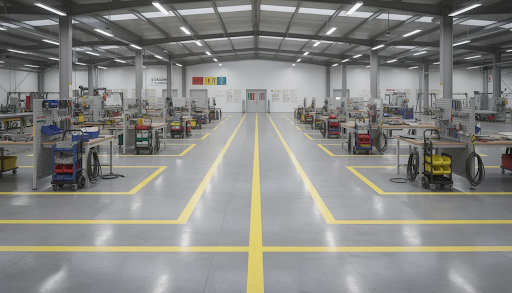
Dedicated staging areas: Every machine should have a defined inbound and outbound pallet or part staging area, clearly marked on the floor with paint or tape. This prevents WIP from piling up randomly.
Visual controls: Use colored floor markings:
- Yellow for aisles
- Blue for WIP zones
- Red for no-go safety zones
Pair physical markings with digital signage tied to production data for real-time status updates.
Integrating Simply Technologies’ data solutions can send live job status to visual boards, reducing manual paperwork stations that clutter the layout and slow information flow.
Designing for Safety and Compliance from Day One
Safety isn’t something you bolt on after the layout is complete—it must be designed into every decision. Computer numerical control equipment moves with high speed and precision, which means hazards are equally precise.
Aisles and walkways: Maintain clear pedestrian aisles at least 1.0–1.5 meters wide. Where pallet jacks or forklifts operate, plan wider paths of 2.0–2.5 meters to prevent collisions.
Machine spacing: Recommend minimum clearances between CNC machines:
- 0.8–1.0 meters on service sides
- Clear access to doors, chip conveyors, fire extinguishers, and emergency stops
- Sufficient room for maintenance technicians to work safely
Ergonomics: Plan for:
- Adjustable-height benches at inspection and deburr stations
- Anti-fatigue mats near machines where operators stand for extended periods
- Storage heights between knee and shoulder level to reduce strain
Chip and coolant management: Place sumps, chip wringers, and coolant reclaim stations in centralized but accessible locations. This reduces spills, slip hazards, and the mess that accumulates when coolant and chips spread across the floor.
Noise and dust control: Separate grinding, manual deburr, and heavy cutting operations with partitions or distance. This keeps noise under commonly accepted workplace limits and protects operators in adjacent areas.
Ventilation and extraction: Shops using coolant mist, welding, or laser cutters need planned duct runs and hoods. Finalize these routes before setting machine positions—retrofitting ventilation is expensive and disruptive.
Electrical and compressed air: Route power drops, air lines, and data cables overhead or in trenches to reduce trip hazards. This approach also makes future reconfiguration easier when you add more machines.
Compliance: Check your local 2024–2026 codes and standards (OSHA or equivalent) for emergency exits, fire egress distances, and PPE signage requirements. Layout decisions that ignore code requirements create costly rework.
Simply Technologies can help design control cabinets, cable routing, and sensor integration so that safety systems and automation coexist cleanly in your layout without creating new hazards.
Material, Tooling, and Information Flow: Beyond Just Machines
Your CNC machines are only part of the equation. How materials, tools, and information move through the shop determines whether those machines actually produce parts efficiently.
Raw material receiving: Position receiving docks, scales, and initial inspection near bulk storage racks, saws, and cutting stations. Double-handling bars and plates wastes labor and risks damage.
Storage strategy: Organize storage by material type and access frequency:
- Vertical racking for long bar stock
- Pallet racking for plate and castings
- Small bins for fittings and hardware Position all storage close to the first operation in each value stream.
Kanban and kitting: Organize tooling and fixture kits by part family, stored near the relevant machine cells. When an operator can grab a pre-assembled kit rather than hunting for individual tools, setup times on repeat jobs drop dramatically.
Tool room placement: Place the central tool crib so that average walking distance from critical machines (especially 5-axis centers requiring frequent tool changes) is minimized. Consider satellite mini-cribs for remote machine clusters.
Inspection flow: Place CMM rooms and manual inspection benches logically between finishing operations and packing. Keep climate-controlled inspection areas relatively central to reduce part travel after machining.
Information flow: Design locations for digital workstations, tablets, or terminals where operators access CAM programs, setup sheets, and quality plans. G code and CNC programming files should be accessible at the machine, not locked in an office.
WIP limits: Clearly mark WIP zones with maximum pallet counts. Your layout should enforce lean principles rather than fight them—when overflow has nowhere to go, it forces upstream process improvements.
Simply Technologies can integrate MES-like dashboards and machine connectivity, reducing paper travelers and enabling real-time routing adjustments based on actual shop floor conditions.
Planning for Automation, Digitization, and Future Growth
The shops that thrive over the next decade will be those that plan for automation today, even if they don’t implement it immediately. New technology in robotics, pallet systems, and data integration is becoming accessible to smaller operations.
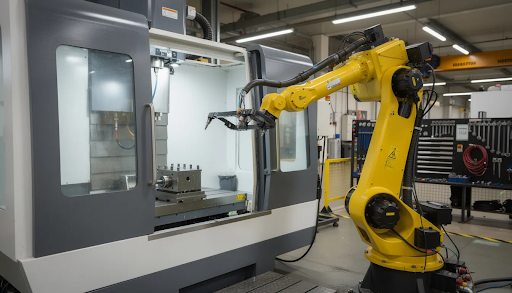
Automation-ready footprints: Design extra floor area and clear approach paths around key machines. Future installation of robotic arms, pallet pools, or gantry loaders requires space you can’t easily create later.
Palletized systems: Consider placement of horizontal machining centers and their pallet systems near material storage and inspection. This supports lights-out runs where CNC machines work without constant operator presence.
Conveyors and carts: Plan logical routes for automated or semi-automated carts (AGVs, tuggers) so they can move parts without crossing dangerous or congested zones. These paths should be straight and predictable.
Data and networking: Run industrial Ethernet and resilient Wi-Fi to all machine clusters. Position network cabinets in accessible but protected areas—modern CNC machines work best when connected to production monitoring systems.
Scalable utilities: Oversize power distribution panels, air compressors, and coolant systems to handle at least 25–50% more CNC capacity than your day-one plan. Adding electrical capacity later means shutdowns and construction.
Modular cells: Build machine cells that can be replicated and rearranged. A 2-mill + 1-lathe cell template, for example, allows you to add capacity by cloning proven configurations as part mixes change.
Change management: Implement layout changes in phases. Reconfigure one value stream at a time rather than shutting down the entire shop. This maintains production while you optimize.
Simply Technologies focuses on connecting CNC machines, sensors, and software so that future automation additions plug seamlessly into your existing layout without requiring complete redesigns.
Implementation Strategies and Continuous Improvement
A shop layout is never truly finished. Markets shift, part mixes change, and new equipment arrives. Building continuous improvement into your layout process ensures you stay efficient over time.
Cross-functional team: Form a team including machinists, programmers, maintenance technicians, safety personnel, and management. Each perspective catches issues others miss.
Piloting: Start with a pilot cell or small area to test new layout concepts before rolling changes across the entire shop. A high-mix mill-turn cell makes an excellent proving ground.
Metrics to track: After layout changes, monitor:
- Setup time per job
- First-pass yield
- Average job lead time
- Distance walked per operator per shift
Feedback loops: Hold weekly or biweekly stand-up meetings on the shop floor near visual boards. This keeps layout improvements visible and accountable.
Standard work updates: Once a new layout stabilizes, update work instructions, setup checklists, and training materials. Documentation that doesn’t match reality creates confusion.
Training: Plan training sessions for operators on new material routes, WIP locations, and safety zones. The first 30–60 days after a re-layout are critical for building new habits.
Digital validation: Use data collected through Simply Technologies-enabled machine monitoring to confirm whether changes actually reduced idle time and eliminated bottlenecks.
Periodic review: Schedule a structured layout review at least annually, or whenever adding significant new equipment. Shops that review regularly avoid the slow drift toward inefficiency.
How Simply Technologies Can Support Your CNC Shop Layout
Optimizing a CNC shop layout requires more than floor plans and tape measures. It demands data, connectivity, and expertise in how modern manufacturing systems work together.
- Simply Technologies specializes in connecting CNC machines, sensors, and production data into a coherent digital workflow that supports layout optimization.
- Their team can help map current machine utilization and bottlenecks using live data instead of guesswork, informing more accurate layout decisions.
- They advise on designing data, power, and control-panel placements so your physical layout supports reliable connectivity and automation from day one.
- Simply Technologies supports phased automation roadmaps, ensuring robots, pallet systems, and inspection automation fit naturally into future layouts.
- By integrating machine monitoring and alerting, they help shops ensure that newly optimized layouts continue to perform and evolve over time.
- Contact Simply Technologies for assessments or consultations tailored to your specific floor space, machine mix, and growth targets.
FAQ
These questions address practical concerns that shop owners commonly face when planning or reconfiguring their CNC shop layouts.
How much space should I allow around each CNC machine?
Beyond the machine footprint, most shops should plan approximately 1 meter clearance on service sides and 1.2–1.5 meters in front of operator doors. You’ll also need dedicated space for chip bins, tool carts, and coolant access. Always check manufacturer service recommendations, as some equipment requires additional clearance for spindle removal or other maintenance tasks that occur annually.
What is a realistic timeline to reconfigure a small CNC shop layout?
A 5–10 machine shop typically needs 4–8 weeks for planning, preparation, and coordination with contractors. The physical moves usually happen over 1–3 weekends or planned shutdown periods. Moving machines, reconnecting utilities, validating CNC programs, and testing processes all take time. Shops that rush the process often discover problems that cost more to fix than the time they saved.
How do I decide between grouping machines by type or by part family?
High-mix, low-volume shops often benefit from part-family cells because they shorten lead times and reduce WIP. High-volume, repeat work may still favor grouping all mills together and all lathes together for efficiency. The best approach uses 3–6 months of job history data to identify which parts commonly run together and which processes they share.
When is it worth planning for robots or pallet systems in a new layout?
If your shop already has at least one or two high-utilization machines running multiple shifts, it’s prudent to reserve automation-ready space and utilities now. The cost of leaving extra floor space is minimal compared to the disruption of retrofitting automation in 1–3 years. Even if you’re not ready for robots today, plan your layout so adding them doesn’t require moving everything.
Can a very small shop (2–3 CNC machines) really benefit from layout planning?
Absolutely. Even small shops can cut wasted time significantly by organizing material flow, tool storage, and inspection benches intelligently. A CNC machinist who walks 50 meters less per hour gains meaningful productivity over a full shift. Starting with good layout habits now also makes later expansion much easier—you’ll have templates and principles already in place when you add more machines.