
Key Takeaways
- Any school can build a safe cnc classroom by combining clear rules, basic personal protective equipment, and age-appropriate machines instead of expensive, complex systems.
- A well-planned layout with clear walkways, visible emergency stops, and a supervised operator zone prevents more incidents than any single gadget or upgrade.
- Using enclosed, education-focused cnc equipment and simple digital tools from Simply Technologies can dramatically reduce risks and setup headaches.
- A repeatable routine—pre-start checks, supervised runs, and shutdown checklists—builds safe habits in students quickly and keeps your working environment incident-free.
- Ongoing mini-lessons, not one big safety lecture at the start of term, are key to keeping a cnc classroom safe all year.
Introduction: Why CNC Classroom Safety Matters Now
Since around 2015, more middle schools, high schools, and community colleges have added cnc mills, routers, lathes, and 3D printers to their STEM labs and makerspaces. These cnc machines let students prototype real parts, solve problem solving challenges, and build skills that translate directly to manufacturing careers. However, even small desktop equipment can cut skin, throw flying debris, or create fumes if used carelessly.
The goal of this article is to help educators build a safe cnc classroom without overengineering it. Instead of complicated industrial systems, we’ll focus on layout, routines, and good machine choices. Simply Technologies focuses on practical, classroom-ready CNC and digital fabrication setups, so the guidance here is grounded in what actually works in schools with real students and limited budgets.
Designing a Safe CNC Classroom Layout
The room layout is your first and most cost-effective safety control. You can plan it before buying any machines, and a thoughtful arrangement prevents accidents more reliably than expensive add-ons.
Positioning Your Machines
Place cnc machinery—mills, routers, desktop CNCs, laser cutters, and 3D printers—along one wall or in a dedicated “fabrication zone” rather than scattered around the room. This consolidation makes supervision easier and keeps potential hazards contained.
Keep at least 1 meter (about 3 feet) of clear space around each machine. This clearance allows for:
- Loading and unloading materials safely
- Instructor access to emergency stops without squeezing past students
- Quick evacuation if something goes wrong
- Routine maintenance and repairs
Creating Operator Zones
Mark a clearly defined operator area around each CNC using colored floor tape. Only the active operator and the teacher should be inside this rectangle while the machine is running. This simple visual boundary reinforces that moving parts demand respect.
Create a separate “design zone” with computers for CAD/CAM work, positioned away from operating machinery. Students can learn programming and design without standing close to hazards, and noise from cutting operations won’t disrupt their concentration.
Emergency Access Points
Place emergency stops and main power disconnects in visible, reachable locations. Never position them behind a machine or in a corner blocked by storage carts. Every student should be able to quickly shut down any running equipment within two seconds of recognizing a problem.
Simply Technologies can help schools prototype room layouts using simple digital planning tools, so teachers can visualize safety zones before equipment arrives.
Choosing Safer CNC Equipment for Classrooms
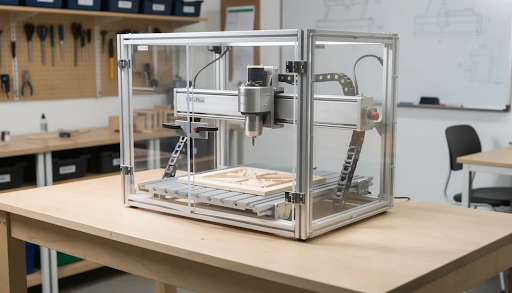
Picking the right type of machine removes many hazards from day one. An enclosed benchtop router, for example, contains flying debris and guards against contact injuries far better than an open industrial table. When you select equipment with specific features designed for education, you spend less time managing risk and more time teaching.
What to Look For
Prioritize fully or mostly enclosed cnc equipment for schools:
| Equipment Type | Recommended Features |
| Desktop mills | Full enclosure, interlock switches, auto-pause when door opens |
| CNC routers | Chip guards, built-in dust extraction ports, large e stops |
| Laser cutters | Certified enclosures, keyed access, visible status lights |
| 3D printers | Enclosed build chambers, door interlocks |
For lasers, choose models designed for education with certified enclosures and interlocks that pause operation when opened. These safety mechanisms reduce eye and burn hazards significantly.
Starting Small
Start with lower-power, education-grade machines before moving into large open-bed routers or high-speed industrial mills. Good beginner options include:
- Small 3-axis routers for wood and plastics
- 40–60W CO₂ lasers with full enclosures
- FDM 3D printers with enclosed chambers
Look for built-in dust extraction ports, chip guards, and simple emergency stop buttons that students can quickly understand and use. The goal is safe operation without requiring extensive training just to get started.
When schools buy through Simply Technologies, they can request configurations and accessory kits tailored for classroom safety, including shields, starter PPE packs, and signage templates.
Core Classroom CNC Safety Rules and PPE
Clear, posted rules and a few essential PPE items prevent most injuries, even in busy labs with 20–30 students. You don’t need an elaborate system—just consistency.
Required Personal Protective Equipment
The basic PPE that should be required near running cnc machines includes:
- Safety glasses with side shields (non-negotiable for anyone near moving parts)
- Closed-toe shoes (no sandals or canvas sneakers)
- Tied-back hair or caps for anyone with long hair
- Face shields for operations that generate significant debris
Loose clothing, dangling jewelry, lanyards, and scarves must be removed or secured before anyone operates rotating machinery. A single loose thread can catch on cutting tools with devastating speed.
Hearing Protection
Ear protection becomes essential for louder machines. Open routers and milling machines can reach 90–110 dB, well above the 85 dB(A) threshold where prolonged exposure causes hearing damage. For classes with more than 30 minutes of cutting time, provide earmuffs or plugs to protect workers and students alike.
Operator Rules
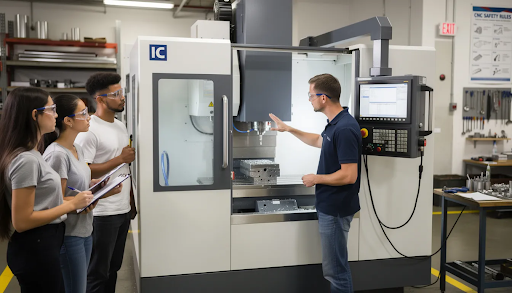
Only one designated student operates a CNC at a time. Bystanders must stay behind a marked line or outside the operator zone while the machine is in operation. This simple rule eliminates most pinch-point contact and distraction-related incidents.
Develop a simple, printed “CNC Safety Agreement” that students (and guardians, if minors) sign at the start of term. This document confirms they understand the rules and agree to follow emergency procedures.
Simply Technologies can provide downloadable poster-style safety rule templates that schools can customize with their own lab’s specific do’s and don’ts.
Daily Routines: Pre-Start, Operation, and Shutdown
Consistent routines make safety automatic. Checklists work surprisingly well with students from about grade 7 upward—they appreciate the structure, and the habit of verification sticks with them into their careers.
Pre-Start Checklist
Before any student starts a machine, they should verify:
- [ ] Guards and enclosure doors are secure
- [ ] Workpiece is properly clamped
- [ ] Correct tool is loaded and tight
- [ ] Area is free of loose tools and materials
- [ ] Emergency stop location is known and accessible
Teach students to always run new CNC programs in a dry run first—no material loaded, or the tool positioned slightly above the stock. This practice catches programming errors and unexpected moves before they cause tool breakage or worse.
During Operation
While a job runs, enforce these rules:
- Hands stay outside the enclosure at all times
- Never reach in while anything is moving
- Always know where the emergency stop button is
- Stay alert for strange noises, vibrations, or smells
If something seems wrong, students must hit pause or the e stop and call the instructor. No attempts to “fix” problems themselves. This simple policy dramatically reduces the risk of injuries.
Shutdown Routine
After each job:
- Power down the machine completely
- Wait for all movement to stop
- Clean chips or dust with brushes or a vacuum (never compressed air in a classroom—it spreads debris)
- Log any issues in a maintenance notebook
Simply Technologies offers digital checklist templates that run on tablets or lab computers, allowing students to tick off each step before and after using a machine.
Teaching CNC Safety Without Overwhelming Students
A long safety lecture on the first day rarely sticks. Students in grades 6–14 learn better through short, repeated lessons tied to hands-on tasks. The goal is building habits, not memorizing rules.
Modular Approach
Split safety training into small modules:
| Session | Focus |
| Session 1 | PPE requirements and lab rules |
| Session 2 | Machine anatomy and emergency stops |
| Session 3 | Workholding and tool changes |
| Session 4 | Materials and dust/fume hazards |
This approach prevents information overload and allows students to absorb each concept before moving to the next.
Visual Learning
Use visual aids instead of dense text-only handouts:
- Labeled photos of your actual classroom machines
- Short teacher-made videos showing correct procedures
- Color-coded diagrams highlighting potential hazards
- Posted signs at each workstation
Mini-Reminders
Start each CNC session with a 3-minute “safety reminder” focused on one theme—clamping, eye protection, housekeeping, or monitor positioning. This brief reinforcement keeps safety top of mind without boring students with repetition.
Competency Checks
Before allowing independent use, require:
- A 10-question quiz covering essential procedures
- An observed task where students point to the emergency stop
- A verbal explanation of what to do if a tool breaks
Research shows that 4–8 hour initial training sessions yield 95% proficiency in students when paired with ongoing reinforcement.
Simply Technologies can supply ready-to-use slide decks and printable mini-quizzes that teachers can adapt to their curriculum and specific machines.
Managing Ventilation, Dust, and Noise
Fumes and dust may be less visible than spinning cutting tools, but they matter just as much for long-term health. A classroom where students spend hours every week needs proper air quality management.
Exhaust Systems
FDM 3D printers and small CO₂ laser cutters need local exhaust systems or ducting to windows, especially when used several hours daily in enclosed rooms. Mills and routers should be paired with dust collection or shop vac systems fitted with appropriate filters.
OSHA limits wood dust exposure to 5 mg/m³. Integrated dust collection systems capture 99% of particles at the source, compared to about 70% with standalone ambient vacuums.
Material Selection
Choose materials compatible with classroom use:
- Approved woods (avoid treated lumber)
- Certain plastics (check fume ratings)
- Low-VOC options like PLA for 3D printing
Avoid cutting unknown composites, PVC, or materials with unknown fume production. When in doubt, check the material safety data sheet or skip it.
Noise Control
Simple noise controls include:
- Scheduling louder operations when fewer classes are in session
- Using enclosed machines whenever possible
- Providing hearing protection for extended runs
- Positioning noisy equipment away from shared walls
Enclosed cnc shop setups typically reduce noise from 90–110 dB to around 70 dB—quiet enough for normal conversation and instruction.
Simply Technologies can help schools match their equipment list with realistic ventilation and dust-control options suited to typical classroom budgets.
Building a Simple, Sustainable Safety Culture
A “safety culture” means students remind each other, take checklists seriously, and understand that production speed never comes before protection. This mindset develops through consistent practice, not one-time lectures.
Student Ownership
Assign rotating roles each week:
- Safety Captain: Verifies PPE compliance before class starts
- Cleanup Lead: Ensures workstations are clear at the end
- Equipment Monitor: Checks that all machines are properly shut down
Giving students ownership makes them stakeholders in maintaining a safe environment rather than passive rule-followers.
Learning from Incidents
Keep an incident and near-miss log—even for minor events like a loose clamp or forgotten safety glasses. Review these with the class once a month to identify patterns and improve procedures. Focus on learning, not blaming individuals.
Integrating Safety into Grading
Consider allocating a small portion of project marks to:
- Following procedures correctly
- Maintaining an organized workstation
- Completing pre-start and shutdown checklists
- Demonstrating proper PPE use
This integration reinforces that safety is essential to quality work, not an obstacle to it.
Administrative Support
School administrators should support lab safety by:
- Scheduling enough supervised lab time (1:6 instructor-to-student ratios work well)
- Approving annual budgets for consumable PPE and maintenance
- Providing resources for ongoing training
Simply Technologies can partner with schools to run periodic remote or on-site refresh sessions that keep both staff and students aligned on current best practices.
FAQ
What is the minimum equipment I need for a safe beginner CNC classroom?
A basic but safe setup could include one enclosed desktop CNC router, one enclosed 3D printer, a small shop vac or dust collector, a class set of safety glasses, and simple signage marking operator zones and emergency stops. This minimal configuration lets you teach fundamental skills while keeping hazards contained. Starting small allows teachers to build strong safety habits before scaling up to additional machines or adding a laser cutter. Simply Technologies can help schools choose a phased equipment plan so they don’t overspend or overcomplicate their first year of operation.
How old should students be before they operate CNC machines themselves?
Many schools begin supervised CNC use around grades 6–8 with very simple tasks like loading material and observing cuts. More advanced independent operation typically starts in high school, when students have developed the maturity and focus required. Readiness depends on the specific student, the type of machine, and completion of a safety orientation plus a basic competency check. Younger students can still participate meaningfully by helping with design work, material prep, and observation while the teacher or advanced students run the machines safely.
Do we need formal written safety policies for a CNC classroom?
Written policies are strongly recommended, both for consistency between classes and for administrative support and liability protection. Your documentation should include sections on PPE requirements, supervision ratios, allowed materials, emergency procedures, and machine-specific rules. Having everything in writing ensures that substitute teachers, new staff, and students all receive the same information. Simply Technologies can provide sample policy documents and checklists that schools can adapt to their local regulations and facility constraints.
How often should CNC machines be serviced in a school setting?
Follow a tiered maintenance approach: daily light maintenance includes cleaning chips and visual inspection of guards and wiring. Monthly deeper inspections should cover fasteners, belts, filters, and looking for signs of wear. An annual professional service or detailed teacher-led review catches issues that accumulate over time. Always follow the manufacturer’s maintenance schedule, as educational use patterns differ from industrial cnc machine shop environments but still cause significant wear. Document everything in a simple logbook—it’s essential for both safety tracking and warranty support.
What if we have a very small room—can we still run CNC safely?
Many schools work with tight spaces, and safety is absolutely still achievable with careful planning. Prioritize compact, enclosed machines that contain debris and noise within their footprint. Use vertical storage to keep floors clear, and mark narrow but unobstructed walkways with tape. Limit the number of students allowed in the CNC zone at once—perhaps just three or four—and schedule groups so only a few cnc operators are near machines at any given time. Simply Technologies can help schools design layouts specifically optimized for small rooms without compromising essential safety zones or emergency access.