
Key Takeaways
- The move from hobby CNC to business hinges on picking scalable equipment, realistic pricing, and repeatable workflows
- You can start earning with a compact benchtop CNC, then grow into larger gantry systems as orders increase
- Simply Technologies focuses on practical, upgradeable CNC solutions—not disposable hobby toys
- Planning for ROI, uptime, and support matters more than chasing the absolute cheapest machine
- This article walks through concrete examples (2×3–4×4 hobby-class up to 4×8 production routers) and a step-by-step path to turn side projects into a registered small business
From Weekend Projects to a Real CNC Business
It starts the same way for most makers: a small desktop CNC in the garage, running weekend projects in 2022 or 2023, then a neighbor asks if you can cut a custom sign. Before long, you’ve got five or ten paid jobs lined up each month, and suddenly this hobby feels like something more.
The transition point usually arrives when those casual commissions become steady work. You’re fielding customer demand regularly, managing a small queue of projects, and realizing that your equipment needs to keep pace with your ambitions.
“The right CNC equipment” in this context means scalable: a reliable motion system, a decent spindle, and a control setup that can grow with your shop. Simply Technologies positions itself as a partner for that growth, providing CNC hardware, upgrade paths, and practical advice through their website.
Choosing Your First “Business-Capable” CNC (Not Just a Toy)
The first cnc machine you buy for business—even if you already own a small kit machine—must handle repeat work and long run times. Hobby-grade equipment often lacks the rigidity, thermal management, and component quality to run eight-hour shifts without issues.
When evaluating work envelope ranges, consider your target niche:
- 300×300 mm (12×12”) – Ideal for tiny products like coasters, small signs, and prototype parts
- 600×900 mm (24×36”) – Covers most sign work, furniture parts, and medium batch production
- 1,220×2,440 mm (4×8’) – Necessary when full-sheet processing of plywood, mdf, or acrylic becomes part of your workflow
Key hardware must-haves include a rigid steel or heavy aluminum frame, ball screws or quality rack-and-pinion drive, at least a 1.5–2.2 kW spindle, and a proper dust collection attachment. Simply Technologies emphasizes components that are easy to service and upgrade—stepper drivers you can replace yourself, open PC-based control rather than locked “black box” boards.
Avoid ultra-cheap, no-name imports for commercial use. The hidden cost of downtime, lack of spare parts, and inconsistent accuracy will eat into your profits faster than the initial savings.
Key Specifications to Prioritize
- Motion accuracy and repeatability: Target less than 0.1 mm backlash for woodworking and plastics; tighter tolerances if cutting aluminum regularly
- Cutting speed: Realistic feed rates in mm/min matter for job throughput—faster isn’t always better if it sacrifices precision or surface quality
- Spindle details: Consider power rating (kW/HP), collet type (ER16/ER20), and recommended RPM range for wood, plastic, and aluminum
- Control options: PC-based control vs. handheld pendant; offline vs. USB streaming—Simply Technologies favors systems that are easy to learn yet robust enough for production
- Power requirements: 120V vs. 230-240V single phase—planning for adequate power early avoids surprises when you move from a garage to a small unit
Benchtop vs Floor-Standing CNC for Small Shops
Benchtop CNC routers in the 2×3 ft class suit tight spaces and lower-volume work, while floor-standing machines (4×4 to 4×8) handle higher throughput and larger materials.
For example, a 600×900 mm benchtop router works well for Etsy-scale sign work and custom engraving projects. A 4×8 machine becomes essential for cabinetry, full-sheet processing, and wholesale orders. Simply Technologies can help match machine footprint to your current workshop—whether that’s a single-car garage or a 50 m² commercial space.
Vibration control matters significantly at this level. Proper stand quality and mounting (bolting to the floor or a heavy workbench) directly affects accuracy when stepping up from hobby tables. Sketch your current shop layout and leave room for stock handling, tool storage, and future dust collection upgrades.
Planning the Money Side: From Side Income to Sustainable Revenue
Equipment choice should always be tied to a basic financial plan—not purchased in isolation. The best cnc router in the world won’t save a business with no clear path to cash flow.
Estimate monthly machine income by calculating: average job value (typically $80–$250 per sign or part batch) × number of jobs per week × realistic machine utilization hours. Set a simple payback target—12 to 24 months is reasonable for most small shops—and pick hardware that can support that revenue based on your niche.
Concrete example: 10 projects per month at $150 each generates $1,500 in revenue. That easily justifies a midrange machine payment while building capital for future growth.
Simply Technologies takes ROI seriously, guiding customers to machines that won’t feel underpowered after six months of real production work.
Realistic Budget Ranges and Hidden Costs
- Entry “business-capable” benchtop CNC: Low thousands (affordable but capable)
- Mid-sized 4×4–4×8 routers: Mid to upper thousands depending on spindle power, motion system, and features
- Hidden costs to budget for:
- Quality bits and toolholders (cutter replacement adds up)
- Dust extraction systems and sealed hoses
- Clamps, vacuum fixtures, and workholding
- Software licenses for CAD/CAM
- Spare consumables (collets, spoilboard material, filters)
- Basic metrology tools for inspection
Set aside a small monthly maintenance budget from month one to cover bearings, belts, spoilboards, and filters. Simply Technologies can help bundle essential accessories so buyers don’t end up with a machine they can’t actually put to work.
Pricing Your CNC Work Without Underselling
A common mistake among new CNC business owners: charging only for material while ignoring machine time and design work. This guarantees you’ll work harder for less money.
Components of a proper quote include:
- Design/CAD time (hourly rate)
- Machine setup time
- Actual cutting time (billed per hour)
- Finishing and post-processing
- Packaging and shipping
- Overhead (electricity, tooling wear, shop costs)
Many small CNC businesses charge $60–$120 per hour for cutting time, depending on complexity and regional market rates. Use a simple spreadsheet or quoting template that factors in machine amortization and tool wear—not just raw material cost.
Reliable, predictable CNC hardware makes quoting easier because run times are consistent. This is where investing in quality from Simply Technologies pays dividends.
Scaling Up: When and How to Upgrade Your CNC Equipment
Early warning signs that it’s time to upgrade: a constant backlog, machine running full days, or turning down profitable jobs due to size or throughput limits. When your equipment becomes the bottleneck, it’s costing you money.
The typical jump moves from a single small router to either a larger bed machine, a faster industrial-style router, or a second similar unit for redundancy. Upgrading doesn’t always mean replacing—sometimes it means adding a production machine while keeping the smaller CNC for prototyping and samples.
Simply Technologies can recommend upgrade paths including stiffer frames, higher power spindles, better motion systems, and improved dust control.
Signs You’ve Outgrown Your Hobby-Class CNC
- Machine booked solid more than 25–30 hours per week
- Cycle times too long for profitable batch work
- Constant re-fixturing because the bed is too small
- Rising scrap rates or inconsistent accuracy when pushing a light hobby frame
- Customers requesting materials or part sizes your current setup can’t handle
- You’re declining profitable jobs because of equipment limitations
More powerful, better-supported systems from Simply Technologies handle continuous-duty cycles far better than low-end hobby kits. Plan your next machine at least 3–6 months before the current one becomes a bottleneck to allow for learning and installation time.
Planning an Upgrade Path With Simply Technologies
Choosing the right vendor from the start saves money by enabling gradual upgrades instead of full replacements.
Simply Technologies can help map a multi-year roadmap: start with a compact router, add a bigger gantry machine as volume grows, and later integrate automation like probing, tool changers, and precision fixtures. Specific upgradeable elements include higher power spindles, improved motion drivers, better workholding systems, and upgraded control PCs or software.
Using compatible electronics and control standards from day one reduces downtime when scaling up. Contact Simply Technologies early to discuss expected materials, volumes, and shop constraints before locking in a machine.
Workflow, Software, and Repeatability: Thinking Like a Shop
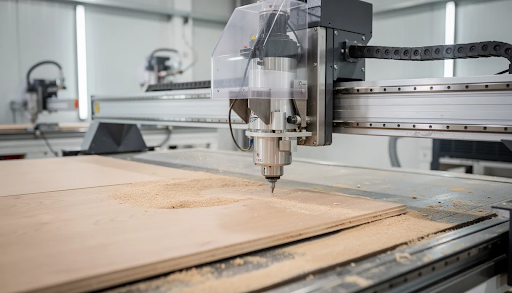
Moving from hobby to business means standardizing processes: CAD/CAM habits, workholding, tool libraries, and file management. Consistency creates efficiency and reduces errors.
A basic CNC workflow follows this process: design in CAD, generate CAM toolpaths, run a simulation, set up stock and zeroing on the machine, cut, inspect, and package. Repeatable setups—fixed jigs, fences, and homing routines—transform one-off projects into scalable production.
Simply Technologies favors control systems that integrate nicely with mainstream CAD/CAM software, lowering the learning curve for new business owners.
Choosing Practical CAD/CAM Software
- Key capabilities to look for: 2D profiling, pocketing, drilling, V-carving, and optional 3D relief depending on your niche
- Beginner-friendly but scalable: The software should support advanced features and toolpath optimization as your shop grows
- Trial before commitment: Test trial versions on small jobs before committing to large commercial projects
- File compatibility: Ensure your software outputs files your machine controller accepts without conversion issues
Simply Technologies can advise on matching machine capabilities with appropriate software stacks for woodworking, signage, or industrial prototyping.
Fixtures, Jigs, and Workholding for Production
Reliable workholding becomes critical once you start running the same part in batches. Consistency in fixturing directly affects both quality and speed.
Common options include:
- T-slot tables with clamps
- Spoilboards with threaded inserts
- Vacuum hold-down for sheet work
- Custom jigs for small repetitive parts
Example: A simple MDF fixture to locate and clamp 10 identical coasters at once can cut your setup time by 80% compared to individual placement.
Solid machine frames and accurate motion from Simply Technologies hardware make these fixtures more effective and predictable. Document your fixture setups with photos, notes, and offsets so jobs can be re-run months later without guesswork.
Production, Maintenance, and Safety in a Small CNC Shop
Once money is involved, uptime, maintenance, and safety become business-critical. Even a small shop should treat the CNC as production equipment: scheduled maintenance, written procedures, and proper safety practices.
Simply Technologies designs and selects machines with serviceability in mind, making routine checks easier for new owners. Production reliability directly affects customer delivery times and online reviews—both essential for building new clients.
Basic Maintenance Schedule
Daily tasks:
- Clean chips and dust from rails and screws
- Check for loose chips under limit switches
- Visually inspect cables and hoses
Weekly tasks:
- Check belt tension or ball screw couplings
- Inspect collets and nuts for wear
- Verify lubrication points
- Confirm homing repeatability across all axes (x axis, z axes, and y axis)
Monthly tasks:
- Square the gantry
- Surface the spoilboard if needed
- Back up control profiles and tool libraries
- Inspect dust collection filters
Simply Technologies can supply maintenance checklists tailored to specific machine models.
Dust, Noise, and Safety Considerations
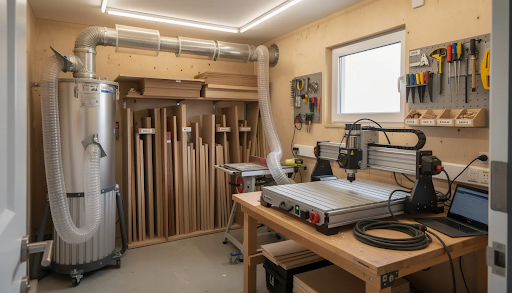
Fine dust and noise must be controlled in any serious CNC workspace—including garages and small units. This isn’t optional; it affects both health and neighbor relations.
Dust measures:
- Quality dust shoes designed for your router
- Properly sized extractors with adequate CFM
- Sealed hoses and proper routing
- Regular filter cleaning or replacement
Noise control:
- Enclosures where appropriate
- Hearing protection during operation
- Awareness of neighbor or landlord requirements in residential areas
Safety basics:
- E-stop access within arm’s reach
- Proper grounding for all equipment
- Tidy cable management
- Clear procedures before anyone else operates the machine
Simply Technologies takes safety seriously when recommending equipment and accessories, especially for first-time business owners.
Working With Simply Technologies to Grow Your CNC Business
Simply Technologies supports the “hobbyist to business” journey from initial equipment selection through long-term scaling.
Pre-sales support includes discussing project types (signage, cabinetry, prototyping), space constraints, and budget before proposing a machine. Post-purchase support covers onboarding guidance, remote help with setup and first cuts, and assistance optimizing feeds and speeds for real jobs.
The company prioritizes machines and components that are repairable and upgradeable—protecting your long-term investment rather than treating equipment as disposable. Visit Simply Technologies to explore current CNC options, resources, and ways to get in touch.
Example Growth Paths for Different Types of Makers
Sign maker trajectory: Starting in 2023 with a compact 600×900 mm router for custom signs and laser engraving work, then adding a 4×4 machine in 2025 when wholesale orders for retail signs and décor increase. The original machine becomes dedicated to samples and rush jobs.
Prototype engineer path: Beginning with a benchtop CNC for PCB engravings and small aluminum brackets, then upgrading to a stiffer, higher-speed router once clients request small production runs. The focus shifts from one-offs to repeatable precision parts.
Furniture maker evolution: Starting with small jigs and templates for hand assembly, later investing in a full-sheet router to produce cabinet parts and flat-pack furniture kits. This opens doors to manufacturing company contracts and commercial work.
Simply Technologies can tailor machine recommendations and upgrade paths to each of these real-world scenarios.
Final Thoughts
The path from weekend hobbyist to profitable CNC business is absolutely achievable—but it requires intentional planning around equipment, pricing, and workflow. The best cnc machine for your situation isn’t necessarily the most expensive or the cheapest; it’s the one that matches your current needs while offering room to scale.
Invest in equipment that will grow with you. Build repeatable processes. Price your work properly. And partner with a vendor like Simply Technologies that understands the journey from garage projects to professional production.
Ready to take the next step? Visit Simply Technologies to explore CNC solutions built for makers who are serious about turning their passion into profit.
Frequently Asked Questions
How long does it usually take to go from hobby CNC to a functioning small business?
Many makers who already know basic CAD/CAM can move from casual projects to consistent paid work in 6–18 months, depending on time available and marketing effort. The first 3–6 months are often spent refining workflows, testing sample products, and dialing in machine settings before aggressively promoting services. Choosing robust, well-supported equipment from the start shortens this ramp-up because less time is lost fighting hardware issues.
Do I need to register a company before buying my first “serious” CNC machine?
In many regions, you can start with occasional sales as an individual, but once revenue becomes regular, it’s wise to register a formal business entity. Check local regulations on business registration, tax IDs, and insurance before scaling beyond casual side work. Having a clear business structure can also make it easier to justify and finance a more capable CNC machine through equipment loans or leasing.
Can I run a CNC business from a single-car garage or small home workshop?
Many successful small CNC businesses started in garages, especially with compact 2×3 or 2×4 machines and good dust extraction. Practical concerns include power availability (some machines need 240V), dust and noise control, and safe material handling in tight spaces. Plan a layout that includes material storage, workbench space, and clear paths around the CNC before committing to a large machine.
What materials should I focus on first as I turn my hobby into a business?
Start with materials your current machine handles reliably—typically softwoods, plywood, mdf, and plastics like acrylic—before branching into harder woods or aluminum. Focus on a narrow set of products so you can optimize feeds, speeds, and fixtures for those materials. When you’re ready to expand into more demanding materials, Simply Technologies can advise on whether your existing equipment is sufficient or an upgrade is warranted.
How can Simply Technologies help me avoid expensive mistakes when upgrading my CNC setup?
Simply Technologies can review your current projects, order volume, and shop constraints, then suggest machines and accessories that match realistic needs rather than hypothetical ones. This includes guidance on power requirements, dust control, software choices, and upgrade paths so you don’t outgrow equipment prematurely. Reach out via their website with details about your current setup and goals to receive tailored recommendations.