
A desktop CNC router brings precision machining to spaces where floor-standing equipment simply won’t fit. Whether you’re running a small shop, building prototypes in a garage, or setting up a classroom for hands-on manufacturing education, these compact machines deliver repeatable results on wood, plastics, and soft metals without demanding industrial square footage.
This guide covers what a desktop CNC router actually is, who benefits most from owning one, what features matter in real-world use, and how to choose a machine that matches your materials and production goals.
Key Takeaways
- A desktop CNC router is a computer-controlled cutting machine designed to fit on a workbench, capable of precise 2D and 3D machining in wood, plastics, composites, and aluminum.
- Compact CNC systems deliver production-grade precision when built with rigid frames, quality motion components like ball screws, and modern controllers.
- Desktop CNC routers are ideal for hobbyists, small production shops, electronics teams, and classrooms where space is limited but reliable, repeatable machining is required.
- Many users start with a desktop system and progress to larger CNC machines as work volume and material demands grow—a scalable approach that spreads capital investment over time.
- Simply Technologies offers CNC routers built for daily use, with education-focused options and direct support for implementation.
What Is a Desktop CNC Router?
A desktop CNC router is a numerically controlled cutting machine compact enough to sit on a sturdy workbench yet capable of executing precise 2D profiles, 2.5D pockets, and even 3D surface machining. The acronym CNC stands for Computer Numerical Control, meaning the router follows digital instructions—typically G-code—rather than relying on manual guidance.
You’ll encounter several interchangeable terms when researching these machines. Desktop CNC router, benchtop CNC, and small-format CNC all describe machines with working areas typically ranging from 12” x 12” to 18” x 24”. These differ fundamentally from larger floor-standing CNC tables (2’ x 4’ to 4’ x 8’ work areas) in footprint, power requirements, and production capacity.
Most desktop CNC routers use a high-speed spindle spinning at 20,000 to 24,000 RPM to drive cutting bits through materials. The primary target materials are wood (MDF, plywood, hardwoods), plastics (ABS, HDPE, acrylic, pvc), composites, and aluminum. These machines are not designed for hardened steels or the heavy production cycles typical of industrial milling centers.
Consider a small shop that needs to prototype fixture plates before committing to a larger production run. A desktop CNC handles the initial design validation—cutting test fixtures in aluminum or acrylic—without tying up the shop’s full-size router. Once the design is verified, production moves to larger equipment.
Desktop machines can be fully or partially enclosed for safety and chip control, making them suitable for offices, labs, and classrooms where dust and noise management matters.
Who a Desktop CNC Router Is For
The value of a desktop CNC router depends entirely on your work volume, the materials you cut, and your learning goals. Not everyone needs a 4’ x 8’ table, and for many users, a compact footprint is actually an advantage.
Hobbyists and makers producing small projects or one-off parts find desktop routers accessible and manageable. Cutting custom signs, inlays, and decorative items in wood and plastics doesn’t require industrial capacity—just solid precision and repeatable results.
Small production shops often add a desktop CNC as a secondary machine for rush jobs, prototypes, and fixtures. Having a dedicated compact router means the main production equipment stays focused on revenue-generating work while the smaller machine handles quick-turn projects.
Electronics and robotics teams mill custom brackets, front panels, enclosures, and structural components. A desktop router cuts aluminum and composite sheet stock into precise parts for drones, robots, and custom hardware without outsourcing.
Schools, colleges, and makerspaces use desktop routers as an accessible entry point into digital fabrication. When integrated into a structured curriculum with CAD/CAM training and safety protocols, these machines teach real manufacturing skills. Simply Technologies offers curriculum-based CNC education solutions that include teacher onboarding and student certification pathways.
Users intending to run full sheets of plywood (4’ x 8’) or handle heavy production cycles will quickly outgrow most desktop footprints. For those applications, a larger CNC router becomes necessary. But for many, a desktop system is the first step in a longer-term CNC adoption plan.
Core Features of a Modern Desktop CNC Router
Not all desktop CNC routers are built the same. Long-term reliability depends on frame construction, motion system quality, and control design. Understanding these core features helps separate capable machines from equipment that won’t survive daily use.
Frame and Gantry
Rigid aluminum or steel construction provides the foundation for cut quality. Machines with linear guides deliver smoother motion and better repeatability than those using simple rails. A solid, well-braced gantry reduces vibration during cuts, which directly affects surface finish and tool life.
Motion System
The choice between lead screws and ball screws significantly impacts precision. Ball screws offer superior accuracy and longer service life, particularly important when cutting detailed work in harder materials. Stepper motors handle most desktop applications adequately, while servo motors—found on higher-end models—provide better precision and faster response times.
Spindle
Spindle power typically ranges from several hundred watts on entry-level machines to 2+ kilowatts on professional-grade desktop systems. Speed ranges of 20,000 to 24,000 RPM accommodate various bit sizes and materials. Compatibility with standard router bits and end mills (1/4”, 1/8” shank diameters) ensures you can find tooling without difficulty.
Work Area and Gantry Clearance
Typical desktop sizes include 12” x 12”, 12” x 18”, and 18” x 24” work areas. The Z-axis height (gantry clearance) usually ranges from 2 to 6 inches, limiting the thickness of stock you can machine. Match your table size to the largest parts you actually need to produce, accounting for workholding hardware and clamps.
Workholding
Basic machines use T-slot tables with manual clamps and spoilboards. More advanced desktop routers include integrated vacuum hold-down systems or modular fixture plates for rapid jig changeover. Secure workholding is essential—particularly when cutting aluminum—to prevent part movement and tool damage.
Control and Software
Desktop CNC routers use industry-standard G-code generated by CAM software. Some machines require an external pc running control software, while others feature standalone offline controllers. Verify compatibility with mainstream CAD/CAM packages before purchase, especially in multi-seat educational environments where software licensing costs add up.
Safety features matter for classroom and office installations. Look for emergency stops, guarding, and enclosure options that manage dust and reduce operational risk. Machines designed with these considerations make desktop CNC accessible to a wider range of environments.
Desktop CNC Router Use Cases in Real Shops and Classrooms
Theory matters less than practical application. Here’s how desktop CNC routers actually get used in production environments and educational settings.
Small Woodworking Shop
Custom inlays, signage, and jigs represent core applications. A small shop producing engraved charcuterie boards—a popular 2024-2025 trend product—can batch-produce nameplates and decorative items efficiently on a desktop footprint. The machine pays for itself through consistent output and reduced hand-finishing time.

Product Prototyping
Designers cutting fixtures and enclosures in ABS, HDPE, brass, copper, and aluminum validate product concepts before committing to injection molds or outsourced fabrication. The ability to iterate quickly on a desktop CNC compresses development timelines and reduces prototyping cost.
PCB Prototyping
Quick-turn milling of single- and double-sided circuit boards lets electronics teams validate designs without waiting days for external fab services. A desktop router with appropriate precision handles trace isolation and drilling for prototype quantities.
Robotics and Drones
Custom camera mounts, motor brackets, and lightweight structural parts in aluminum or carbon fiber sheets get cut on desktop systems. Competition robotics teams use these machines to produce one-off components between events.
Education Programs
High schools and technical colleges integrate desktop routers into engineering, manufacturing, and STEM courses. When the machine is part of a structured curriculum—with step-by-step projects, safety standards, and documented files—students develop genuine manufacturing skills rather than just playing with expensive equipment.
For small-batch production, pair your desktop CNC with repeatable jigs and fixtures. The precision and consistency of CNC control ensures quality across multiple parts, even with limited production runs.
Choosing the Right Desktop CNC Router
Selecting a desktop CNC router comes down to three factors: the materials you plan to cut, the work area you need, and how many hours per day the machine will run.
Materials and Tolerances
Match machine rigidity to material demands. Cutting MDF and plastics requires less rigidity than machining aluminum. If your projects involve intricate designs in harder materials, invest in a more robust frame. PCB prototyping demands tighter tolerances than general woodworking.
Table Size and Z Clearance
Ensure the work area accommodates your largest typical parts. Users frequently discover after purchase that their workpieces exceed the machine’s capacity. Account for clamps, fixtures, and safe clearance around the cutting area.
Rigidity and Construction
Heavier, better-braced frames matter for surface finish quality and tool longevity. A machine that vibrates during cuts produces inferior results and wears tools faster. This is particularly important for aluminum cutting, where rigidity directly affects accuracy.
Control System and Connectivity
Decide between offline controllers and PC-based control based on your workflow. Offline systems simplify setup in environments where a dedicated computer isn’t practical. Verify compatibility with your preferred CAM software—some machines work with specific platforms while others accept standard g code from any source. Check for wifi and port options that match your connectivity needs.
Assembly and Support
Kit-style machines require significant setup time and mechanical aptitude. Factory-assembled systems with clear documentation and instructions reduce time-to-productivity. For educational installations, comprehensive support—including phone contact for troubleshooting—prevents equipment from sitting unused due to technical issues.
Safety and Compliance
Educational and institutional installations must align with regional electrical and safety standards, including CSA compliance in Canada. Emergency stops, proper guarding, and enclosed designs reduce risk in classroom environments with beginners operating equipment.
Consider a scalable path: start with a desktop router and plan for progression to larger CNC machines as production volume or curriculum demands grow. Speaking with a knowledgeable technical team before purchase often prevents mis-specifying equipment.
From Desktop CNC to Full CNC Systems
A desktop CNC router often becomes the first step before investing in larger CNC solutions. This progression makes sense for shops and schools building capability over time.
A typical growth path looks like this:
- Start compact: Validate workflows, train staff or students, and prove out parts on a desktop system with limited risk.
- Move to mid-size: When workpieces or sheet goods no longer fit the desktop footprint, step up to 2’ x 4’ work area machines.
- Add production capability: Eventually add higher-capacity systems or automatic tool-change (ATC) equipped machines for continuous production runs.
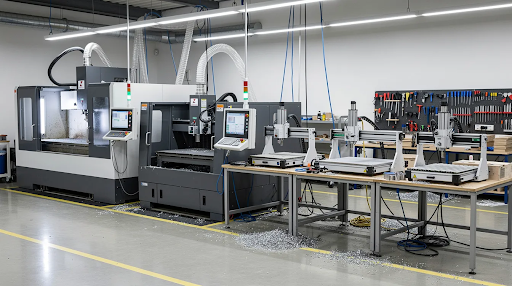
This progression spreads capital investment over time while building operational expertise on smaller machines before scaling. For educational contexts, students who learn fundamentals on desktop equipment transition smoothly to larger routers without relearning core concepts.
Simply Technologies structures their CNC product lineup as a progression—SIMPLY → DISCOVERY → PERFORMANCE → PERFORMANCE ATC—so capability scales without increasing operational complexity. Laser systems and accessories like dust collection integrate into this ecosystem as programs expand.
Support, Training, and Long-Term Reliability
In real shops and classrooms, support and reliability matter more than max advertised cutting speed. A machine that runs consistently with accessible help when problems arise delivers more value than impressive specs that don’t translate to daily performance.
Initial Setup Assistance
Good documentation, recommended first projects, and best practices for tramming, workholding, and tool selection accelerate time-to-productivity. Verified setup procedures prevent common mistakes that frustrate beginners.
CAD/CAM Training
Structured lessons that move users from basic 2D profiles to 2.5D pockets and simple 3D toolpaths build genuine competence. Learning the software workflow is often more challenging than operating the hardware—quality training addresses both.
Curriculum and Certification
For schools, a 16-session program framework provides structure and accountability. Teacher onboarding ensures instructors can support student learning independently. Certification pathways give students documented achievement to show for their work.
Ongoing Technical Support
Access to phone or remote assistance for troubleshooting mechanical or software issues over the machine’s life prevents equipment from becoming expensive paperweights. This is a game-changer for small shops and schools without in-house CNC expertise.
Maintenance Expectations
Daily-use desktop routers require regular lubrication of linear guides, consistent dust management, and occasional component replacement. Understanding these requirements upfront sets realistic expectations and prevents surprise downtime.
For education and small-business environments, choosing a machine with a clear training pathway and real human support minimizes underutilized equipment. Simply Technologies provides direct support for implementation—call 800-288-2961 to discuss your specific application.
FAQ
Can a desktop CNC router cut aluminum reliably?
Many modern desktop CNC routers cut aluminum plate and extrusions when feeds, speeds, and tooling are selected correctly and the machine maintains adequate rigidity. Expect lighter cuts and longer cycle times compared to full-size industrial routers, but you’ll still obtain accurate, repeatable parts suitable for prototype brackets and enclosures. Use appropriate end mills (single or double flute for aluminum), secure workholding, and proper chip clearing through dust collection or air blast for consistent results. The steep learning curve flattens quickly once you dial in the right parameters for your specific machine.
How much space and power does a typical desktop CNC router need?
Most desktop CNC routers fit on a sturdy workbench or cart, requiring a footprint of approximately 2’ x 3’ including space for the controller and monitor. Many machines operate on standard single-phase household power (110-120V in North America), making them suitable for garages, classrooms, and small shops without dedicated electrical infrastructure. Account for additional space around the machine for material handling, tool storage, accessories, and safe operator access—the actual implementation footprint often exceeds the machine’s advertised dimensions. Weight varies considerably; check whether your workbench can handle the load.
What software do I need to run a desktop CNC router?
Users typically need CAD software to design parts, CAM software to generate toolpaths and G-code, and control software to send that code to the machine. Many desktop CNC routers work with widely used platforms—both commercial options and open-source alternatives compatible with windows and other operating systems. Some machines include integrated packages that combine design and toolpathing for simpler workflows. Confirm software compatibility before purchase and factor in licensing price for multi-seat educational environments where costs can add up quickly. Download trial versions to evaluate workflow before committing.
Is a desktop CNC router suitable for a high school or college program?
Desktop CNC routers work well in schools when combined with structured curriculum, teacher training, and appropriate safety measures. Fully or partially enclosed machines help manage dust and reduce risk in classroom environments with beginners. Choose systems that align with regional safety standards—CSA compliance in Canada, for example—and provide long-term support and upgrade paths as programs grow. The machine becomes a great tool for STEM education when integrated into projects rather than treated as standalone equipment. Reviews from other educational institutions can help validate your choice.
How long does it take to learn to use a desktop CNC router effectively?
Motivated users can complete basic projects within a few days of focused learning, though building confidence with CAD/CAM and more complex parts typically takes several weeks of consistent practice. For structured educational programs, a 16-session curriculum provides a reasonable framework to move beginners from zero experience to independent operation on common materials. Consistent hands-on practice accelerates skill development more effectively than theoretical instruction alone. The possibilities expand significantly once you master setup, tool selection, and basic troubleshooting. Suggestions from experienced users in forums and communities can accelerate your learning curve.