
Key Takeaways
In 2026, small shops, makerspaces, and schools continue to lose thousands of dollars by mis-matching CNC size, rigidity, and support to their actual work. Before you open a single catalog, understanding the most common pitfalls will save you from expensive regret.
- The biggest mistakes are buying on price and spec sheets alone, underestimating rigidity and dust management, ignoring software and training requirements, and skipping vendor support verification
- Small shops and education programs should define their next 6–12 months of projects first, then choose bed size, spindle power, and controller around those concrete needs
- Simply Technologies focuses on CNC solutions and training specifically for small shops and schools, which shapes the practical perspective throughout this guide
- A structured checklist covering size, power, workflow, safety, and support before purchase prevents most common CNC buying regrets
- Total cost of ownership—including tooling, dust collection, fixturing, and electrical work—often exceeds the base machine price by 30% or more
Introduction: Why CNC Buying Mistakes Are So Expensive in 2026
CNC routers and mills in 2026 are more capable than ever, but they’ve also become more complex to evaluate than in the 2018–2020 era. What looks like a straightforward purchase on a product page often hides compatibility issues, support gaps, and workflow mismatches that only surface after the machine arrives.
Small woodworking and fabrication shops, plus schools and makerspaces, frequently treat a CNC like a bigger 3D printer. They underestimate the power requirements, the dust management demands, the fixturing complexity, and the training time needed to actually produce quality parts. A desktop 3D printer might forgive a casual approach; a CNC router cutting hardwood or aluminum at production speeds will not.
A wrong CNC choice often locks a program or shop for 5–10 years. Mistakes around rigidity, work envelope, or support show up quickly as missed deadlines, broken tools, and machines that sit idle because nobody can troubleshoot them. The reference data is stark: a properly matched new CNC can achieve under 2 hours of monthly downtime and 4,500 parts output, while decade-old or poorly matched equipment might suffer 40+ hours of downtime and produce only 1,000 parts.
Simply Technologies works directly with small shops and education programs and regularly encounters the same avoidable buying errors. This guide is a practical “what not to do” checklist rather than a generic spec overview—because avoiding costly mistakes starts before you ever request a quote.
Buying on Price and Specs Alone (Without Real Jobs in Mind)
Chasing “best price per cutting area” or fixating on headline accuracy figures leads to poor fit for real work. Many 2026 buyers focus on bed dimensions in millimeters, claimed repeatability like ±0.02 mm, or peak spindle power in kilowatts—without ever testing those specs against their actual production needs.
- The spec sheet trap: A machine that advertises ±0.005-inch accuracy might achieve that only under ideal conditions with specific materials and feeds. Your shop’s daily reality—varied stock, ambient temperature swings, operator skill levels—will produce different results.
- A concrete example: A small sign shop in 2025 purchased a low-cost 4×8 router for under $8,000, attracted by the large bed and competitive price. Within weeks, they discovered excessive gantry flex when cutting 18 mm birch plywood at production speeds. The resulting wavy edges and inconsistent depths forced them to slow down dramatically, erasing the productivity gains they expected from upgrading to CNC.
- Start with real jobs: Before opening any catalog, write down 3–5 concrete upcoming projects. For a school, this might be STEM kit components, organizational trays, and furniture pieces. For a shop, perhaps cabinet carcasses, dimensional signs, and prototype brackets. Document the required work envelope, tolerances, and typical materials.
- Demand real test cuts: Ask vendors—including Simply Technologies—to run at least one test cut using your own file and material, not generic demo files. A machine that makes sense on paper needs to prove itself with your actual workpiece before you commit.
Mistake #1: Ignoring the Machine Envelope and Classroom/Shop Space
Envelope and real-world footprint are commonly misjudged by small shops and schools. The cutting area you see in specs is only part of the space equation.
- Understanding X, Y, Z envelope: If your school program plans to nest 24”×48” project sheets, you need at least 1300×1300 mm of actual cutting area. If your vocational training involves thicker stock with clamps and fixtures, you may need 150 mm or more of Z clearance—not the minimal 50–75 mm found on many entry-level machines.
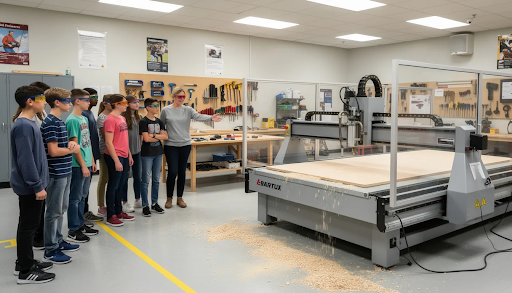
- The “bigger is better” trap: Schools often buy a full 4×8 router hoping for maximum flexibility, then realize there’s no safe perimeter, no clearance for dust hose routing, and no space for student groups to gather around the machine for demonstrations. A larger machine in a cramped room creates safety hazards and workflow bottlenecks.
- Power and access constraints: A machine that physically fits might not pass through doorways or into freight elevators. It might land too far from 230 V circuits or require three-phase power your building doesn’t have. These oversights add thousands in electrical work or force awkward compromises.
- Practical recommendation: Map your room with tape on the floor before committing. Include 0.9–1 m (about 3 ft) clearance around the machine on all sides, plus space for your dust collector, computer station, material racks, and safe observation areas for students or additional operators.
Mistake #2: Underestimating Rigidity, Motion System, and Spindle Quality
Rigidity and motion systems directly determine what materials you can cut and how accurately you can cut them. This isn’t theoretical engineering talk—it shows up in chatter marks, broken bits, and parts that don’t fit together.
- Frame construction matters: Small CNC machines aimed at hobbyist markets often use lightweight aluminum extrusion frames and belt drives. These work fine for foam, soft plastics, and gentle passes in softwoods. But hardwoods, aluminum, and the inevitable abuse from students or rushed production will expose their limits quickly.
- Lead screws vs ball screws: For small-format machines in 2026, ball screws typically provide better backlash control and repeatability than standard lead screws. This matters when you’re cutting cabinet joinery that needs to fit precisely or aluminum brackets for vocational training projects where tolerance stacking becomes obvious.
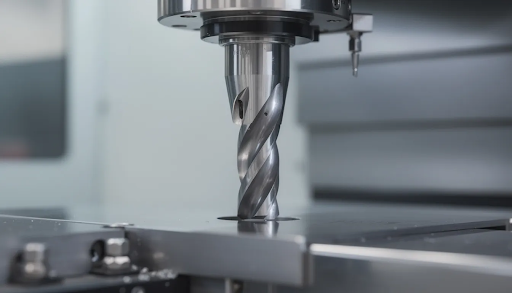
- Spindle vs router choice: Air-cooled 1.5–2.2 kW spindles with ER collets run more quietly and precisely than handheld trim routers bolted onto a gantry. ER collets (ER11 or ER20) are crucial for small shops chasing clean edge quality. Runout at the tool tip should measure under 0.02 mm TIR at 10 mm from the collet for serious wood and plywood work.
- A real-world example: A school chose a light-duty belt-driven router to save $2,000 on their budget. Within a semester, they discovered visible chatter lines on MDF projects and broken bits whenever students pushed feed rates beyond the machine’s comfort zone. The money saved evaporated in replacement tooling and student frustration.
- What to ask vendors: Request measured runout at the tool tip, details on frame material (welded steel, cast aluminum, or extrusion), and specifics about the motion system. Simply Technologies can provide this data and help you understand what it means for your intended materials.
Mistake #3: Forgetting the “Hidden” Costs – Tooling, Dust, Fixturing, and Electrical
The base machine price is just the beginning. Total cost of ownership often surprises first-time buyers who didn’t budget for the ecosystem around the CNC.
| Cost Category | Typical 2026 Range | Notes |
| Starter tooling kit | $300–$800 | Upcut, downcut, compression, and engraving bits |
| Dust collection | $600–$1,500 | 2–3 hp collector, hoses, fittings, shroud |
| Fixturing | $200–$1,000 | T-track, clamps, vacuum pods, spoilboard |
| Electrical work | $500–$2,000+ | Dedicated circuits, possible three-phase |
| Computer/software | $500–$1,500 | Dust-protected control PC, CAD/CAM licenses |
- Tooling adds up fast: A quality compression bit for plywood might cost $40–$80. Specialty bits for plastics, aluminum, or carving profiles add more. Schools running multiple projects per week will burn through bits faster than expected.
- Dust collection is non-negotiable: Fine dust from MDF and other engineered materials creates respiratory hazards and damages electronics. A proper system with adequate CFM (cubic feet per minute) and static pressure isn’t optional—it’s essential for health and machine longevity.
- Electrical realities: Small spindles need dedicated 20–30 A circuits at 230 V. Larger 3–5 hp units may require three-phase power. Budget for an electrician’s time, especially in older buildings with limited panel capacity.
- Computer and network needs: Schools often forget that running a CNC means dedicating a computer to machine control, ideally protected from dust and vibration. Design work should happen on a separate machine in a cleaner environment.
- Build a realistic spreadsheet: Add 20–30% contingency to your total budget before ordering. Vendor guidance from companies like Simply Technologies can help you anticipate these costs rather than discovering them mid-installation.
Mistake #4: Overlooking Software, Workflow, and Training Needs
CNC success depends as much on software and people as on the physical machine. The most capable router in the world produces nothing if your team can’t program it.
- CAD/CAM capability gaps: Many first-time buyers focus on G-code compatibility but ignore whether their staff can actually use the software that drives the machine. Whether you’re using Fusion 360, VCarve, or education-focused solutions, someone needs to learn toolpath strategies, step-over calculations, chip load management, and ramping techniques.
- Training time in schools: Educators might receive a 2-hour handover from a vendor, but real classroom readiness requires practice files, documented safety procedures, and projects aligned with curriculum. The learning curve for CNC is steeper than for most shop equipment.
- A small shop scenario: A furniture shop owner buys a capable 3-axis router, but workflow stalls for months because nobody has time to learn CAM toolpath strategies. The result is broken bits, burnt edges, and a machine that sits idle more than it runs.
- Demand an onboarding plan: Before purchasing, require a concrete training schedule from your vendor—at least a full day for staff, sample projects, and clear documentation. Simply Technologies can supply training tailored to small shops and schools, including curriculum-aligned project files.
- Test software first: Use 30-day trials or education licenses for candidate CAM software before committing to hardware. Make sure your team is comfortable with the interface and that the software works with your school’s IT policies and network security requirements.
Mistake #5: Choosing the Wrong Machine Class for Small Shops and Schools
Not all CNC machines serve the same purpose. Understanding machine classes helps you match capabilities to your actual needs rather than buying too much or too little.
Entry-level desktop CNCs (work envelopes around 300×300 mm to 600×600 mm):
- Great for prototyping, small signs, and STEM projects
- Often use stepper motors and lighter frames
- Not suited for full-size furniture production or heavy aluminum cutting
- Good starting point for schools testing whether CNC fits their program
Mid-size benchtop and small gantry routers (600×900 mm to 1200×1200 mm):
- Sweet spot for many small shops and K–12/college labs
- Balance footprint, rigidity, and cost effectively
- Can handle hardwoods, plywood, and light aluminum work
- Suitable for small batches and varied project types
Heavier gantry machines (4×4 or 4×8 with steel or composite frames, ball screws, and 3+ kW spindles):
- Suited to production-level shops or advanced career-tech programs
- Demand more space, power, and budget
- Require more sophisticated dust collection and safety measures
- Overkill for basic design classes or hobbyist garages
- A cautionary example: A K–12 school purchased an industrial-class open-gantry machine with minimal guarding and complex controls, thinking bigger meant better. The result was safety concerns with young students, a control interface too complex for rotating teachers, and a machine that rarely got used.
- Match class to program maturity: Map your expected throughput (parts per week), materials (MDF, hardwood, aluminum), and staffing to the right class. Consult with vendors like Simply Technologies that specialize in matching machine class to your program’s actual stage of development.
Mistake #6: Neglecting Safety, Noise, and Dust in Real Environments
Safety requirements in schools are stricter than in a private garage, but even small shops need to take environmental factors seriously. A CNC that technically fits may still create problems.
- Open-frame risks: Open-gantry routers in crowded classrooms create pinch points, flying chip hazards, and noise levels that can exceed 90 dB. This causes safety issues and makes sustained operation uncomfortable for everyone in the space.
- Essential safety features: Proper enclosures, clearly marked emergency stop buttons, and reliable homing routines are essential for environments where multiple operators—especially students—share a single machine. These features aren’t optional accessories; they’re fundamental requirements.
- Dust as a health and equipment hazard: Fine MDF dust remains a major respiratory hazard in 2026. It also infiltrates electronics, clogs cooling systems, and shortens machine life. Effective dust collection requires shrouds matched to your spindle, CFM-appropriate collectors, and proper filtration.
- A makerspace cautionary tale: One makerspace added a 1,500×1,500 mm router without a proper dust plan. Within months, complaints from neighboring classrooms about visible dust and noise forced them to halt operations until they retrofitted an enclosure and adequate collector—doubling their initial investment.
- Review local codes: Check school district safety requirements and OSHA-equivalent regulations before finalizing your purchase. Choose machines and accessories that meet or exceed these standards. Simply Technologies can help specify enclosures and dust solutions appropriate for educational and small-shop settings.
Mistake #7: Underestimating Support, Parts Availability, and Long-Term Service
For small shops and schools, even a few days of downtime can derail client jobs or teaching weeks. Support-related mistakes create ongoing headaches that outlast the initial purchase excitement.
- The import risk: Low-cost CNC machines with no clear service network may save money upfront but cost weeks of downtime waiting for replacement boards or custom parts. If your machine’s manufacturer is overseas with no local presence, simple repairs become major projects.
- Questions to ask vendors: What are typical response times for support requests? Is remote troubleshooting available? Are spare controllers, stepper motors, servo drivers, and spindles available domestically? Is documentation kept current and accessible online?
- School-specific needs: Schools especially need predictable, easy-to-follow troubleshooting steps that teachers or lab managers can execute without calling in specialized technicians. If every minor issue requires a service call, the machine will spend more time idle than cutting.
- Look for vendors who understand your constraints: Simply Technologies understands small-shop and education limitations, offers clear escalation paths, and can assist with upgrades or retrofits rather than forcing full replacement when issues arise.
- Request references: Ask vendors for references from similar-size shops or schools who have used the same CNC platform for 2–5 years. Find out how support has held up over time, not just during the honeymoon period.
Mistake #8: Forgetting About Upgrade Paths and Future Growth
Failing to think about growth leads to early obsolescence and wasted budget. What works for your program today may be insufficient in two years.
- Programs evolve: Many shops and schools start with simple 2D profiles and pockets, then within 1–2 years want 2.5D carvings, rotary work, or automatic tool changers as students and staff gain confidence. A machine that can’t grow with you becomes a bottleneck.
- Modular platforms: Some CNC platforms allow upgrades like longer rails, more powerful spindles, rotary axes, or better controllers without replacing the entire machine. This protects your initial investment and extends useful life.
- A growth example: A small shop began with a 1000×1000 mm router in 2023. By 2025, they expanded to a 1000×1800 mm bed and added a 4th axis for turned components—all without buying a completely new system. Their original purchase decision accounted for this possibility.
- Schools and curriculum shifts: As programs shift from basic design classes to advanced manufacturing or robotics pathways, the CNC capability you need changes. Choosing a platform that can be expanded protects your budget over 5–10 years.
- Plan with your vendor: Simply Technologies can help plan realistic upgrade paths for small shops and educational labs, aligning initial purchases with long-term growth rather than forcing replacement cycles.
How Simply Technologies Helps You Avoid These CNC Buying Mistakes
Simply Technologies works specifically with small shops and schools to mitigate the buying errors outlined above. Their approach differs from generic equipment dealers.
- Project-based recommendations: Simply Technologies begins by reviewing your actual work—sample drawings, materials, and classroom or shop layout—rather than simply quoting based on desired bed size or budget.
- Appropriate machine class selection: The company recommends motion systems, spindle options, and machine classes tuned to small-shop woodworking, prototyping labs, and educational environments, avoiding both under-powered and over-specified solutions.
- Software and training support: Simply Technologies supports software selection, onboarding, and training for staff and students, including sample projects, safety checklists, and workflow templates that match your curriculum or production needs.
- Long-term partnership: Spare parts planning, upgrade advice, and ongoing support are part of their offering. The goal is keeping machines productive rather than forcing premature replacement.
- Start a conversation: Visit https://simplytechnologies.xyz/ to discuss your specific shop or school situation and get a tailored CNC recommendation instead of a generic catalog choice.
FAQ: Common CNC Buying Questions for Small Shops and Schools
How big should my first CNC be for a school or makerspace?
For most K–12 labs and makerspaces, a 600×900 mm or 1000×1000 mm work envelope provides an ideal starting point. Most student projects—signs, organizers, small furniture components—comfortably fit within a 2×3 ft or 3×3 ft cutting area. A smaller, more rigid machine is easier to supervise, simpler to maintain, and creates fewer safety concerns than a full 4×8 table that dominates the room.
Programs expecting to build full sheet-goods furniture regularly might consider a 4×4 or 4×8 router, but only if space, power, and dust collection can genuinely support it. Simply Technologies can help make this determination based on your curriculum goals and facility constraints.
Can a small CNC router handle both wood and aluminum?
Many benchtop and small gantry CNC routers can cut aluminum in 2026, but success depends on frame rigidity, motion system quality (ball screws outperform belts), and proper spindle selection and programming. Light hobby-class belt-driven machines often struggle with vibration and poor tool life when pushed into metal work, especially for production parts.
If you plan regular aluminum cutting, consult with Simply Technologies to select an appropriately rigid platform, adequate spindle power, coolant or mist options, and verified feeds and speeds for the alloys you’ll be cutting.
What kind of computer do I really need to run a CNC?
Most small-shop and school CNC machines in 2026 run from a mid-range Windows PC purchased in the last 3–4 years with 8–16 GB RAM and SSD storage. The CAD/CAM design computer benefits from a stronger CPU and GPU for complex modeling, while the machine-control PC mainly needs reliability and protection from dust.
Schools and shops often find it practical to dedicate a simple, inexpensive PC at the machine purely for control, while using existing lab or office computers for CAD/CAM work in a cleaner environment.
How much maintenance does a CNC require in a school setting?
Routine maintenance includes daily dust removal from rails and work surfaces, weekly lubrication of linear rails or leadscrews, periodic inspection of belts or ball screws for wear, and regular collet replacement as precision degrades.
Student-heavy environments require stricter routines: pre-flight checklists, documented zeroing procedures, and periodic safety and alignment checks each term. Simply Technologies provides recommended maintenance schedules and checklists tailored to specific CNC platforms used in schools and makerspaces.
How long does it realistically take to get a new CNC fully integrated into classes or shop workflow?
While basic setup can happen in a day or two, full integration into classes or production workflows typically takes 4–12 weeks, depending on staff availability and project complexity. The process breaks into phases: installation and wiring, initial training, first simple projects, and then progressive introduction of more complex toolpaths or multi-tool jobs.
Planning this ramp-up with your vendor—such as Simply Technologies—helps avoid frustration, under-utilization, and the common pattern of machines sitting idle after the initial excitement fades.